Nintex to Microsoft Power Platform
Nintex for Office 365 workflows stopped on 2 April 2026Nintex
Assessment & Extraction Tool
Workflows and forms from every Nintex product, read from their exports, mapped to Power Automate and Power Apps, and rebuilt by AI.
Export the workflows and forms, drop the files in a folder, and the tool tells you what each one becomes on Power Platform, how big the job is, and what needs a decision first. Nothing connects to SharePoint or to Nintex. Then it writes a bundle per workflow and form, with a Power Automate flow draft, for AI to rebuild from.
See the full Assess - Extract - AI Migrate cycle in 3 minutes:
The Challenge
Three Nintex products, one estate
Every Product Exports Differently
Nintex for SharePoint on-premises, Nintex for Office 365 and Nintex Automation Cloud each store a workflow their own way, and Nintex Forms has three designers on top. Most estates have more than one of them, built by different people over a decade.
Some of It Has Already Stopped
The Nintex for Office 365 workflow engine was switched off on 2 April 2026. For those workflows the export is all that is left: there is nothing running to look at, only a file that describes what it used to do.
The Logic Lives in the Designer
Conditions, lookups, approvals, task forms, form rules and calculated values sit inside the workflow and form definitions. Nobody has written them down, so reading the export is the only reliable way to know what the process does.
Passwords in the Export
A Web request, a Call web service or an Execute SQL keeps its user name and password inside the export file, in plain text. Anyone who has the file can read them, and most migration projects pass those files around without knowing.
What It Reads
Workflows and forms
One tool for the whole Nintex estate. The customer exports with the tools Nintex already provides and drops the files in a folder. A zip that is not a workflow package is looked into, so the zip that Export All Forms on Site saves is scanned as it is.
Nintex for SharePoint
Workflow exports (.nwf) from SharePoint 2013, 2016, 2019 and Subscription Edition, and Nintex Forms exports (.xml), classic and responsive designer.
Nintex for Office 365
Workflow packages (.nwp) with their task forms, and Nintex Forms (.nfp, one per list, or the zip of every form on a site).
Nintex Automation Cloud
Workflow packages and design.json exports with their start and task forms, and New Responsive designer forms (.json).
Overview
Know Your Nintex Estate
One row per workflow and per form: the product it comes from, how it starts, how many actions it has, how much carries over as it is, what has to be rewritten or redesigned, and its size. Copies of the same workflow are recognised, so the estate is sized on what is really there.
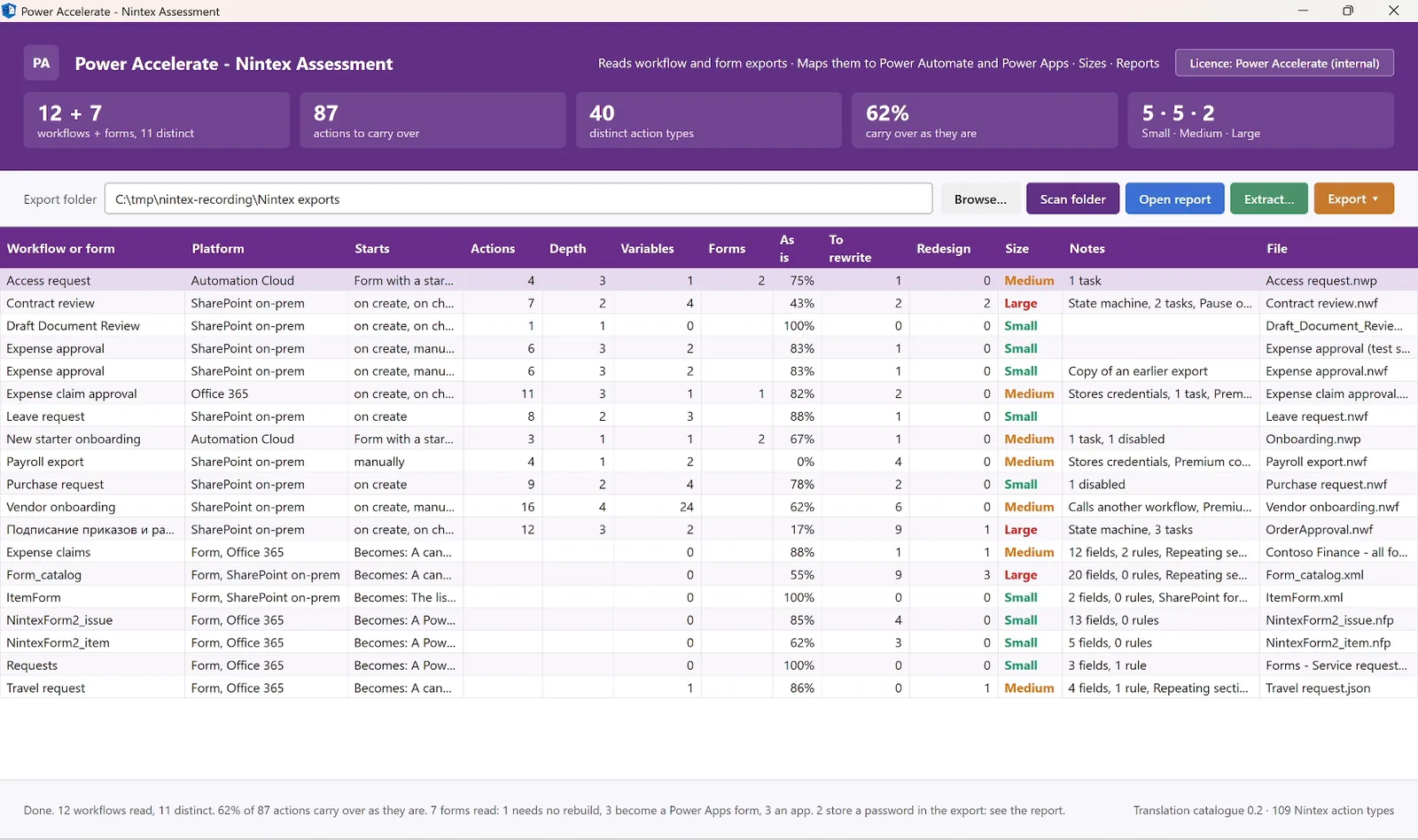
The assessment view - 12 workflows and 7 forms from all three Nintex products, with what carries over, the size, and notes such as stored credentials
A Catalogue From Real Exports
Every action is matched against a translation catalogue of 109 Nintex action types, each one seen in real exports: Direct, Partial, Redesign, Nothing to rebuild, or Not catalogued. Form controls are matched the same way to Power Apps controls.
Sizing You Can Check
Small, Medium or Large per workflow and per form. Each criterion is sized on its own and the item takes the highest, and the report shows which criterion decided it. One state machine makes a workflow Large however short it is.
Reports for Every Audience
A self-contained HTML report, an Excel workbook with every sheet filtered, and a JSON export of the full model. The same numbers in each, for the steering group, the planners and the build team.
How It Works
Four Steps, No Connection
From export to rebuild bundle, nothing touches the live system.
Export
Export the workflows and forms with Nintex's own export. No connection to SharePoint or Nintex, no service account, no agent, no security review of a live integration.
Scan
Point the tool at the folder. Every workflow and form is read: trigger, lists, variables, actions, conditions, task forms, fields, rules and calculations.
Decide
The report shows what each action and form becomes, what needs a decision first, and a first migration plan in waves with hours.
Extract
Select the workflows and forms to rebuild. Each gets a bundle with a build sheet, the data, the forms as exported and a Power Automate flow draft.
Assessment
Every Workflow, Every Form, Every Decision
Double-click any row to see what each step becomes in Power Automate, or what each control becomes in Power Apps. The report brings it together for the whole estate.
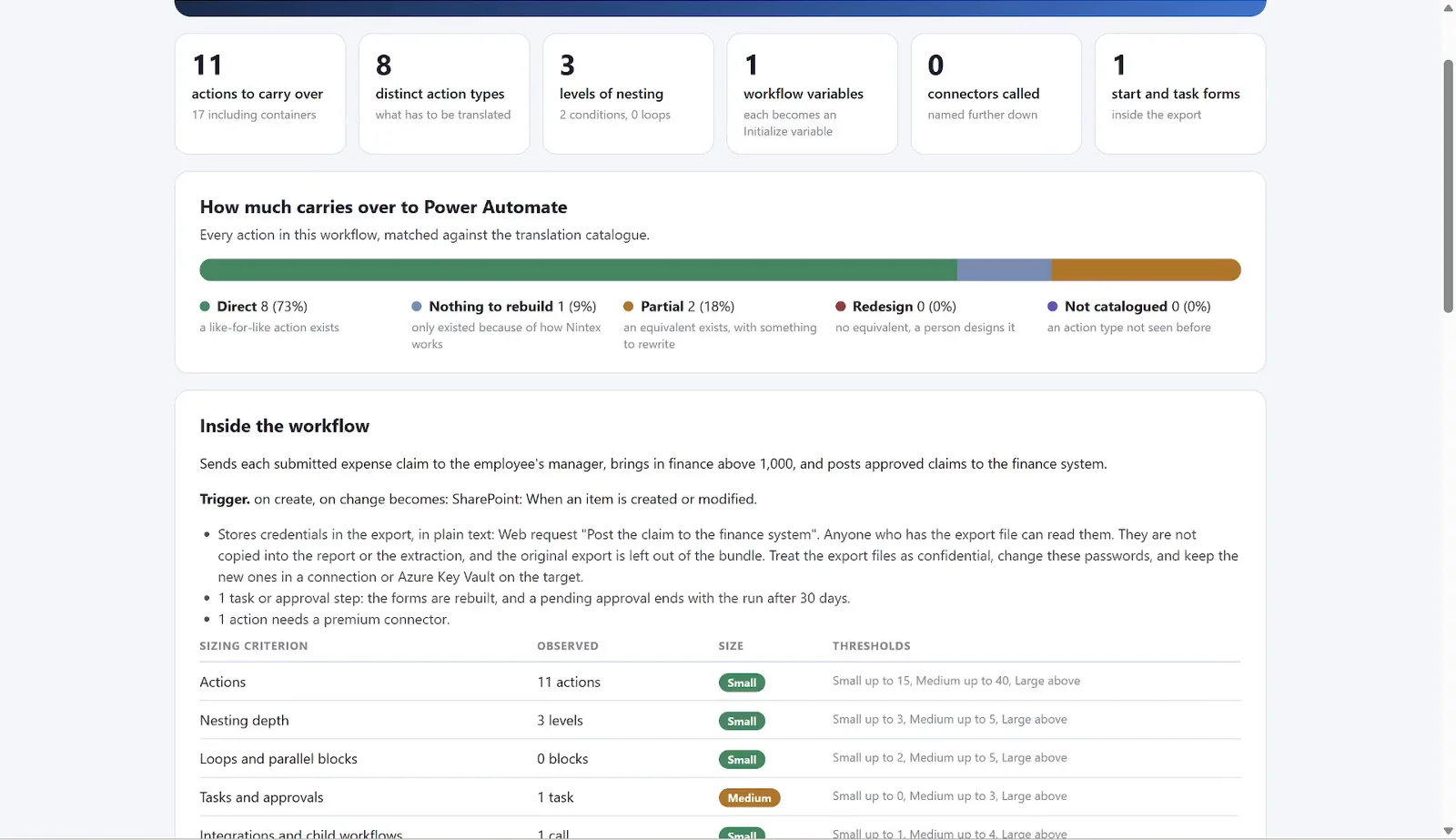
A workflow - what carries over, the sizing, and the stored-credentials warning first
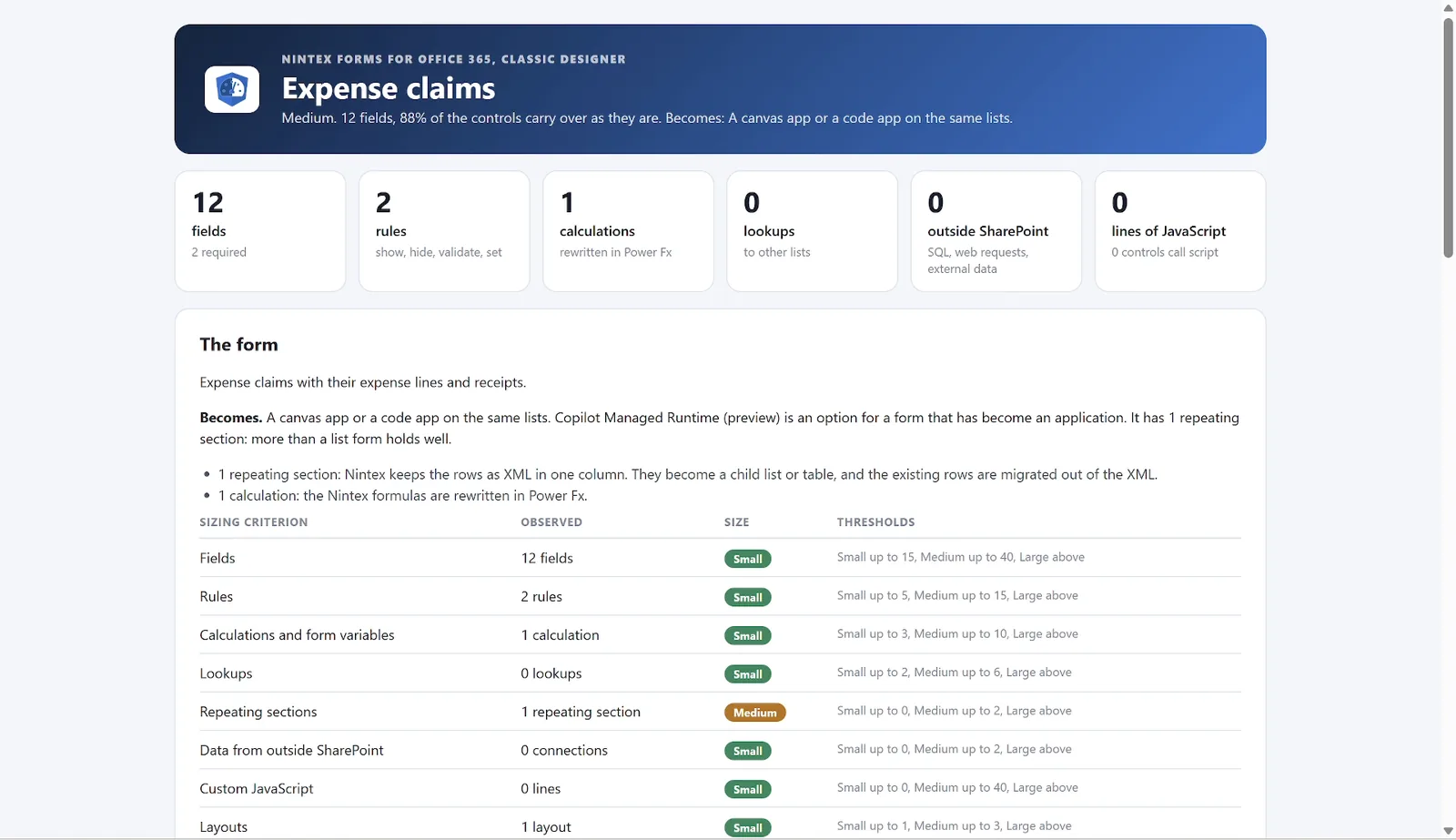
A form - fields, rules, calculations, and the lightest target that does the job
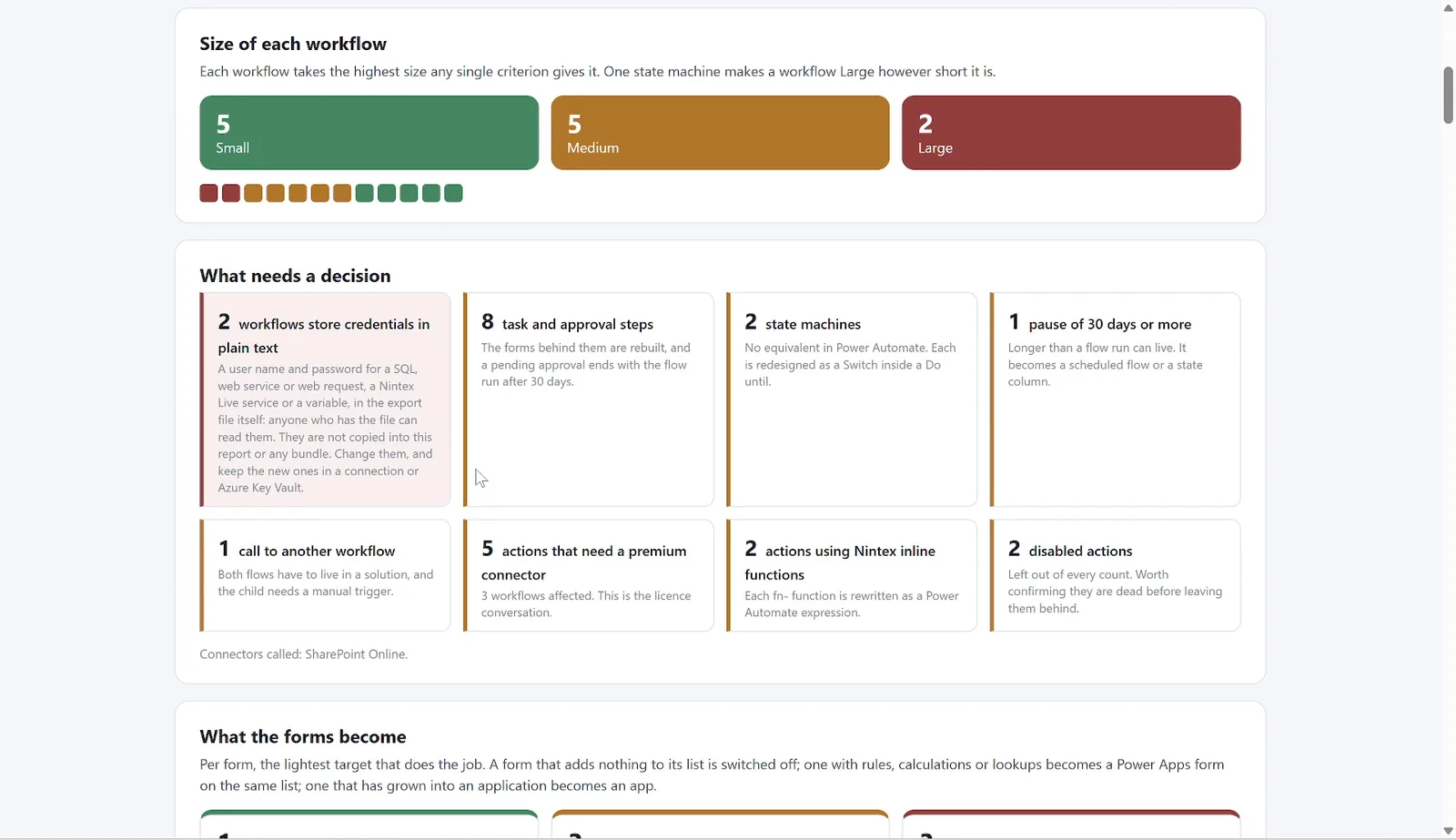
What needs a decision - stored passwords first, then approvals, state machines and premium connectors
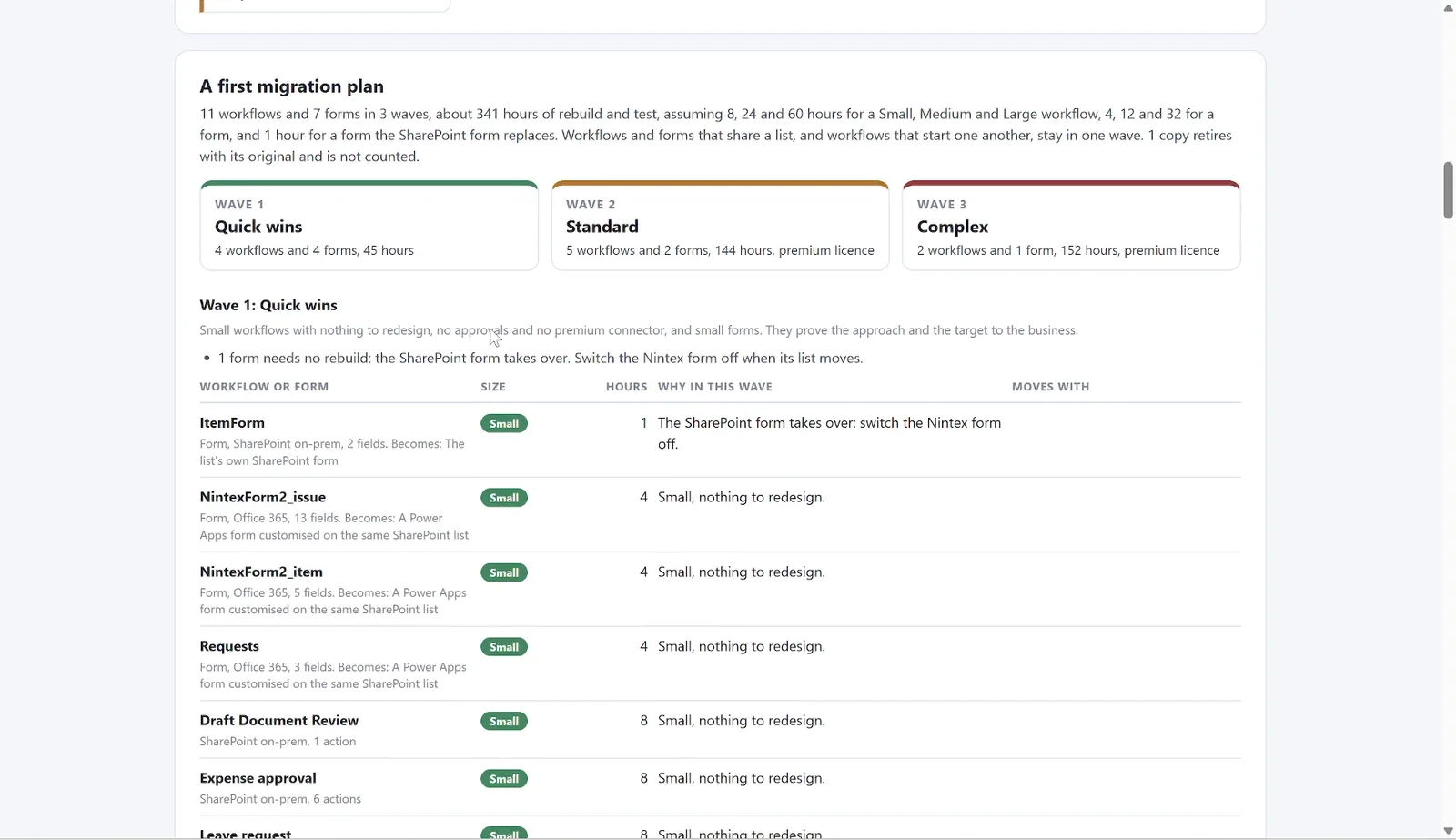
A first migration plan - waves, what moves together, and the hours
Actions to Power Automate
Every action with what it becomes: Send an email to Office 365 Outlook, an approval to Approvals, a list update to SharePoint, a state machine to a Switch inside a Do until. Partial and Redesign come with a note on what has to change.
What a Form Becomes
The lightest target that does the job: the list's own SharePoint form when nothing is computed or checked, a Power Apps form on the same list for rules and lookups, or a canvas app, code app or Copilot Managed Runtime app when the form has grown into an application.
Stored Credentials
Workflows and forms that keep a user name and password in the export are flagged, with the step, as the first decision: change those passwords and keep the new ones in a connection or Azure Key Vault. The values are never read into the report.
A Plan in Waves
Quick wins, standard and complex. Workflows and forms that share a list, and workflows that start one another, stay in one wave. Hours per size are an assumption you can set, and the report says so.
The Platform Limits
A flow run lives 30 days, so long pauses and approvals that wait longer are called out. Premium connectors are counted, because they are the licence conversation.
Extraction
A Bundle Per Workflow, With a Flow Draft
The assessment tells you what you have. The extraction hands it over. Each workflow and form gets its own folder with everything the rebuild needs, written for a person and for an AI agent alike.
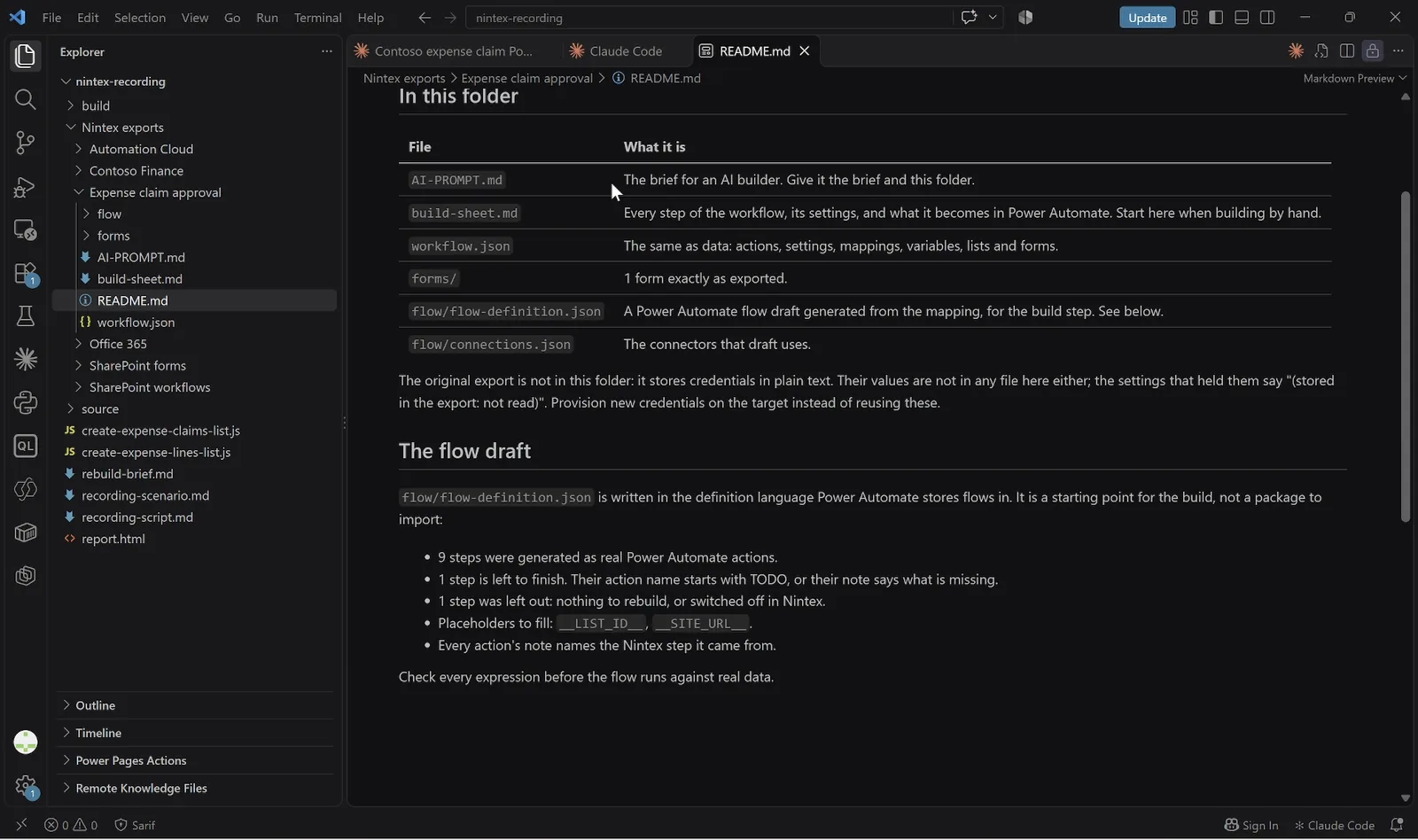
The bundle README - every file explained; the original export is left out when it stores a password
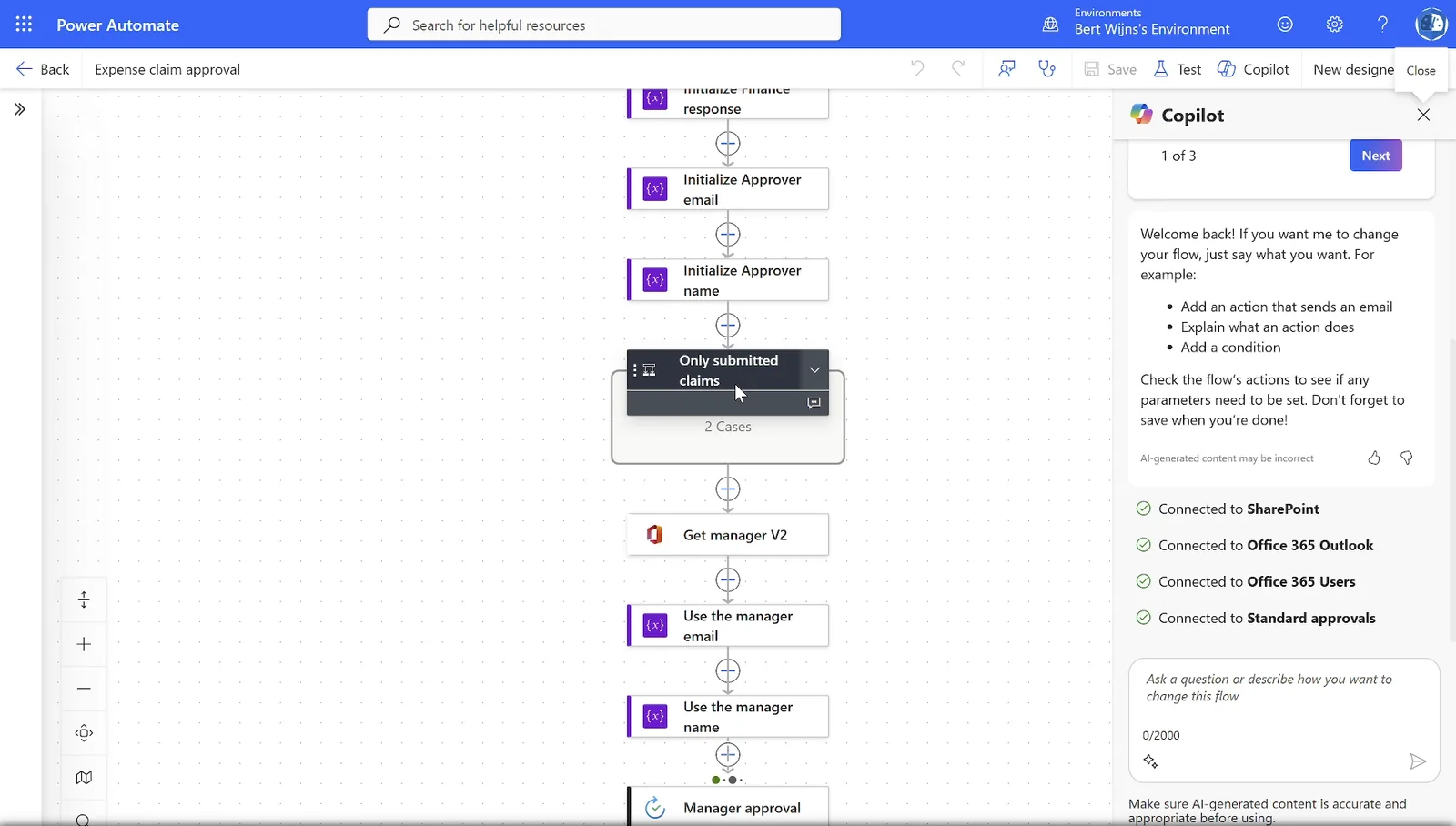
The flow in Power Automate, built from the flow draft in the bundle
The Build Sheet
Every step in order, with its settings and what it becomes in Power Automate. Internal column names in square brackets, so the rebuild uses the lists as they are.
The Data
The whole workflow as JSON: actions, settings, mappings, variables, lists and forms. The forms themselves exactly as exported, with every control, choice and rule.
A Power Automate Flow Draft
A flow definition generated from the mapping, in the language Power Automate stores flows in. Most steps come out as real actions; the few to finish are named TODO and say what is missing.
Instructions for AI
An AI-PROMPT with the rules of the rebuild: keep the logic and the wording, follow the notes on Partial and Redesign steps, do not invent lists or people, and never write a credential into the flow.
Passwords Stay Behind
When an export stores a password, the bundle leaves the original export out, and the settings that held it say so. New credentials are provisioned on the target, in a connection or Azure Key Vault.
Forms Ready to Rebuild
Every field with the list column it binds to, its control and choices, and the panel or repeating section it sits in. Rules and calculations name the other controls instead of referring to them by id.
End-to-End Flow
From Nintex Export to
a Running Flow and App
The canonical shape of every engagement: Assess → Extract → Rebuild → Deploy. The bundle goes to an AI coding agent, which builds the Power Automate flow and the app on the same SharePoint lists the Nintex solution used.
1. Assess
Every workflow and form in the exports, mapped, sized and planned
2. Extract
A bundle per workflow and form, with a build sheet, the data and a flow draft
3. Rebuild
An AI agent builds the flow, the lists the form needs, and the app
4. Deploy
Power Automate and Power Apps on the same lists, approvals in Teams and Outlook
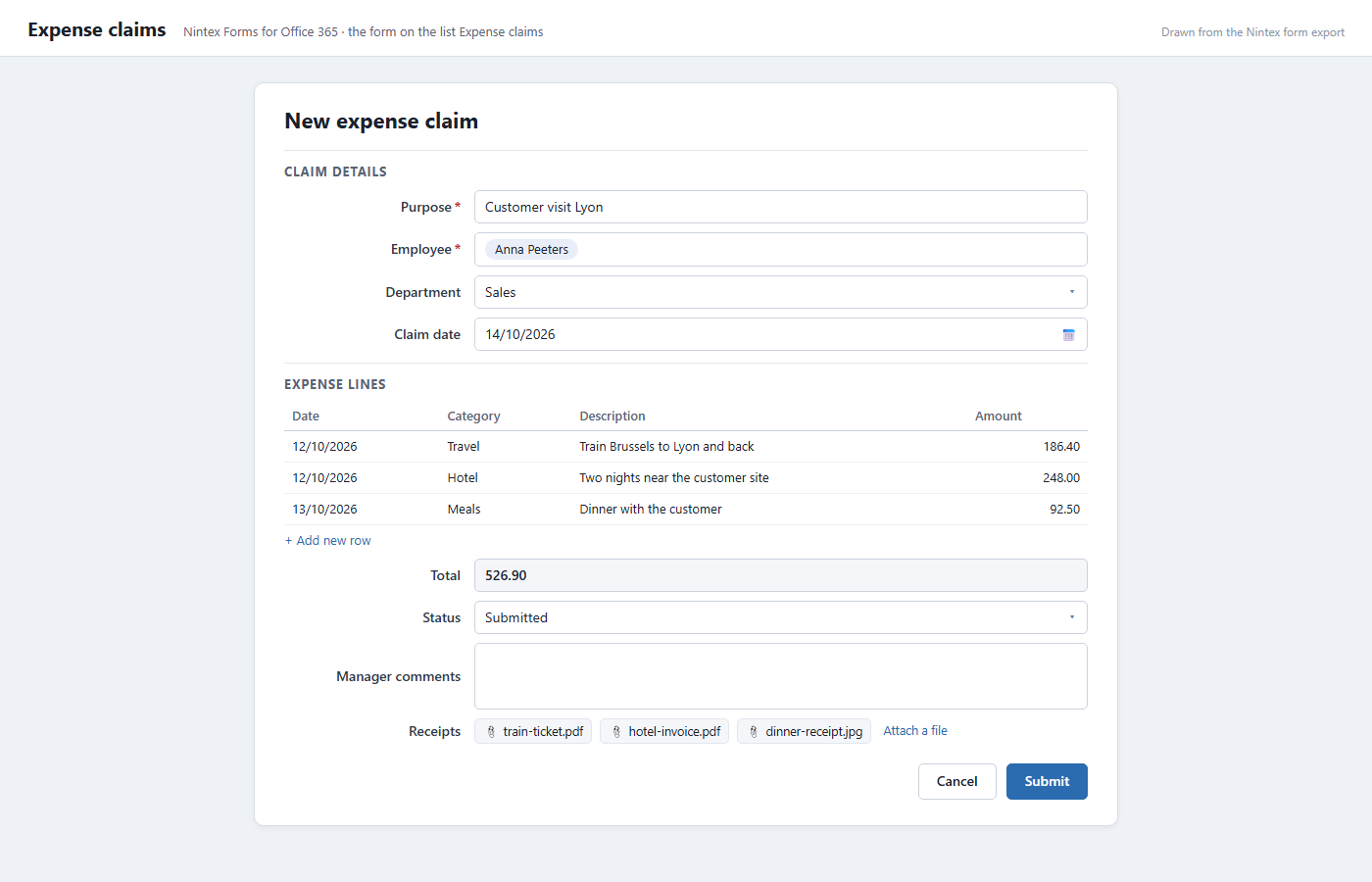
Before - the Nintex form, drawn from its export file
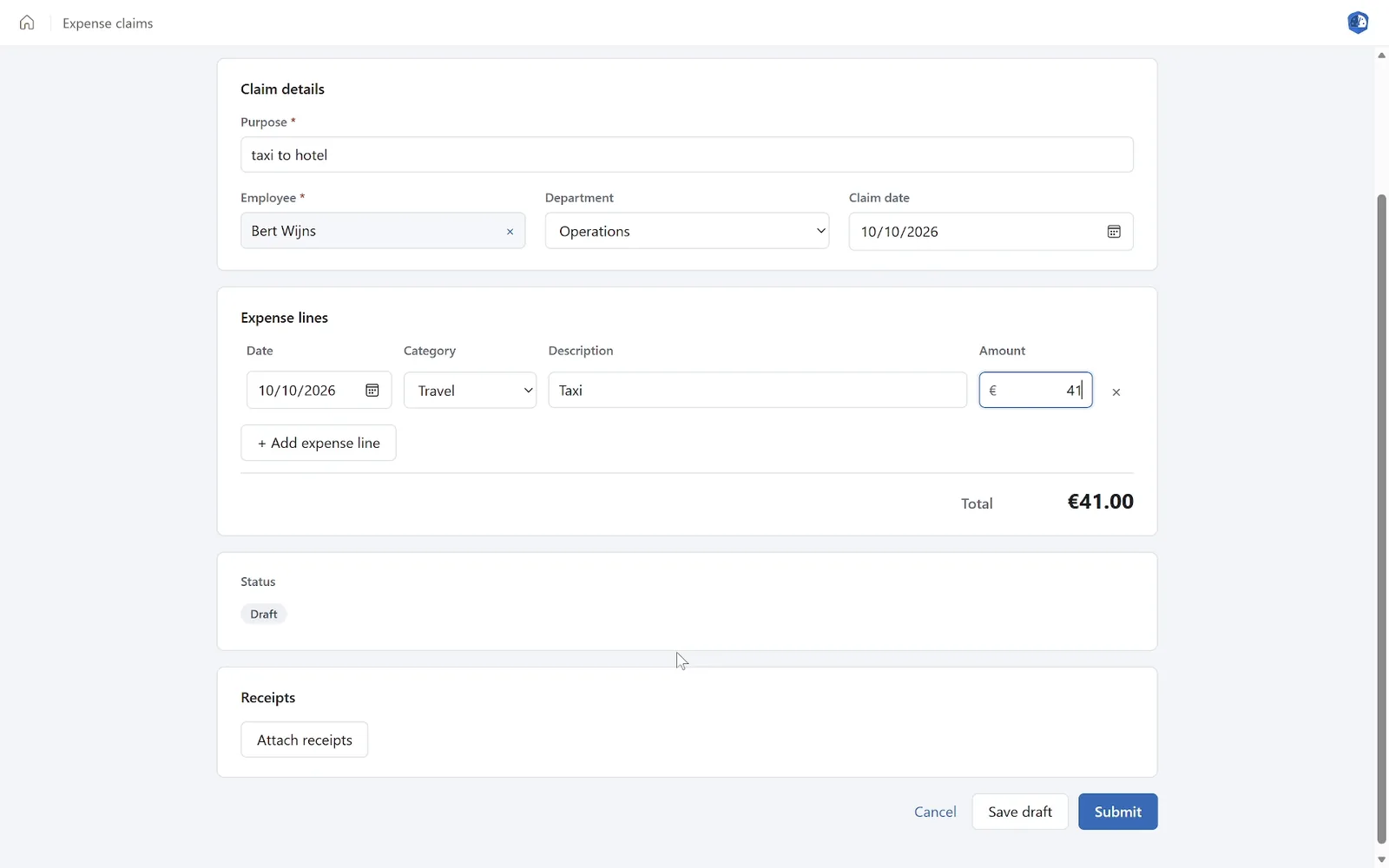
After - the same claim in a managed app on the Copilot Managed Runtime
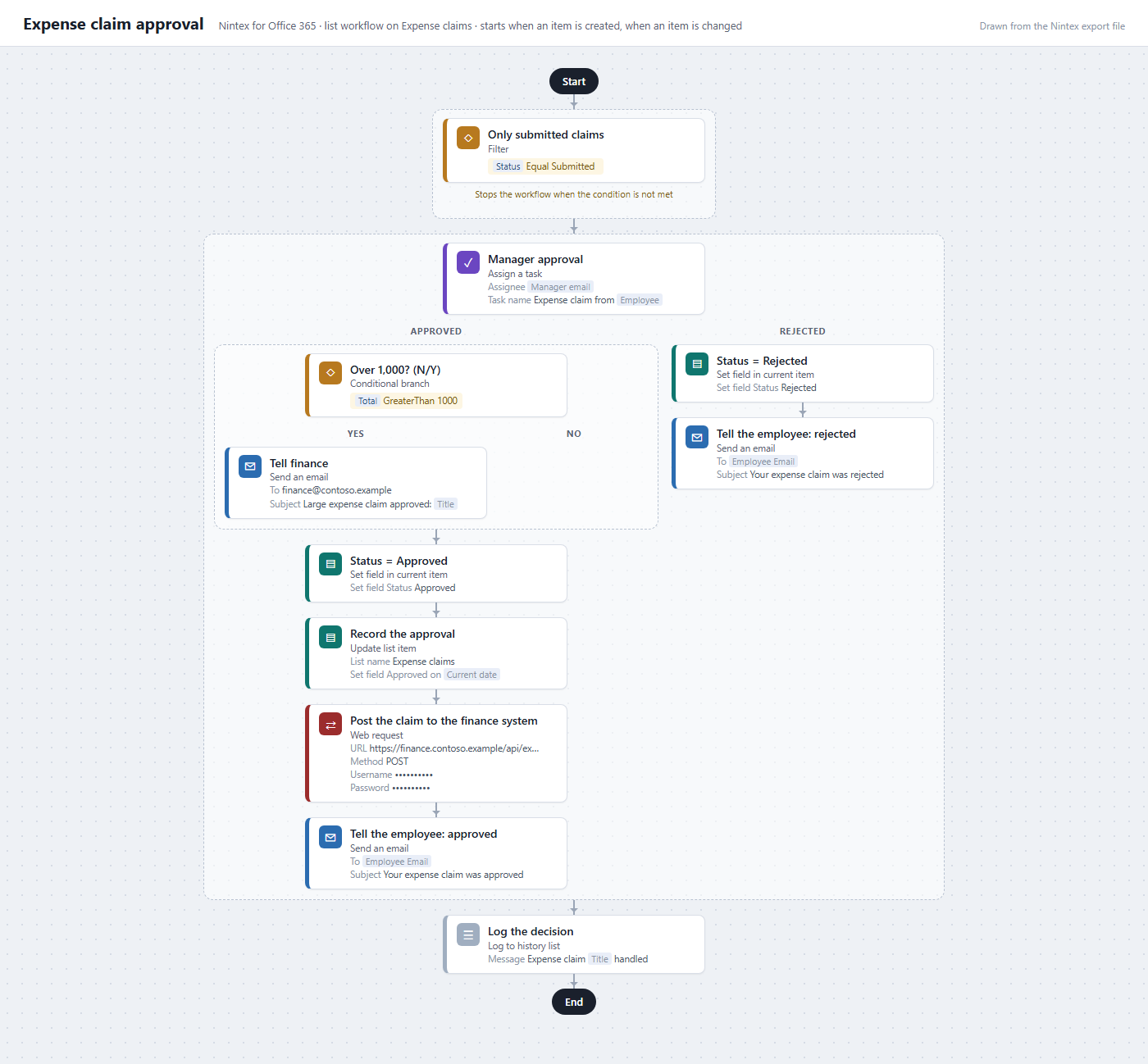
Before - the Nintex workflow, drawn from its export file
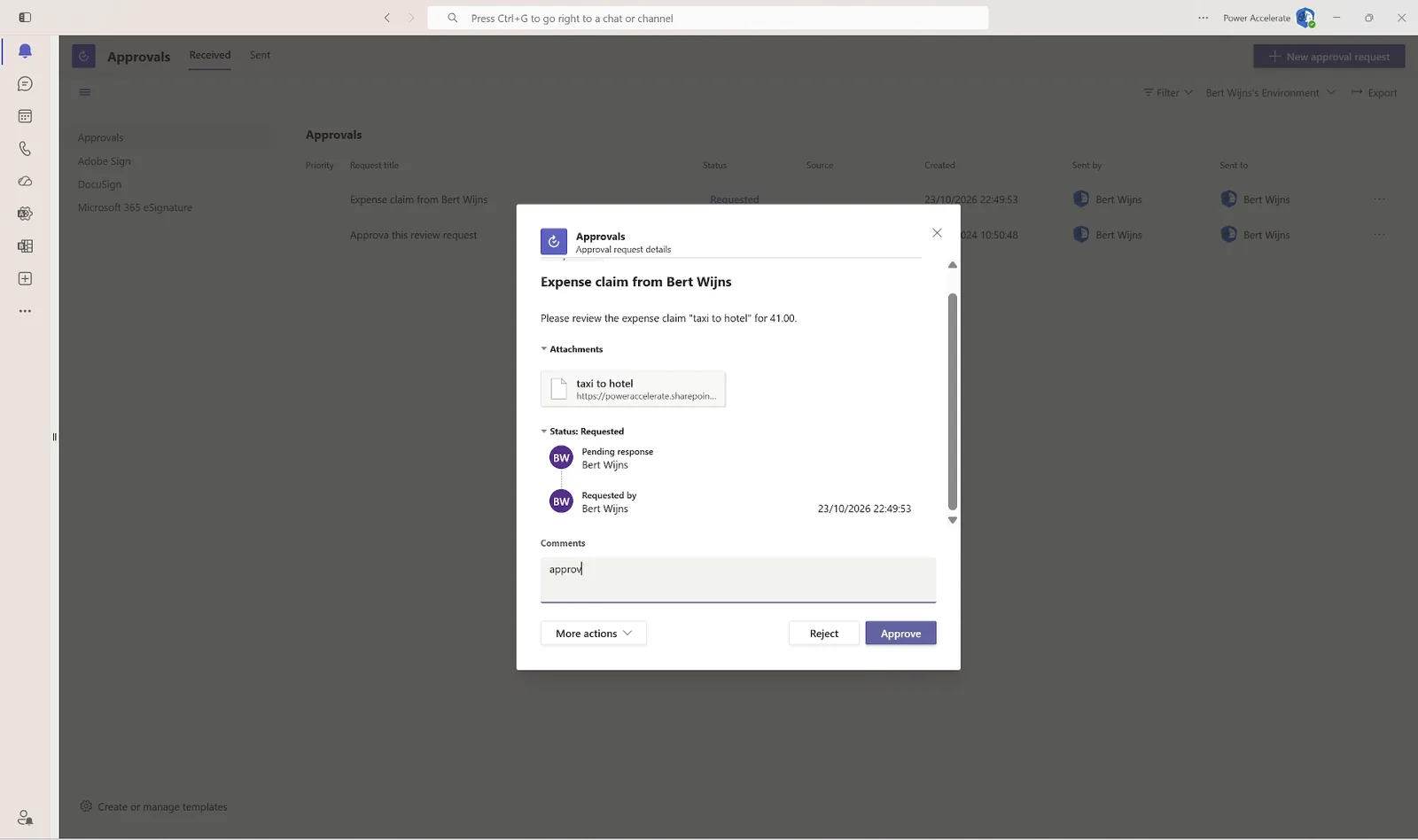
After - the approval in Microsoft Teams, sent by the rebuilt flow
A Nintex for Office 365 workflow of 11 actions: a filter, a manager approval, a branch for claims over 1,000, status updates, e-mails, and a web request to the finance system that stores its user name and password in the export. 82% carries over as it is; size Medium. The Nintex form: 12 fields, 2 rules, a calculated total and a repeating section of expense lines, so it becomes an app rather than a list form. In the flow draft, 9 steps came out as real Power Automate actions and 1 was left to finish. The rebuild runs as a Power Automate flow and a managed app on the Copilot Managed Runtime, on the same SharePoint list, with the approval in Teams.
Why PowerAccelerate
Built for Real-World Migration
Non-Invasive
The tool reads export files and nothing else. No connection to SharePoint, Nintex or Microsoft 365, and nothing in the source changes. Safe to run the day you hear about it.
Secrets Found, Never Read
Stored passwords are detected by where they sit, not by reading them. The report names the workflow and the step; no output contains the value.
One Tool, Three Products
Nintex for SharePoint, Nintex for Office 365, Nintex Automation Cloud and all three Nintex Forms designers, in one report and one plan, because real estates are mixed.
Copies Recognised
Dev, test and re-exported copies of the same workflow are marked and left out of the sizing, so the estate is planned on distinct workflows.
Nothing on Trust
Every size shows the criterion that decided it, every action shows its catalogue entry, and every hour figure says it is an assumption you can change.
Migration-Ready
HTML for stakeholders, Excel for planning, JSON for automation, and a rebuild bundle with a flow draft for the build itself.
Recommended Approach
Your Migration Journey
01 - Sample
Send a handful of exports, including the workflow everyone is worried about. You get the report back and see what the rebuild would start from, before anything is agreed.
02 - Assessment
The whole estate scanned, with what each workflow and form becomes, the decisions to take, and a plan in waves with hours.
03 - Execution
Wave by wave: switch off what the SharePoint form replaces, rebuild the rest from the bundles, and let AI do the heavy lifting while your people review and approve.
Get Started
Ready to Move
Your Nintex Estate?
Send us a few exports and see the report, or talk through your workflows and forms. Assess, extract and rebuild on Power Platform, with AI doing the heavy lifting.