Lotus Notes / HCL Domino Migration
Lotus Notes / HCL Domino
Assessment & Extraction Tool
Scan, extract, and rebuild. From Lotus Notes to a modern platform, in a fraction of the time.
Whether your team still calls it Lotus Notes or HCL Domino, the tool does all three at industrial quality. Scan the entire portfolio and classify every database. Extract documents, attachments, rich text, ACL and design elements in portable form. Let AI generate the modern replacement app on the platform of your choice — with data already migrated.
See the full Assess - Extract - AI Migrate cycle in 2 minutes:
The Challenge
Legacy apps are holding companies back
Expensive & Slow
Moving apps 1-by-1 to modern platforms is effort-intensive, costly, and doesn't scale. Average dev effort per app: 34 hrs (small), 126 hrs (medium), 314 hrs (large).
Expertise Gap
Legacy platform experts are retiring. Knowledge is leaving faster than apps can be migrated. Every month of delay means more institutional knowledge lost.
Poor User Experience
Legacy apps require many clicks, have no mobility, and are prone to errors. End users work around the tools instead of with them.
High TCO
Licensing, infrastructure, and maintenance costs keep growing for systems that deliver less. The longer you wait, the more it costs.
Three Paths, One Tool
Not every database should be rebuilt
Some databases should be archived. Some should be lifted to a simpler target. Only a few need a full rebuild from the ground up. The hard part is knowing which is which — and that decision traditionally sits inside the head of whoever has maintained the estate for the last decade. The Assessment & Extraction Tool classifies every database in your portfolio in minutes, so you spend your migration budget on the apps where it actually matters.
All three paths run on the same extraction engine underneath — what changes is only what happens downstream. Same fidelity, same tooling, different treatment.
Archive
For databases that are no longer actively used but must be preserved. Compliance retention, audit trail, insolvency handover, or simple historical reference. Data and attachments are extracted cleanly to SharePoint, a file share, or any long-term store — no rebuild needed.
Typical signals: no recent document activity, no scheduled agents running, no active users.
Lift
For databases with simple structure but ongoing use. Forms, views, lists and light workflow that map naturally to SharePoint lists, Dataverse tables, or a basic app. Low-complexity targets get a fast, lightweight migration without over-engineering.
Typical signals: a handful of forms and views, minimal scripting, a small set of users, straightforward data model.
Rebuild
For apps with real business logic that need to keep working. LotusScript, agents, complex workflows, computed fields, integrations — the kind of app where "just export the data" would lose 80% of what makes it useful. AI rebuilds the full application on the platform of your choice, data included.
Typical signals: significant script, scheduled agents, active users, rich form logic, meaningful workflow.
Overview
Know Your Notes / Domino Landscape
Before you can modernize, you need to understand what you have — and then get it out cleanly. The Lotus Notes / HCL Domino Assessment & Extraction Tool gives you complete visibility into your Notes portfolio, extracts the content that matters, and then uses AI to generate a fully functional replacement app on your platform of choice.
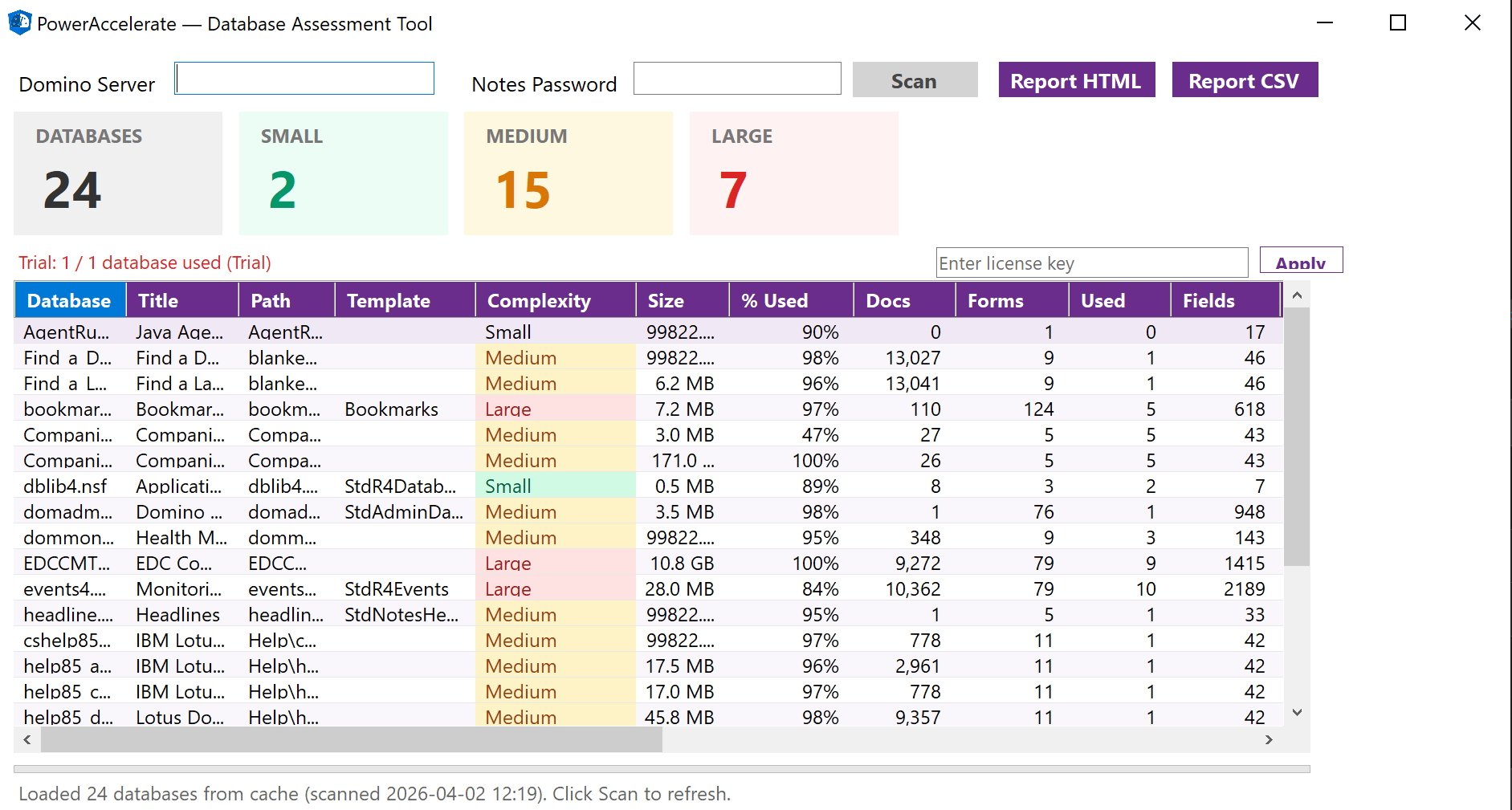
Main assessment view — server-wide database inventory with complexity classification
Full Portfolio Discovery
Automatically connect to any Domino server and enumerate every database. Get a complete inventory with file paths, sizes, replica IDs, template names, and last-modified dates — no manual cataloging required.
Deep Design Analysis
Go beyond surface-level metadata. The tool inspects forms, fields, views, agents, ACLs, and document statistics for every database — giving you a true picture of complexity before migration planning begins.
Professional Reports
Export detailed, stakeholder-ready reports in Excel and JSON. Every scan result is structured for immediate use in migration planning, governance reviews, or executive briefings.
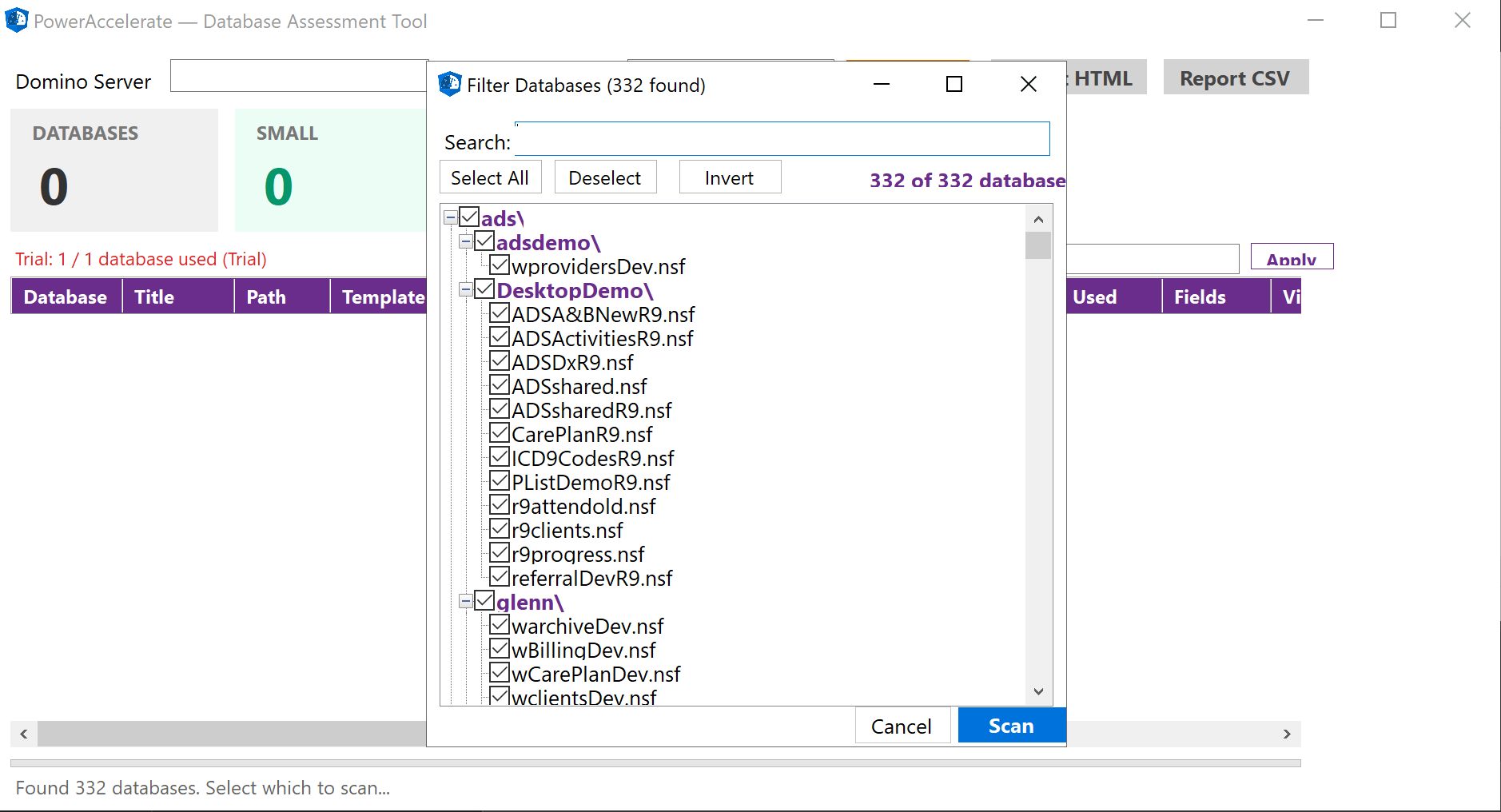
Smart database selection — filter and select databases before scanning
How It Works
Four Steps to Full Visibility
From connection to report, the entire workflow is designed to be fast, safe, and non-invasive.
Connect
Point the tool at any Domino server — local or remote. Enter the server name and credentials, and the tool establishes a secure connection via the Notes client.
Select
Choose which databases to assess. Select individual databases for a targeted review, or select the entire server for a full portfolio scan.
Scan
The tool reads design elements, ACLs, document counts, and structural metadata. It performs read-only operations — nothing is modified on the server.
Report
Generate professional Excel and JSON reports with full breakdowns by database, complexity classification, and migration-readiness indicators.
Deep Scan
Five Dimensions of Analysis
Each database is analyzed across five critical dimensions. The deep scan reveals the true structure and complexity of every Notes application.
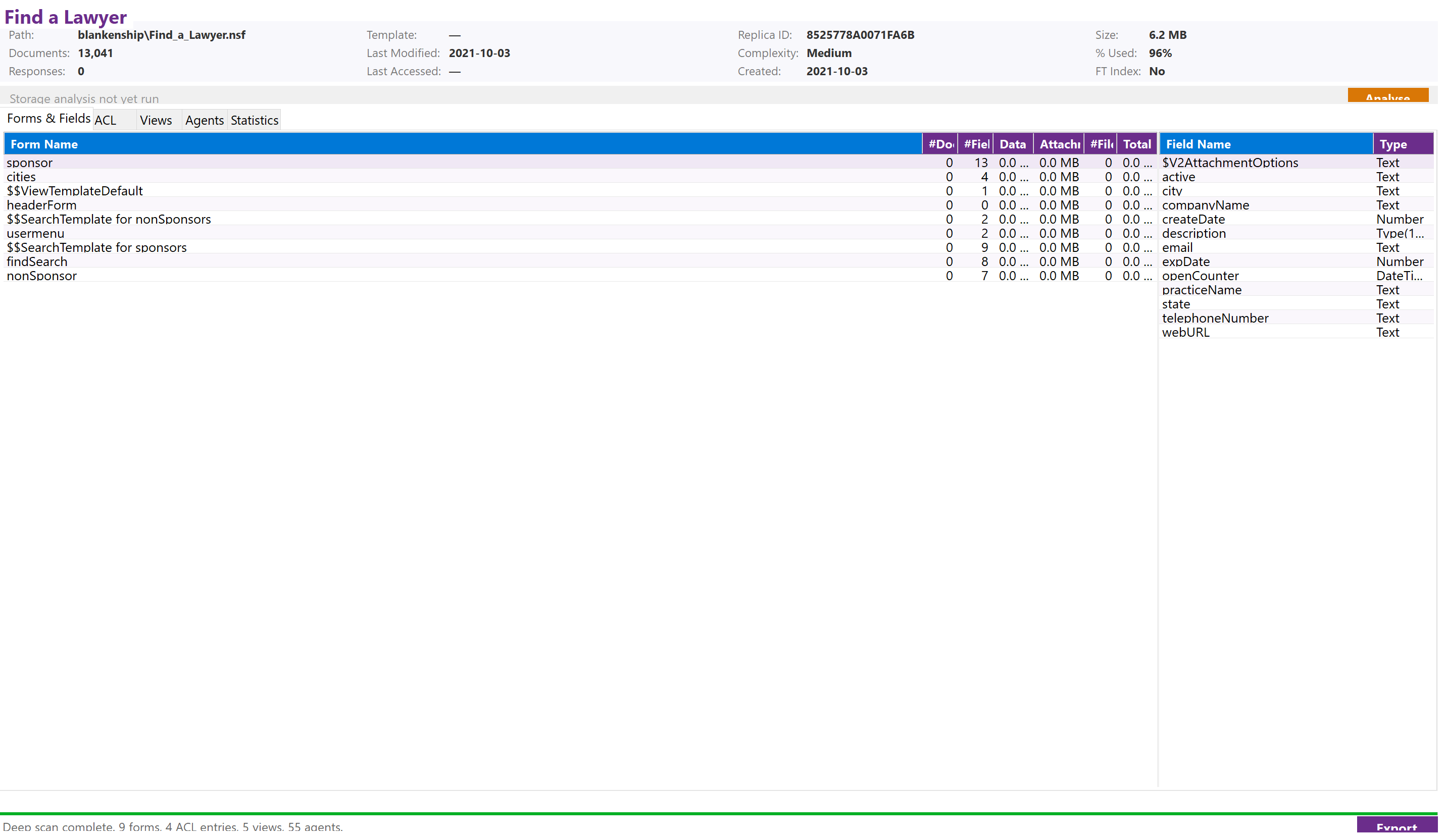
Forms & Fields — complete form and field inventory

ACL — access control list audit
Views — view and folder inventory

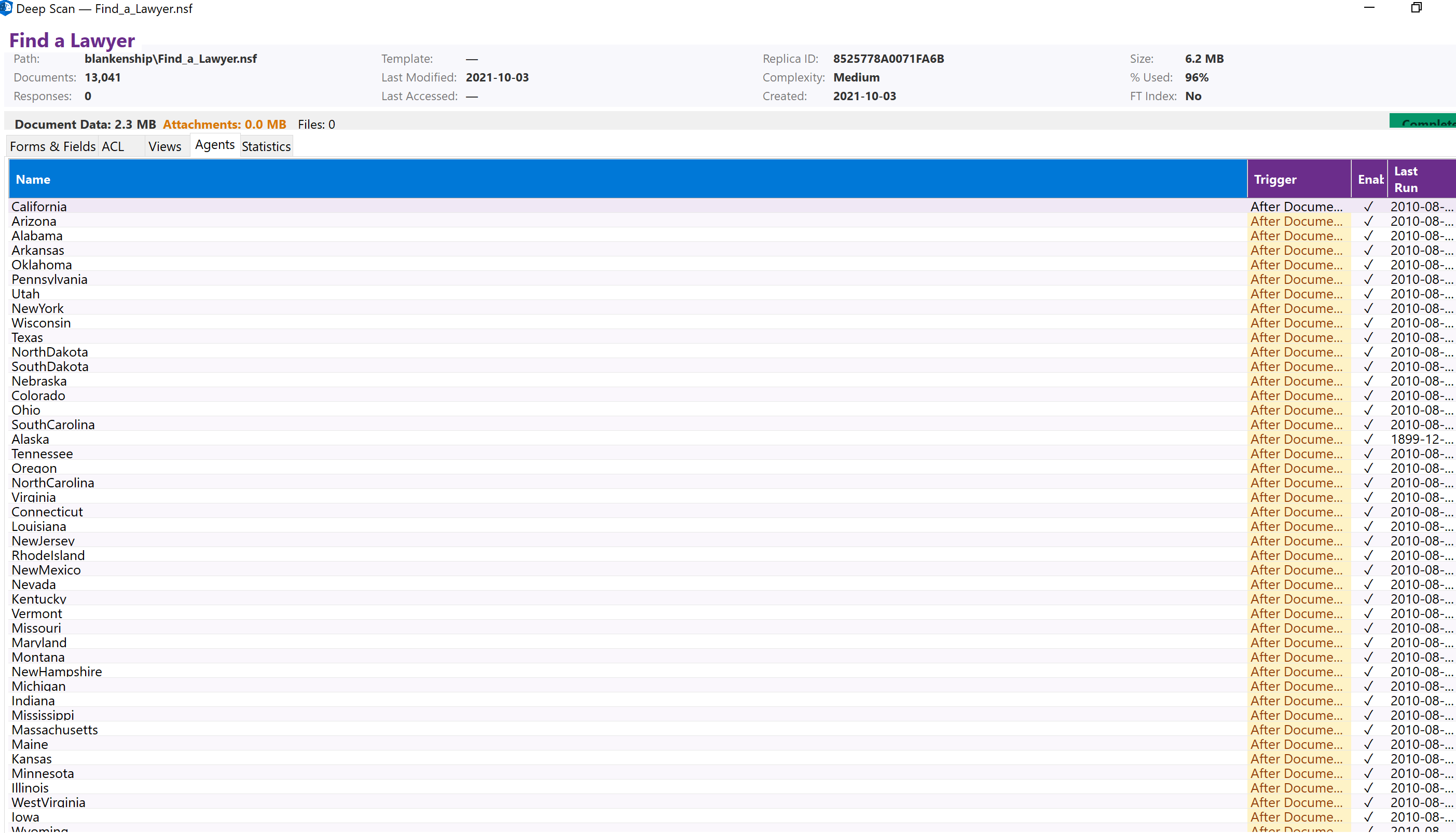
Agents — scheduled agent analysis
Forms & Fields
Every form and its fields are enumerated — including field types, default values, and computed formulas. This is the foundation for mapping to Power Apps screens and Dataverse tables.
ACL Security
Full Access Control List extraction — roles, privilege levels, and per-entry permissions. Understand who has access to what before you migrate security models.
Views
All views and folders are cataloged with their selection formulas, column definitions, and sort orders. Critical for reconstructing data presentation in the target platform.
Agents
Scheduled agents, triggered agents, and background processes are identified with their triggers, schedules, and code language (LotusScript, Formula, Java). Essential for planning automation migration.
Statistics
Document counts, database size, storage usage, and activity indicators. Know which databases are actively used and which are candidates for archival.
Extraction
Full Extraction, Not Just Metadata
Assessment tells you what you have. Extraction gets it out. The tool pulls the complete content of every selected database into a portable, structured format — ready for migration, archival, or AI-driven rebuild. Notes is hard to extract cleanly because of its proprietary storage, rich text model, and document hierarchies. The tool handles it.
Documents & Fields
All document bodies, computed fields, date fields, multi-value fields, and rich text — preserved with formatting and original structure intact.
Attachments & Embedded Images
Extracted at original fidelity — no re-encoding, no lossy conversion, no surprises when the data lands in the target environment.
Rich Text Rendering
Optional HTML rendering via the Domino HTTP interface for human-readable output, where that's the shape downstream consumers need.
Relationships
Parent-child and response hierarchies preserved — conversations and threaded documents stay linked through the migration.
Design Elements
Forms, views, folders, agents, ACL and roles — all captured alongside the data for complete context, ready to inform the AI rebuild.
Portable Output
Local SQLite database plus a Dataverse-ready schema manifest, packaged as a zip for hand-off to the next step — or straight to your migration team.
End-to-End Flow
Almost Fully Automated
Lotus Notes / HCL Domino Modernization
The canonical shape of every engagement: Assess → Extract → Generate → Deploy. Each step feeds the next. Extracted content — documents, rich text, attachments, ACL, and design elements — flows into an AI pipeline that generates a working replacement on your target platform, with migrated data included. No manual schema mapping. No rebuilding from scratch.
1. Assess
Full portfolio scan — forms, fields, views, agents, ACL, documents, attachments
2. Extract
Documents, rich text, attachments, ACL and design elements exported as portable SQLite + schema manifest
3. Generate
AI reads the schema and generates Dataverse tables, Power Apps, and flows
4. Deploy
Your modern app — with migrated data — deployed to Power Platform
Migration Framework
Categorize, Scope & Prioritize
AI-powered assessment gives you the full picture before you start. Each app is evaluated and routed through a decision framework.
Still in use?
If NO → Archive or Decommission the application.
Data relevant?
If YES → Archive data to SQLite or Copilot Studio for retrieval.
Simple app?
Rebuild with standard AI tools — limited data and logic.
Medium-complex?
Migrate with Power Accelerate + AI — data, process, and workflow centric.
Target platform?
Power Platform, SharePoint, SAP, ServiceNow, or any modern stack.
Migration Targets
Remove
Decommission apps no longer needed or in use. Clean up your legacy portfolio.
Preserve
Archive to SQLite or Copilot Studio — apps not in use but with important data to retain.
Simple Migrate
Migrate with standard AI tools — simple in-use apps with limited data and logic.
Complex Migrate
Migrate with Power Accelerate + AI — medium-complex apps that are data, process, and workflow centric.
Why PowerAccelerate
Built for Real-World Migration
Non-Invasive
The tool performs read-only operations. No data is modified, no agents are triggered, and no documents are created on the target server. Safe to run on production environments.
Pause & Resume
Large server scans can be paused and resumed at any time. The tool tracks progress per database, so you never lose work — even across sessions.
Local or Remote
Connect to local Domino servers on your network or remote servers accessible via Notes client. Wherever your databases live, the tool can reach them.
Security Audit
Full ACL extraction gives you a security audit for free. Identify over-permissioned databases, orphaned access entries, and inconsistent role assignments across your portfolio.
Storage Intelligence
Understand how much storage each database consumes, which ones are growing, and which are dormant. Make informed decisions about what to migrate, archive, or decommission.
Migration-Ready
Every output is structured for the next step. Excel reports feed into project planning tools, JSON exports feed into automation pipelines, and AI outputs accelerate development.
Recommended Approach
Your Migration Journey
01 — Pilot
Rapid Proof of Value. Showcase value and outcomes fast. Get real apps in front of your end-users. Prove the AI-powered approach works.
02 — Assessment
Full Inventory & Analysis. Assessment, categorization, and prioritization. Rapid assessment to gather main KPIs. AI-powered migration path recommendations.
03 — Execution
Scale with AI. Decommissioning, archiving, and migration. AI-powered app recreation at scale. Self-service citizen development.
Get Started
Ready to Accelerate
Your Migration?
Let AI do the heavy lifting. Extract, assess, and recreate — in no time. Reach out for a demo or to discuss your migration needs.