Microsoft Excel to Microsoft Power Platform
AI does the migration. We do the rest.Microsoft Excel
Assessment & Extraction Tool
Scan, extract, and rebuild. From .xlsx and .xlsm workbooks to Microsoft Power Platform - formulas, VBA and all.
Somewhere in every organisation there is a workbook that stopped being a spreadsheet years ago. It has macros, user forms, a rates card, an approval step and a person whose job it is to keep it alive. The tool inventories the whole estate, measures each workbook properly, extracts every sheet, formula and VBA module, and hands AI what it needs to rebuild the thing on Power Platform.
See the full Assess - Extract - AI Migrate cycle in under 3 minutes:
The Challenge
The spreadsheet that became a business system
It Was Never Meant to Be This
It started as a calculation. Then someone added a macro, then a user form, then a rates card, then an approval step. Nobody decided to build a business system in Excel. It happened one helpful addition at a time, and now a department depends on it.
The Logic Is Undocumented
The rules live in formulas nested six deep, in VBA behind a user form, and in the head of whoever wrote it. There is no specification. Reading the workbook is the only way to know what it actually does, and almost nobody does that before quoting a rebuild.
Governance Cannot See It
No version control, no audit trail, no access model beyond whoever has the file share. Numbers that reach the board are computed in a file that anyone can edit and nobody can diff. Audit findings against spreadsheets are one of the most common triggers for a modernization budget.
One Person Deep
Every one of these workbooks has exactly one person who understands it, and that person is usually close to moving on. The risk is not that the file breaks. It is that the file keeps working and nobody can change it.
Four Paths, One Tool
Not every workbook should be rebuilt
Most estates contain a handful of genuine applications and a very long tail of workbooks that are reports, extracts or one-off models. Rebuilding all of them is how these programmes run out of budget. The tool measures every workbook and routes it, so the spend lands on the few that earn it.
All four paths run on the same extraction engine underneath. Same fidelity, same tooling, different downstream treatment.
Archive
For workbooks nobody edits any more but whose numbers must survive. Rows and structure are extracted to a queryable SQLite archive that outlives Excel, the file share and any licence.
Routed here when: no populated data sheets, no formulas and no VBA - nothing left that a rebuild would carry across.
Keep in Excel
Sometimes the honest answer is to leave it alone. A genuine ad-hoc model with no shared users and no governance exposure does not need a platform. The tool will say so rather than manufacture a migration.
Routed here when: plenty of formula logic but very little stored data, no VBA and no structured tables - a calculation model, not an application.
Lift to Dataverse or Canvas
For structured, shared workbooks with light logic. The sheets are already tables in all but name. They map onto Dataverse with a model-driven app, or onto a canvas app, without being reinvented.
Routed here when: eight or more populated data sheets wired together by cross-sheet lookups reads as relational, so Dataverse. List-shaped tracker workbooks fall through to Canvas on SharePoint.
Rebuild as a Code App
For the workbooks that are genuinely applications. Heavy VBA, user forms, deep formula chains, external integrations. AI rebuilds them as a Power Apps Code App over Dataverse, with the logic carried across rather than guessed at.
Routed here when: more than 1,000 lines of VBA, or three or more user forms, or a database-backed connection with VBA behind it.
Overview
Know Your Excel Estate
Before you can modernize, you need to know what you have. Point the tool at a folder and it inventories every workbook, scores its complexity, and names a recommended Power Platform target for each one - measured from the file itself rather than from what anyone remembers about it.

Main assessment view - every workbook with its sheet, row, formula and VBA counts, T-shirt size, recommended target and licence state
Note the third row: an 11 MB macro-enabled workbook with 26 sheets, 26,784 formulas and 103 VBA modules, sized XL and routed to Power Apps Code Apps. The first row, a 22 KB single-sheet extract, is routed somewhere entirely different. That difference is the whole point.
Folder-Scope Discovery
Point the tool at a folder, a file share or a synced OneDrive directory. It walks every .xlsx, .xlsm and .xlsb workbook, fingerprints each one, and inventories the lot - including password-protected files, which are detected and reported rather than silently skipped. Binary .xlsb workbooks are inventoried and their VBA read, and flagged to be re-saved as .xlsm before full analysis.
Measured, Not Surveyed
Sheets and hidden sheets, named ranges, tables, formula cells, formula depth and volatility, pivot tables, data connections, external links, VBA modules and line counts, user forms and their controls, cross-sheet references and the recompute order.
Professional Reports
Stakeholder-ready output in HTML, Excel and JSON. Structured for migration planning, governance review and executive briefings, or as the canonical input to the AI rebuild step.
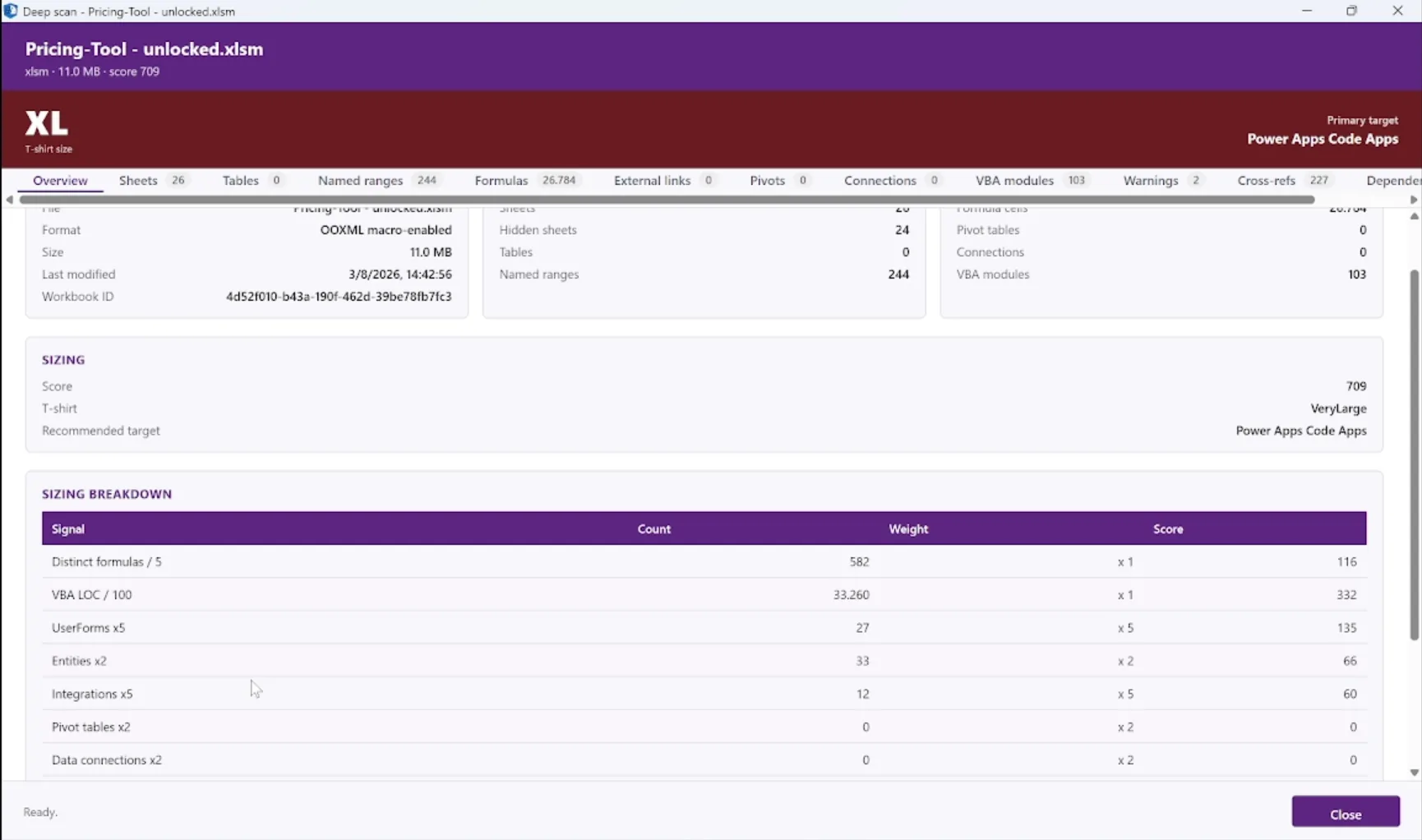
Drill into any workbook - complexity score, T-shirt size, recommended target, and the signal-by-signal breakdown behind the recommendation
How It Works
Four Steps to Full Visibility
From folder pick to report, the whole workflow is fast, safe and non-invasive.
Connect
Pick a folder of workbooks. No Excel and no Office install required - the tool reads the OOXML package directly and decompresses the VBA project itself. Nothing to install on the source, no service accounts, no agents.
Discover
Every workbook in scope is opened read-only and fingerprinted, returning sheet, row, table, named-range, formula, pivot, connection and VBA-module counts.
Scan
Each workbook is profiled in depth: formula complexity and volatility, cross-sheet dependencies, hidden and very-hidden sheets, external links, user-form layouts, and VBA module structure.
Report
HTML, Excel and JSON reports with T-shirt sizing, complexity scoring, recommended Power Platform targets and a per-workbook migration plan.
Deep Scan
Every Dimension of a Workbook
A workbook hides more than it shows. Deep Scan opens all of it - including the sheets marked very hidden that most people never knew were there - and presents exactly what the AI rebuild needs as input.
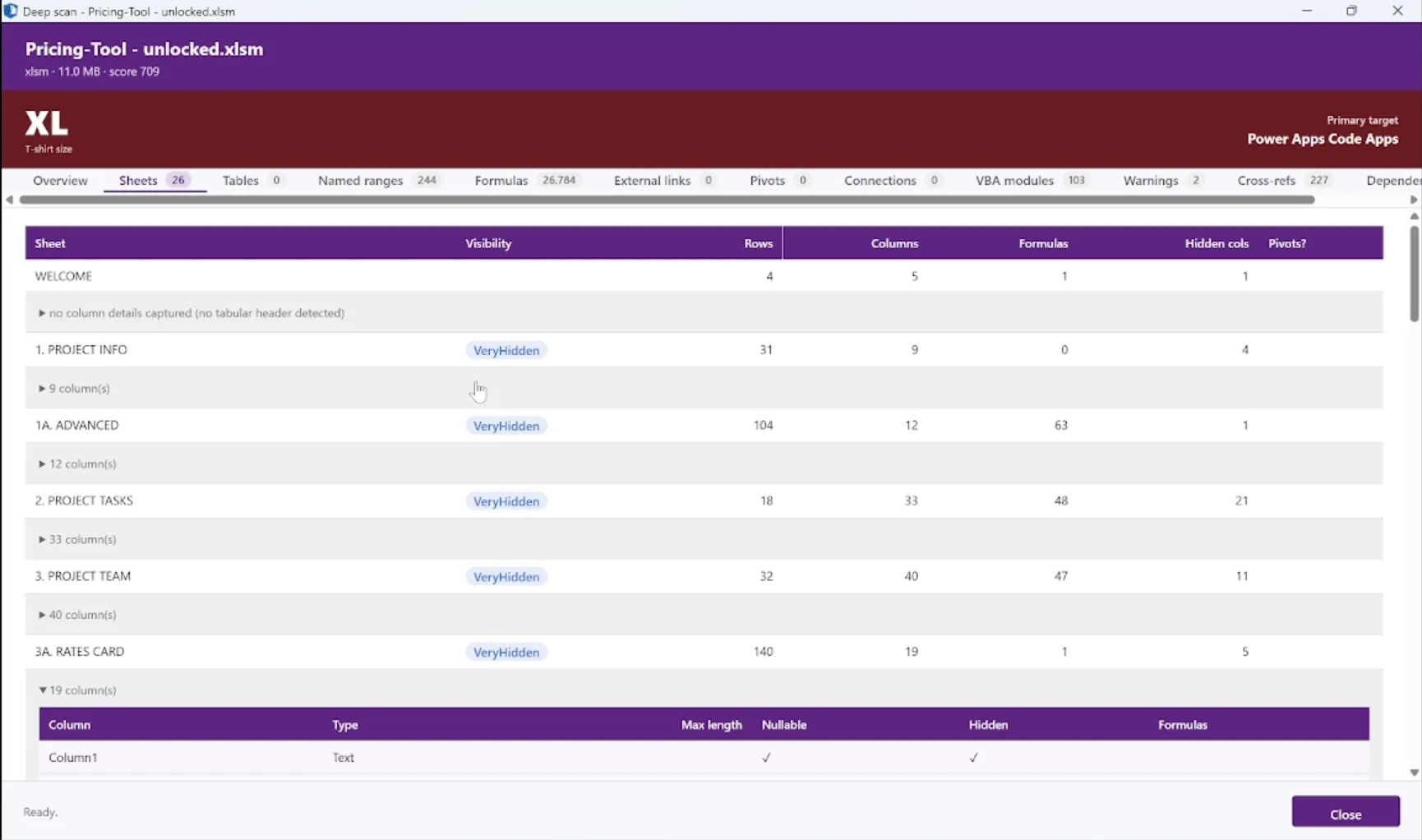
Sheets - visibility, rows, columns, formulas, per-column detail
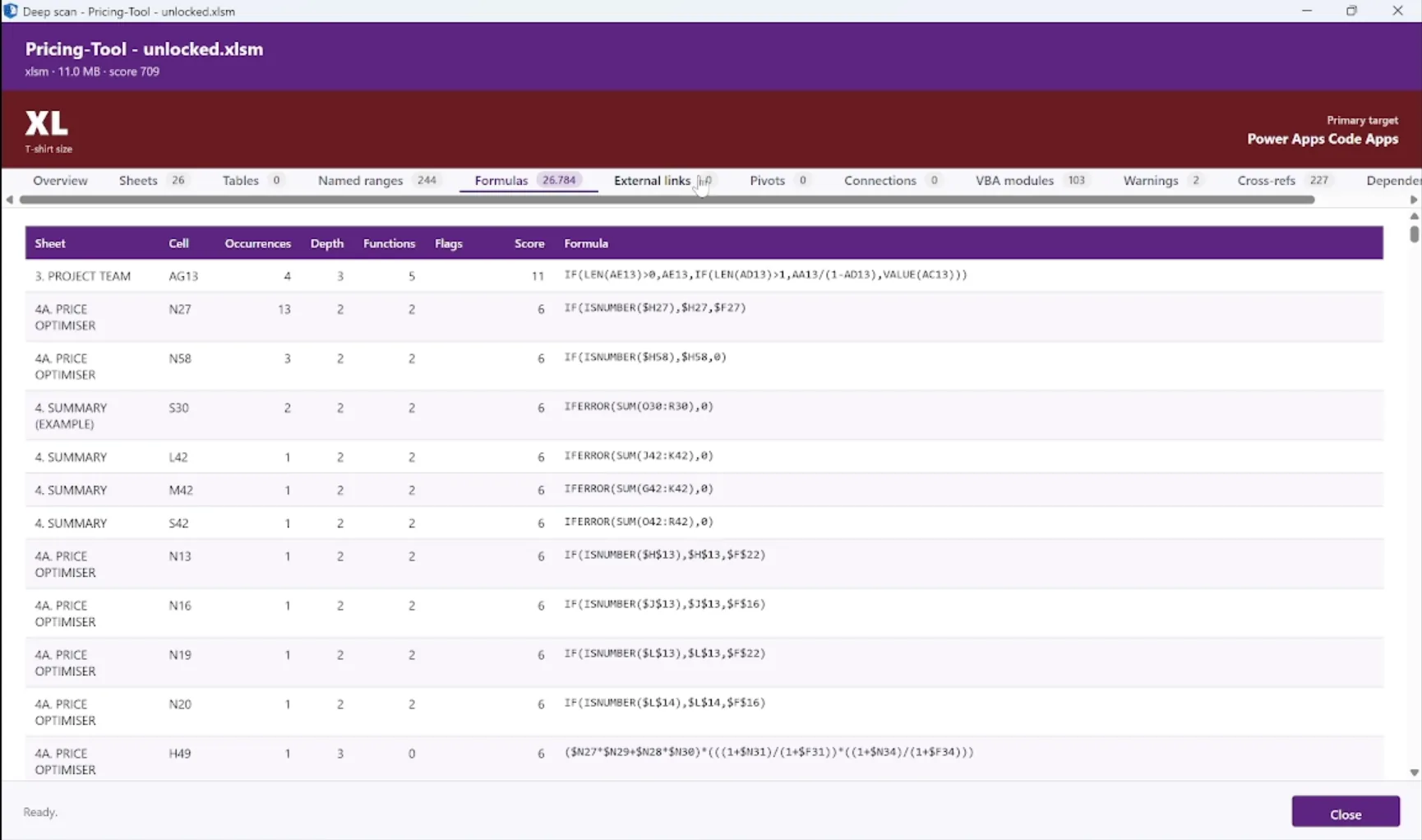
Formulas - occurrences, depth, functions, complexity score
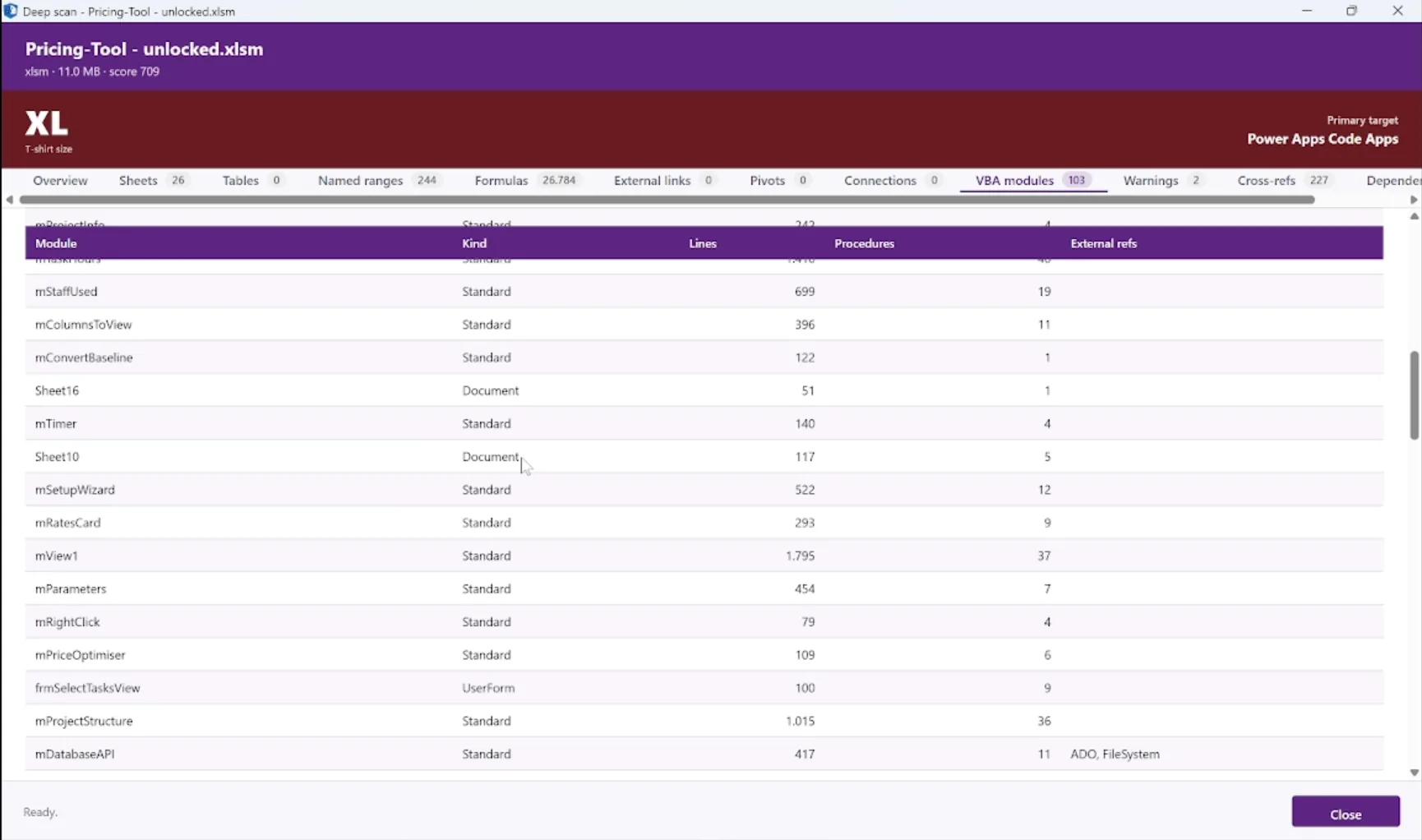
VBA modules - kind, lines, procedures, external references
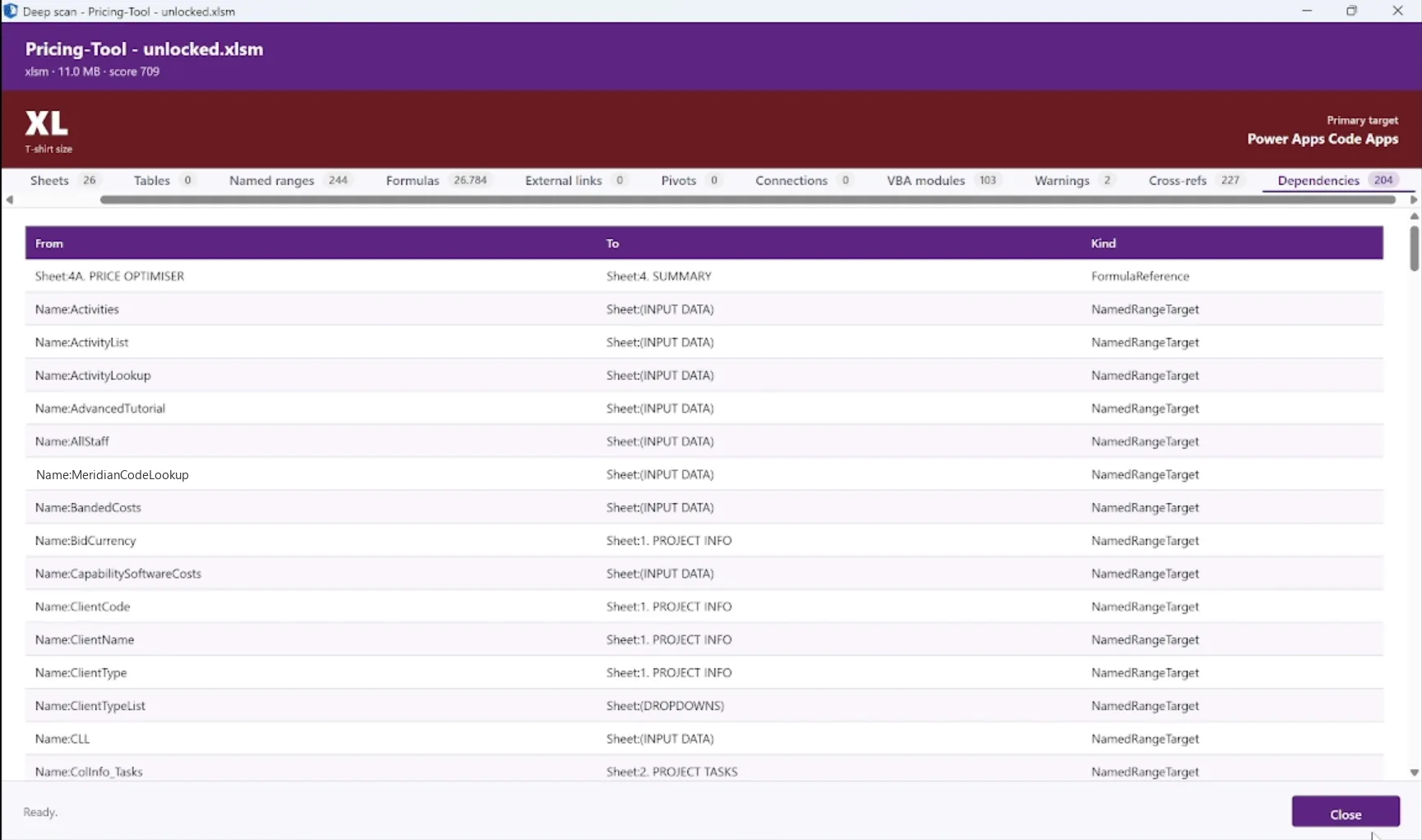
Dependencies - what feeds what, and by which kind of reference
Sheets, Names & Tables
Every sheet with its visibility state, row and column extent and formula count. Very-hidden sheets - the ones Excel will not show in the normal unhide dialog - are surfaced alongside the rest, with the named ranges and structured tables that are usually the closest thing to a data dictionary the file has.
Formulas & Complexity
Every distinct formula with occurrence count, nesting depth, function count and a complexity score. Volatile functions, cross-sheet references and external references are flagged, because those are what make a workbook fragile.
VBA & User Forms
Standard modules, class modules and sheet code-behind, with line counts, procedure counts and external references. User-form layouts and controls captured too. Extracted directly from the OOXML package - no Excel, no Office, no automation.
Links & Connections
External workbook links, data connections, pivot caches and query definitions. This is where a workbook stops being self-contained and starts being an integration, and it is the single biggest source of migration surprises.
Cross-Refs & Dependencies
Which sheet feeds which, in what order the workbook has to recompute, and where the circularity and overlap sit. The dependency graph is what makes a rebuild sequenceable rather than a guess.
Extraction
Full Extraction, Not Just Metadata
Assessment tells you what you have. Extraction gets it out. Every sheet, every row, every formula and every line of VBA comes out into a portable archive and an AI-ready bundle. Nothing is summarised away, because the rebuild is only as good as what it can see.
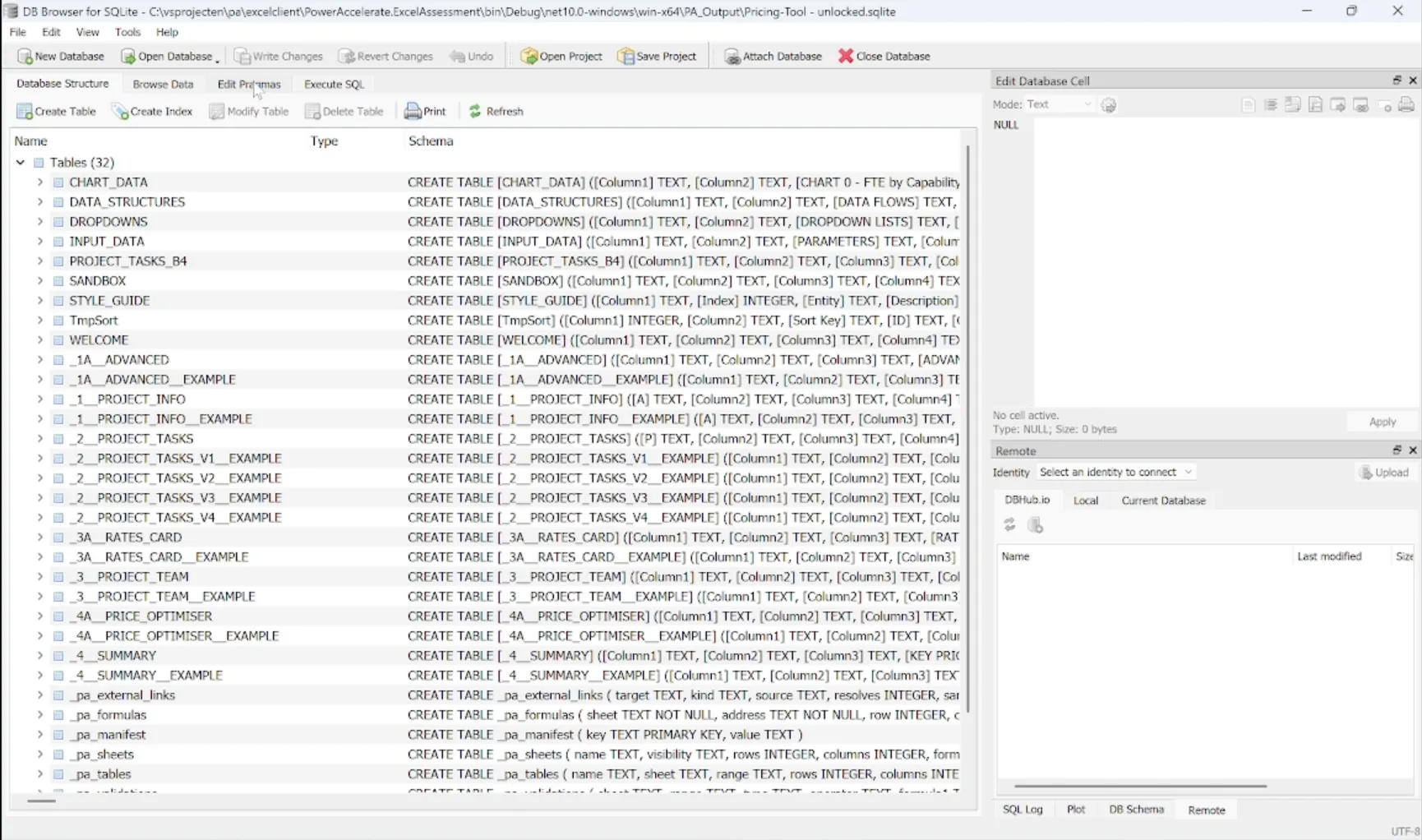
The extracted workbook as SQLite - every sheet a table, plus formula, validation and link metadata
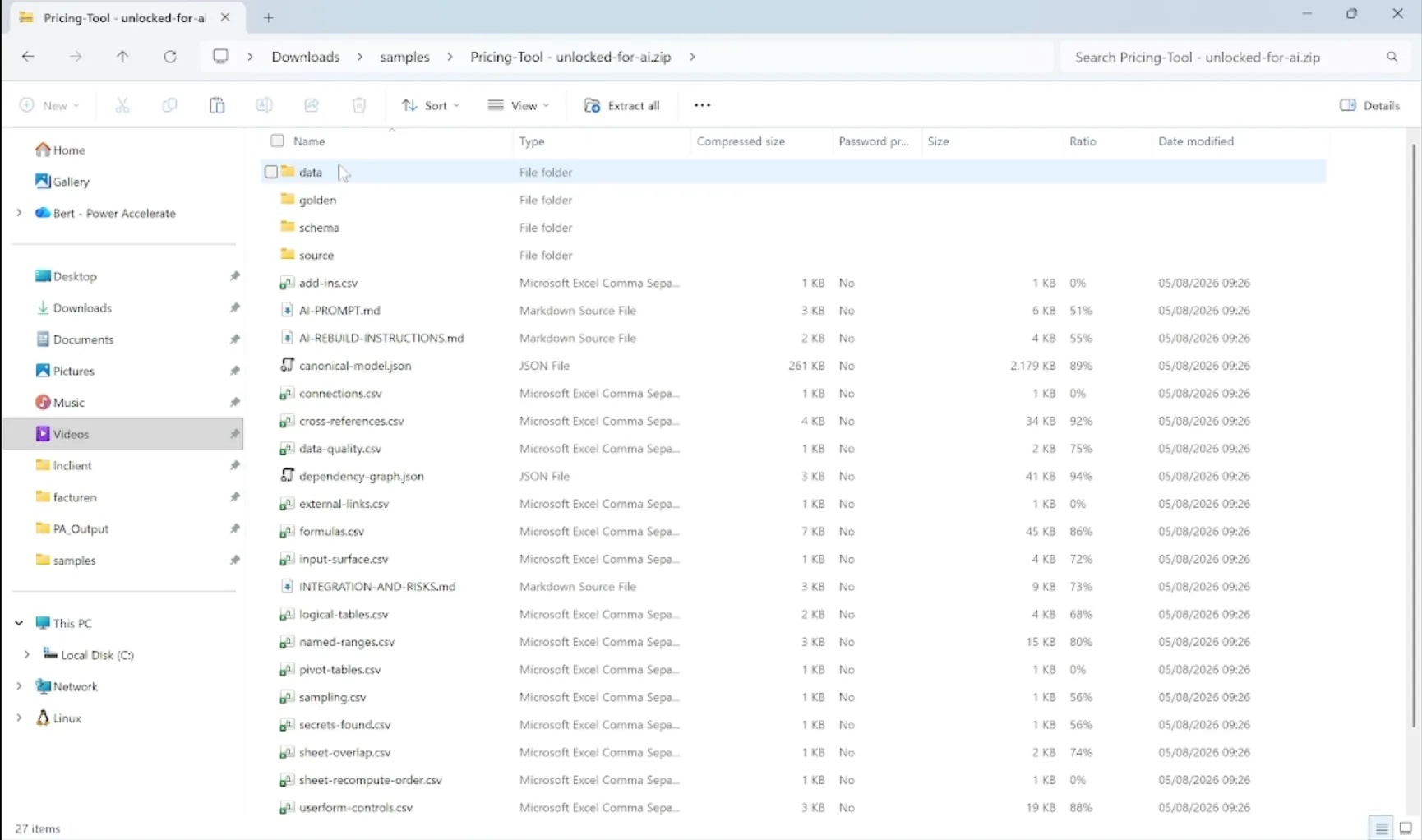
The AI rebuild bundle - canonical model, schema, dependency graph, VBA source and written instructions
Rows to SQLite
Every sheet becomes a table, every row a record, in one portable SQLite database per workbook. Queryable with plain SQL, readable years from now without Excel and without a licence.
Formulas as Data
The full formula inventory exported with sheet, cell, occurrence count, depth and complexity, so the rules can be reasoned about as a set rather than hunted cell by cell.
VBA Source
One readable .bas file per module, extracted straight from the workbook package. Standard modules, class modules, ThisWorkbook and sheet code-behind, and user forms with their control layouts.
The Dependency Graph
Cross-references, sheet overlap and recompute order exported as structured data, so the rebuild knows what depends on what before it starts writing anything.
Risk & Quality Signals
Data-quality findings, validation rules, the input surface, and a scan of the VBA for embedded credentials and connection strings. Anything found is reported and redacted from the module bodies before they are bundled, so the secrets do not travel with the handoff.
AI Rebuild Bundle
One zip carrying the canonical model, the schema, sample data, the VBA source and a written rebuild instruction. Hand it to public AI tooling such as GitHub Copilot and it has everything it needs.
End-to-End Flow
Almost Fully Automated
Excel Modernization
The canonical shape of every engagement: Assess → Extract → Generate → Deploy. Each step feeds the next. The extracted schema, rows, formulas and VBA flow into an AI pipeline that generates a working Power Platform replacement with the data already migrated.
1. Assess
Full estate scan - sheets, named ranges, formulas, VBA, links, connections, dependencies
2. Extract
Rows, formulas, VBA source and the dependency graph exported as portable SQLite plus an AI-ready bundle
3. Generate
Public AI tooling reads the bundle and generates the Dataverse schema, the application and the data-migration steps
4. Deploy
Your modern Power Platform app, with migrated data, deployed on Dataverse
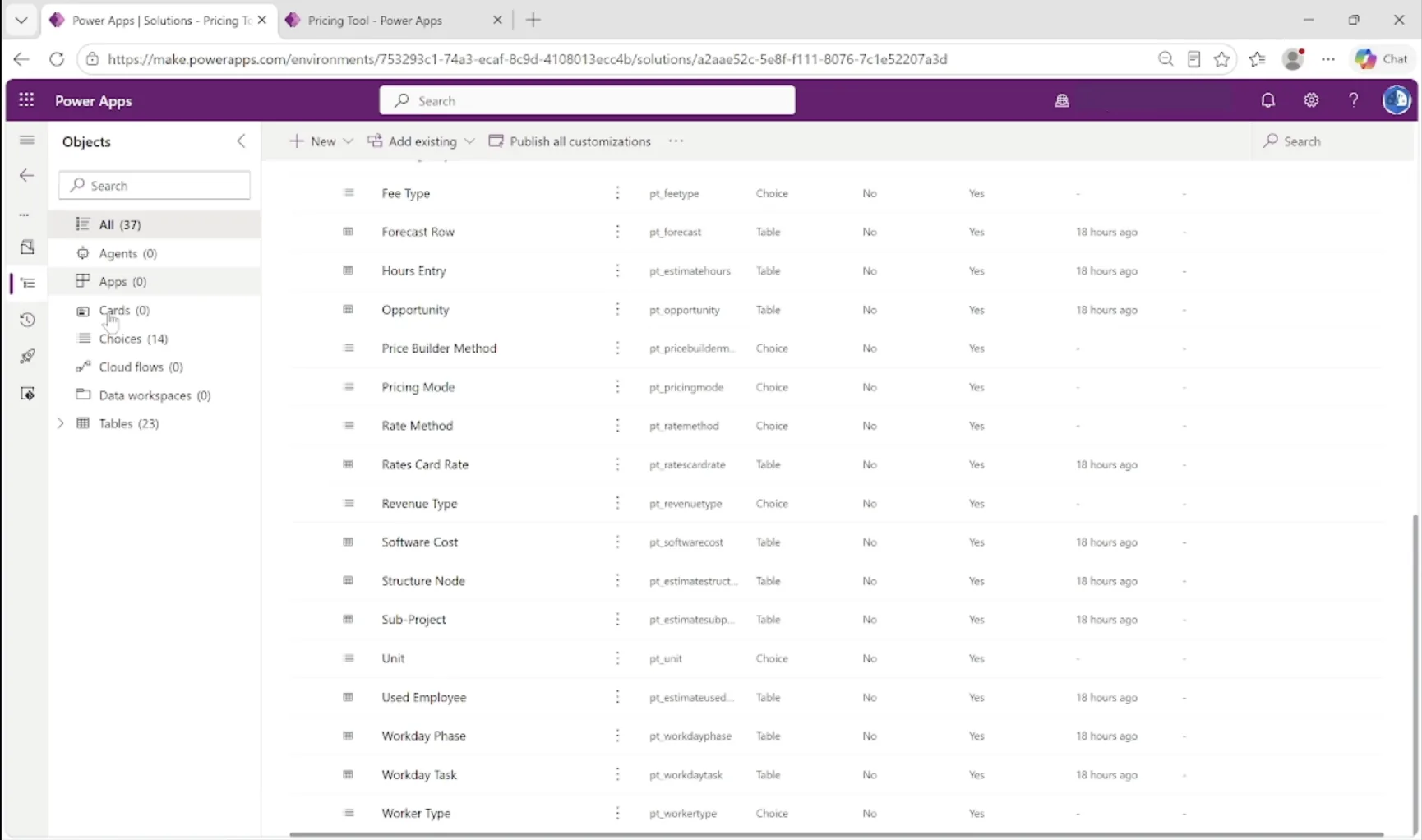
The generated Dataverse solution - tables and choice columns derived from the sheets and validation lists
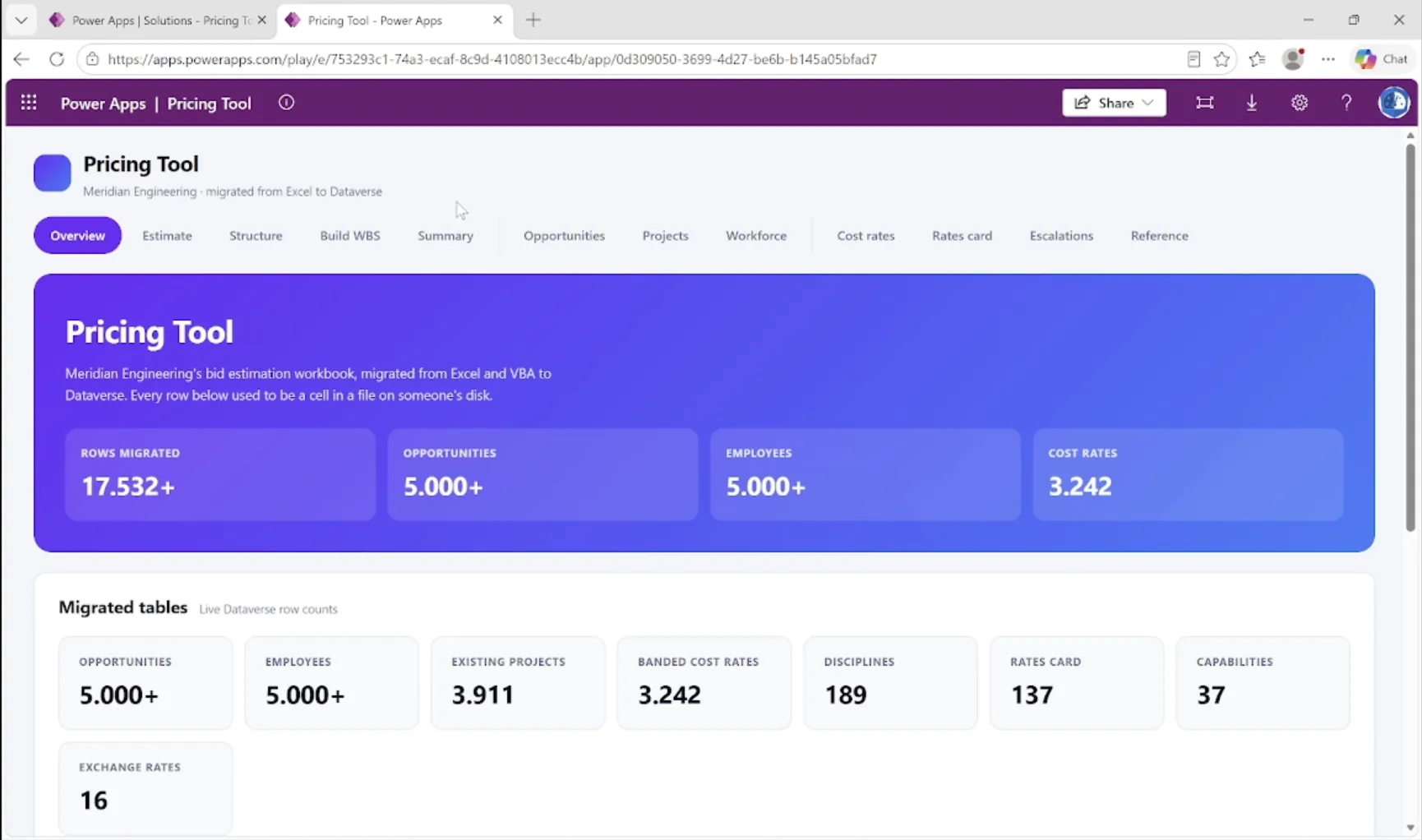
The rebuilt workbook running as a Power Apps Code App, with the migrated rows live in Dataverse
26 sheets, 24 of them hidden or very hidden. 244 named ranges. 26,784 formula cells across 582 distinct formulas. 103 VBA modules totalling 33,260 lines, plus 27 user forms. Complexity score 709, T-shirt VeryLarge, recommended target Power Apps Code Apps. Extracted, rebuilt, and running on Dataverse with 17,532+ rows migrated across 23 generated tables.
Why PowerAccelerate
Built for Real-World Migration
Non-Invasive
Workbooks are opened read-only. Nothing is recalculated, nothing is saved back, no macro is ever executed. Safe to run against the production file share.
No Office Dependency
Unlike every other extraction approach, this one needs no Excel, no Office and no automation. The tool reads the OOXML package and decompresses the VBA project itself, so it runs on a locked-down build or a clean VM.
Content-Bound Licensing
Licences bind to the content of a workbook, not its filename. Renaming, moving or copying a file changes nothing, so both sides always know exactly what is covered.
Protected Files Handled Honestly
Encrypted workbooks are detected and reported rather than silently skipped. Where a file cannot be read, the report says so and says why, instead of producing a quietly incomplete inventory.
Sizing You Can Argue With
Every complexity score comes with the signal-by-signal breakdown that produced it, and every target recommendation shows which rules fired. Nothing is a black box you have to take on trust.
Migration-Ready
Every output is structured for the next step. HTML for stakeholders, Excel for planning, JSON for automation, and an AI rebuild bundle for the code generation itself.
Recommended Approach
Your Migration Journey
01 - Pilot
Pick the workbook everyone is most afraid of. Prove the extraction quality on it, and get an AI-rebuilt replacement in front of the person who owns the process in days rather than months.
02 - Assessment
Estate-wide scan with complexity scoring and a recommended target per workbook. Find out how many are genuine applications, how many are archives, and how many should simply stay in Excel.
03 - Execution
Archive the inactive, lift the simple, rebuild the few that earn it, and leave the rest alone. AI does the heavy lifting; your people review and approve.
Get Started
Ready to Modernize
Your Excel Estate?
Let AI do the heavy lifting. Assess, extract and rebuild on Power Platform - formulas, VBA and all. Reach out for a demo or to talk through your workbook portfolio.