OutSystems to Microsoft Power Platform
OutSystems
Assessment & Extraction Tool
Your OutSystems applications, read from the exports you make yourself, mapped to Power Platform, and rebuilt by AI.
Export your applications, drop the files in a folder, and the tool tells you what each one becomes on Power Platform, how big the job is, and what needs a decision first. Nothing connects to OutSystems, and nothing leaves your machine. Then it writes a bundle per application, with the data model, the screens and the logic step by step, for AI to rebuild from.
See the full Assess - Extract - AI Migrate cycle in 3 minutes:
The Challenge
Low-code, high lock-in
The Logic Lives in the Model
Screens, aggregates, actions, Advanced SQL, timers and processes sit in the application model. Nobody has written them down, so reading the export is the only reliable way to know what the application does.
Applications Lean on Each Other
An application uses modules and extensions from other applications and from the Forge. Size it without them and the estimate is wrong, so what is in use and not in the export has to be named.
Not Everything Has an Equivalent
SQL that changes data, C# extensions, JavaScript and long-running processes have no one-to-one counterpart on Power Platform. They need a decision before the build, not halfway through it.
The Platform Is a Running Cost
Every application that stays keeps the subscription going. Knowing what each one becomes, and how big it is, turns leaving into a plan instead of a guess.
What It Reads
Applications, modules and what they use
One tool for the whole OutSystems estate. You export the applications yourself and drop the files in a folder. Subfolders are read too.
Applications and Modules
Reactive Web, Mobile and Traditional Web applications from OutSystems 11, with every module the export holds: entities and static records, screens and blocks, client and server actions, aggregates and Advanced SQL.
Integrations and Settings
The REST and SOAP methods an application calls and exposes, site properties and session variables by name, roles, timers and business processes. The values of site properties and stored passwords are not read.
What Is Not in the Export
Modules and extensions an application uses that the export does not hold are named, with what uses them, so you know what else to export before the sizing is final.
Overview
Know Your OutSystems Estate
One row per application: its type, modules, screens, entities, actions, logic steps, Advanced SQL, integration methods and extensions, its size, what it becomes on Power Platform, and the notes that matter.
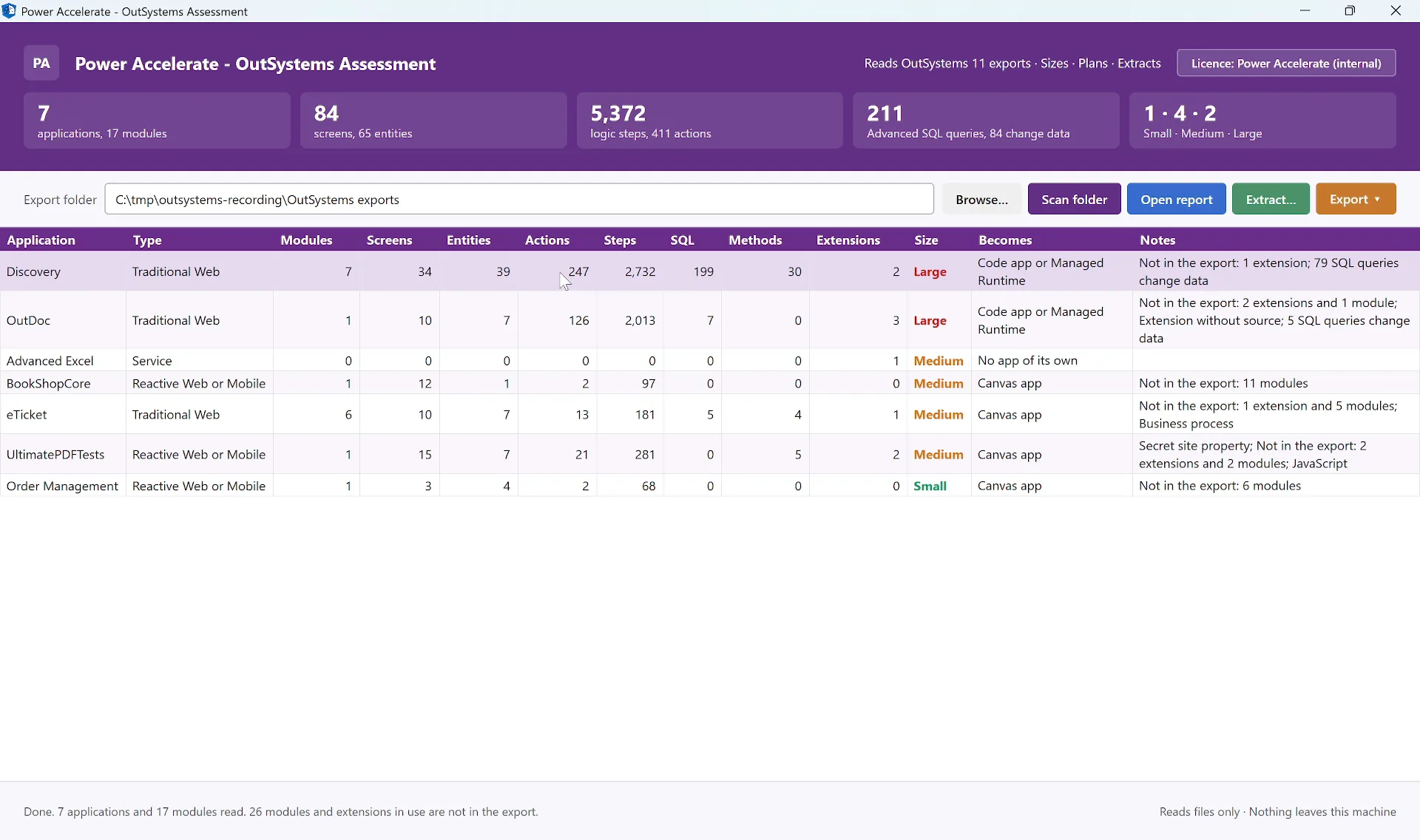
The assessment view - seven public sample applications, from Small to Large, with what each becomes and what the export leaves out
What Each Part Becomes
Entities become Dataverse tables and static entities choices. Screens become a canvas app, a code app or an app on the Copilot Managed Runtime, server actions flows or custom APIs, timers scheduled flows. Each marked Direct, Partial or Redesign.
Sizing You Can Check
Small, Medium or Large per application. Each count is sized on its own, the application takes the highest, and the deep scan shows which count decided it.
Reports for Every Audience
A self-contained HTML report, an Excel workbook and a JSON export of the full model. The same numbers in each, for the steering group, the planners and the build team.
How It Works
Four Steps, No Connection
From export to rebuild bundle, nothing touches a running environment.
Export
Export your applications with OutSystems' own export. No connection to OutSystems, no service account, no agent, nothing installed on the platform.
Scan
Point the tool at the folder. Every application and module is read: data model, screens and widgets, actions step by step, queries, integrations, timers and processes.
Decide
The report shows what each part becomes, what needs a decision first, and a first migration plan in waves.
Extract
Pick the applications to rebuild. Each gets a bundle with a build sheet, the data model, every screen and action, and the instructions for an AI agent.
Assessment
Every Application, Every Screen, Every Decision
Double-click any application for a deep scan: how its size was decided, its data model, every screen with its widgets, and every action step by step. The report brings it together for the whole estate.
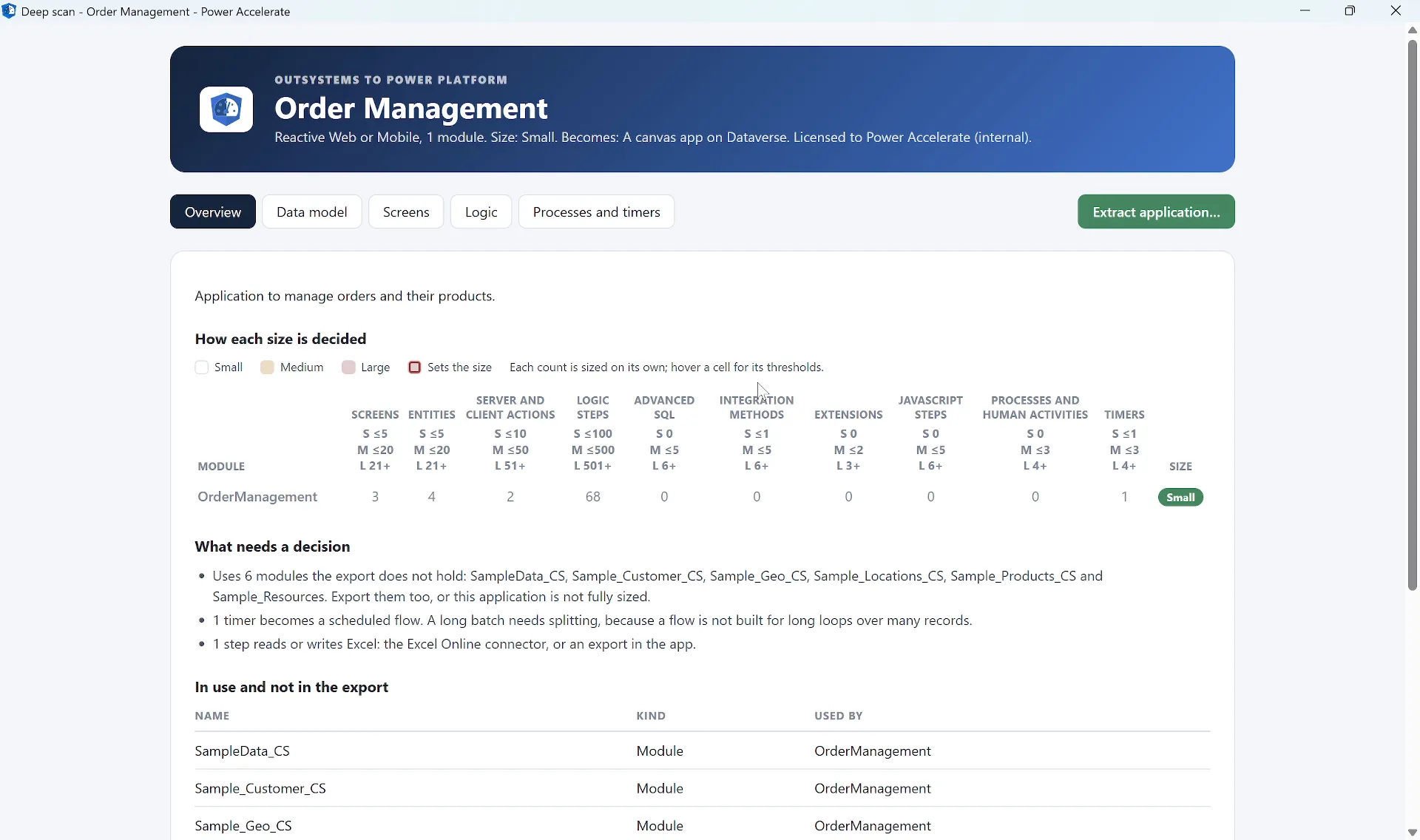
A deep scan - the size and how it was decided, what needs a decision, and what is in use but not in the export
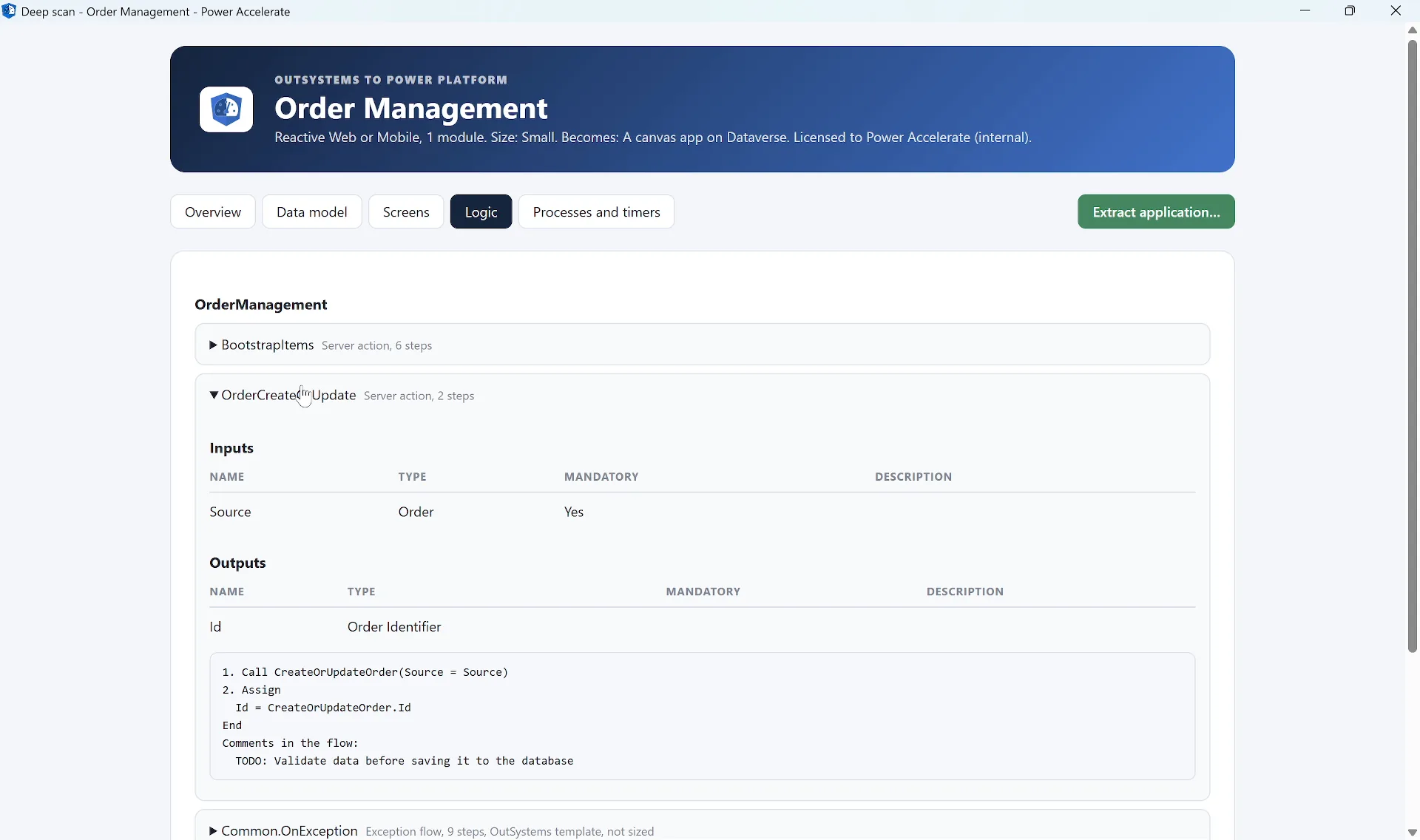
The logic - every action with its inputs, outputs and steps, as text
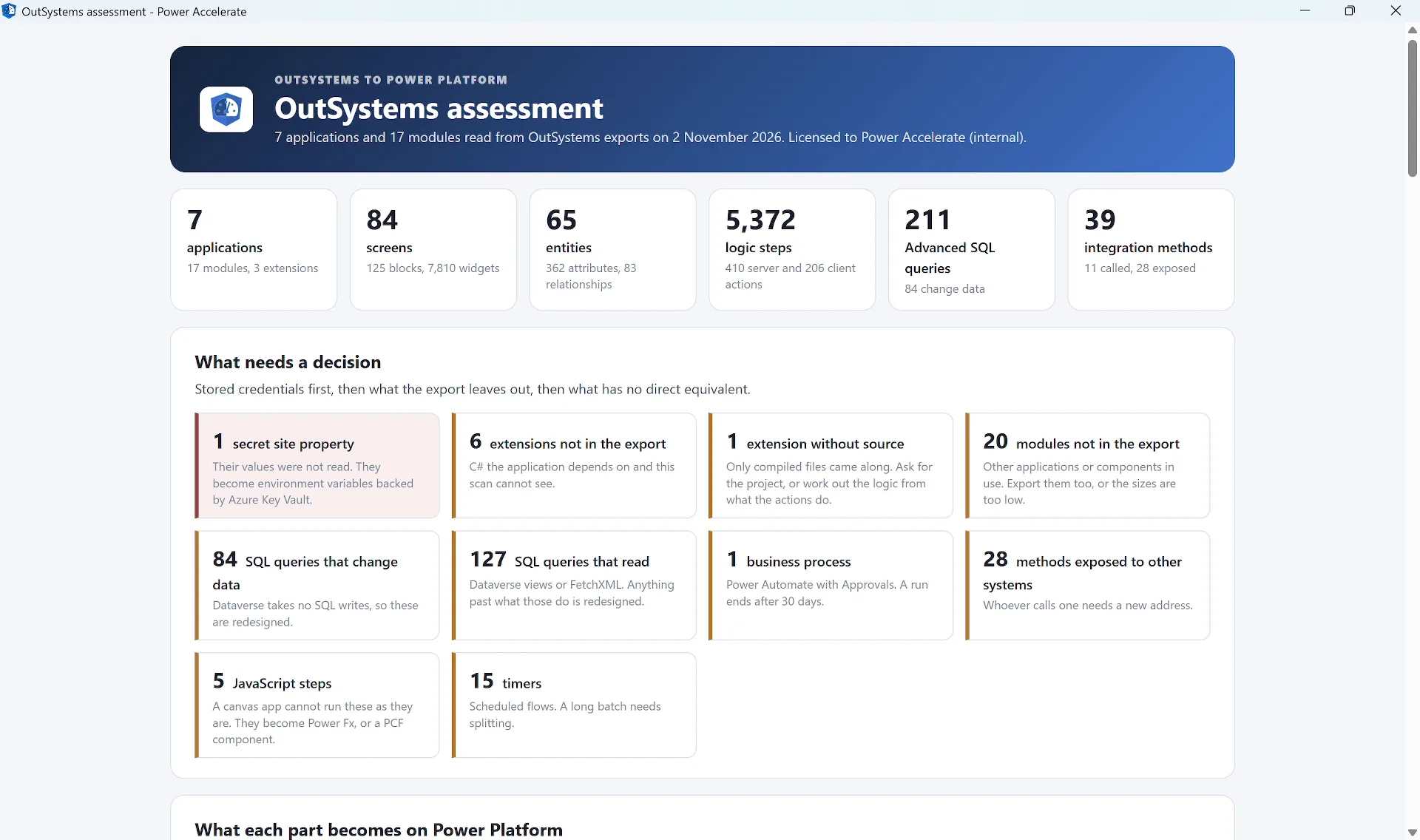
What needs a decision - secrets first, then what the export leaves out, then what has no direct equivalent
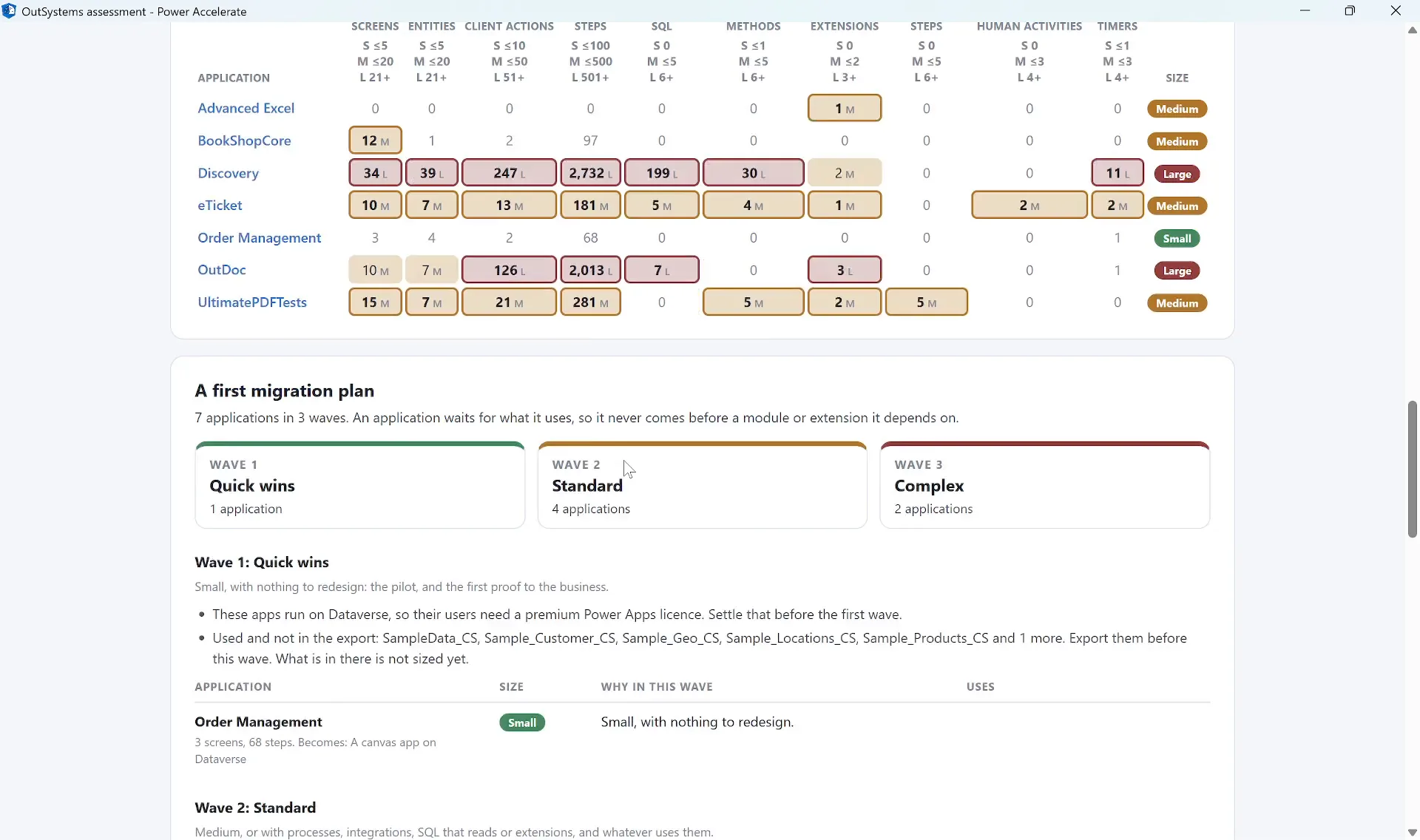
A first migration plan - three waves, and an application never before what it uses
Data Model to Dataverse
Entities with their attributes, lengths, mandatory fields and delete rules, their relationships and indexes, and the records of static entities, ready to become Dataverse tables and choices.
Screens and Logic
Every screen and block as an outline of its widgets, with what each is bound to and what it does, and every action as numbered steps with its branches.
Advanced SQL
Queries that only read become Dataverse views or FetchXML. Queries that change data are flagged for redesign, because Dataverse takes no SQL writes.
Integrations
The REST and SOAP methods an application calls and exposes, each with what it becomes: a custom connector, a custom API or an Azure Function.
A Plan in Waves
Quick wins, standard and complex. An application waits for the modules and extensions it uses, so it never comes before them.
Extraction
A Bundle Per Application, Ready for AI
The assessment tells you what you have. The extraction hands it over. Each application gets its own folder with everything the rebuild needs, written for a person and for an AI agent alike.
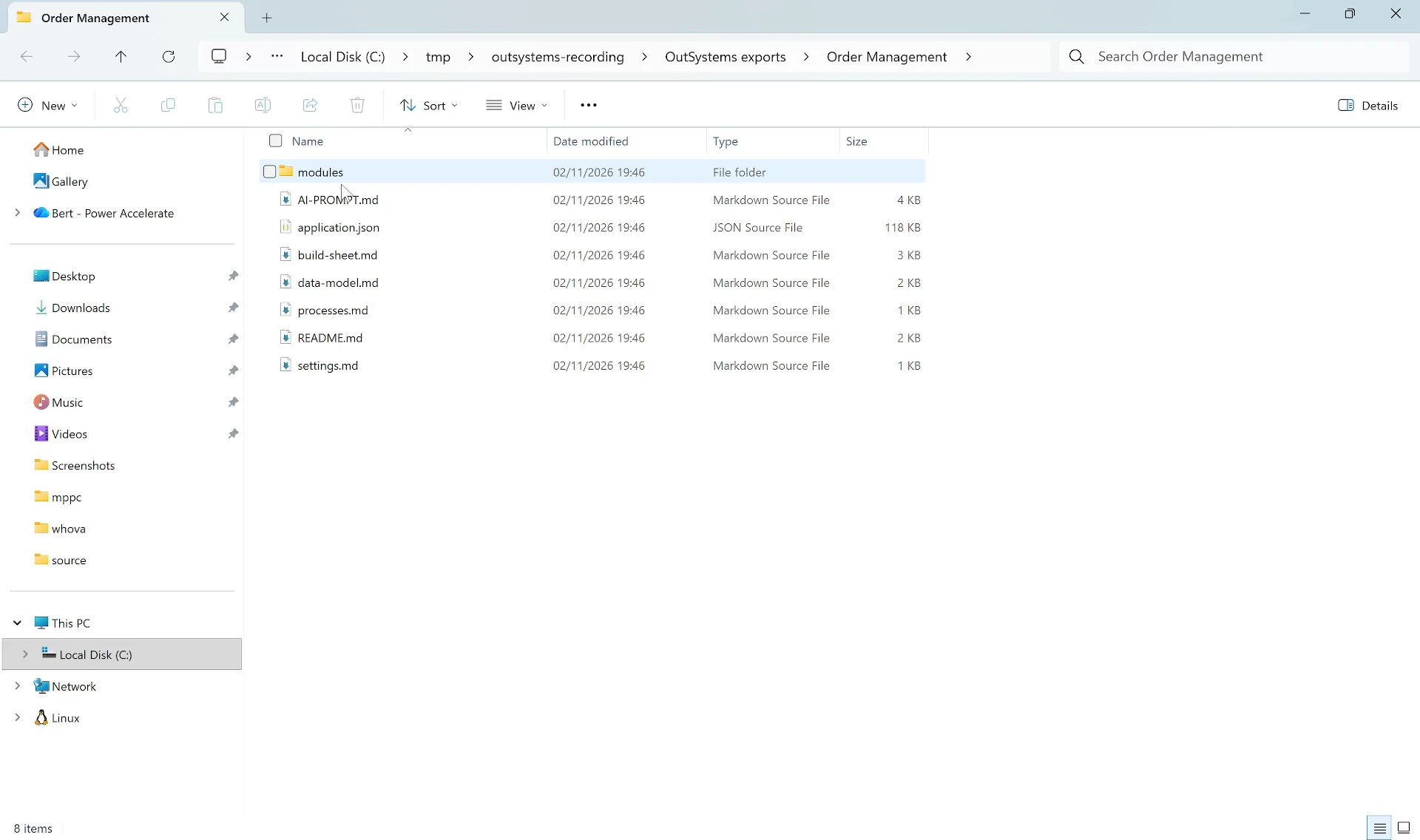
The bundle - README, AI-PROMPT, build sheet, data model, and a folder per module with its screens and logic
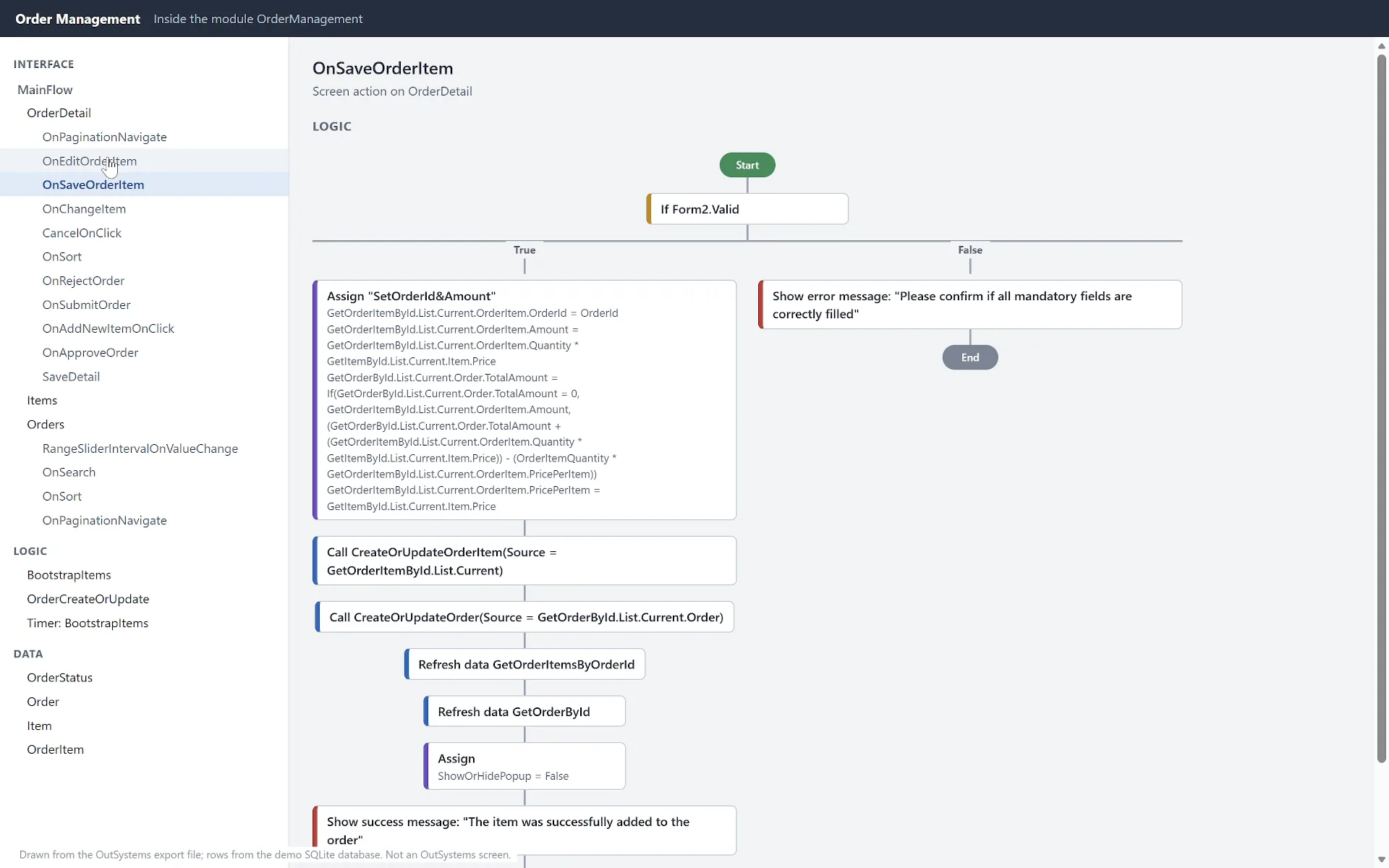
One action, drawn from the export - the bundle gives an AI agent the same steps as text
The Build Sheet
What the application becomes, how its size was decided, what needs a decision, what it uses that is not in the export, and an index of every screen and action.
The Data Model
Every entity and structure with its attributes, relationships, delete rules and static records, ready to become Dataverse tables and choices.
Screens and Logic
One file per screen and block, with its widgets, data and screen actions, and one per action, with its steps in order. The module's own scripts and images come along.
Instructions for AI
An AI-PROMPT with the rules of the rebuild: keep the logic and the wording, do not invent tables or people, never write a credential into the app or a flow, and list what could not be decided.
Secrets Stay Out
Stored passwords and the values of site properties are never read, so they cannot end up in a bundle. Settings go across by name, to be set on the target.
Missing Pieces Named
Modules and extensions the application uses but the export does not hold are listed by name, so the AI agent calls them out instead of guessing.
End-to-End Flow
From OutSystems Export to
a Running App on Power Platform
The canonical shape of every engagement: Assess → Extract → Rebuild → Deploy. The bundle goes to an AI coding agent, which builds the Dataverse tables, moves the data, and builds the app.
1. Assess
Every application in the exports, mapped, sized and planned
2. Extract
A bundle per application, with the data model, screens and logic
3. Rebuild
An AI agent builds the tables, moves the data and builds the app
4. Deploy
Dataverse and an app on Power Platform: canvas, code app or Copilot Managed Runtime
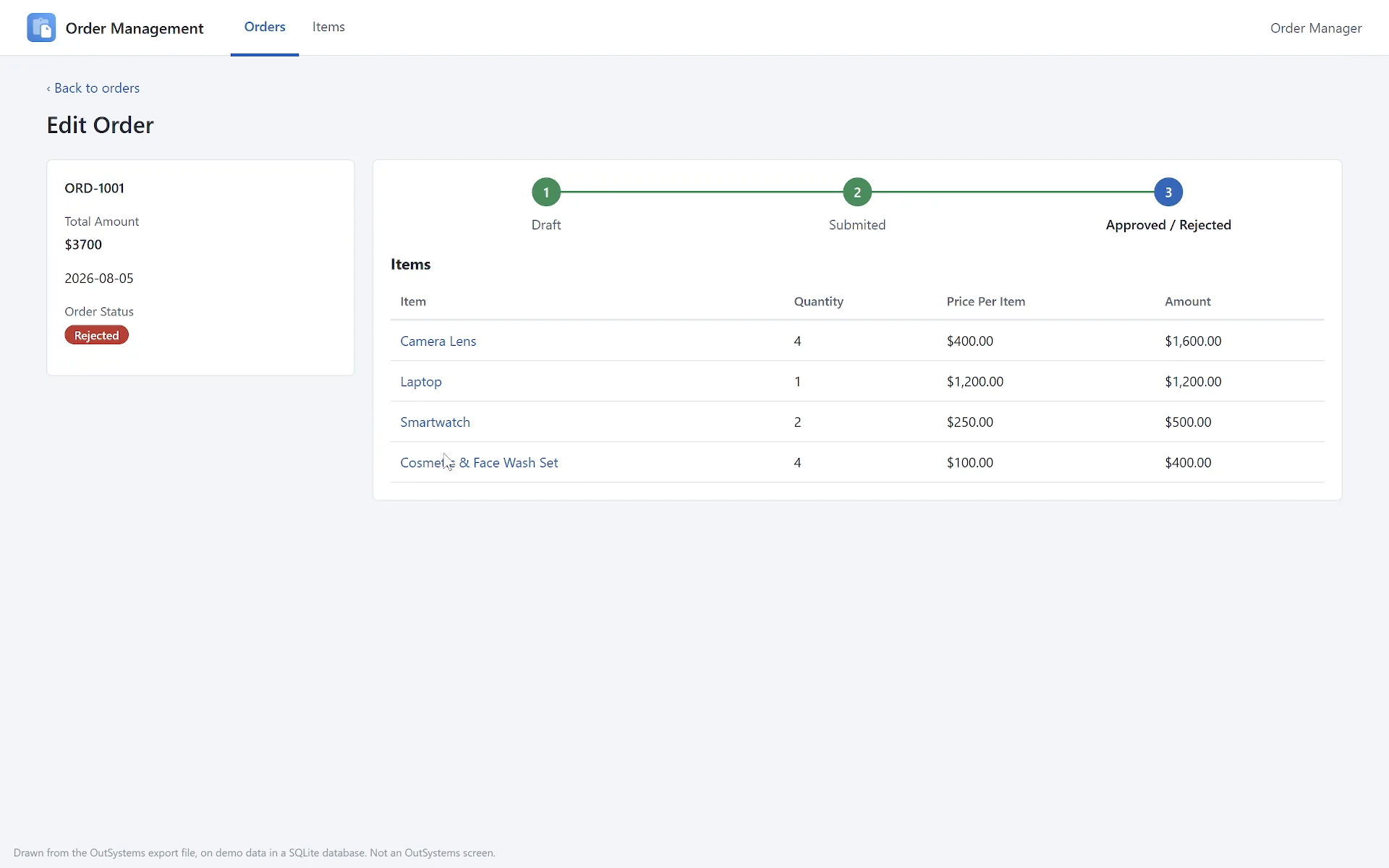
Before - the application, drawn from its export
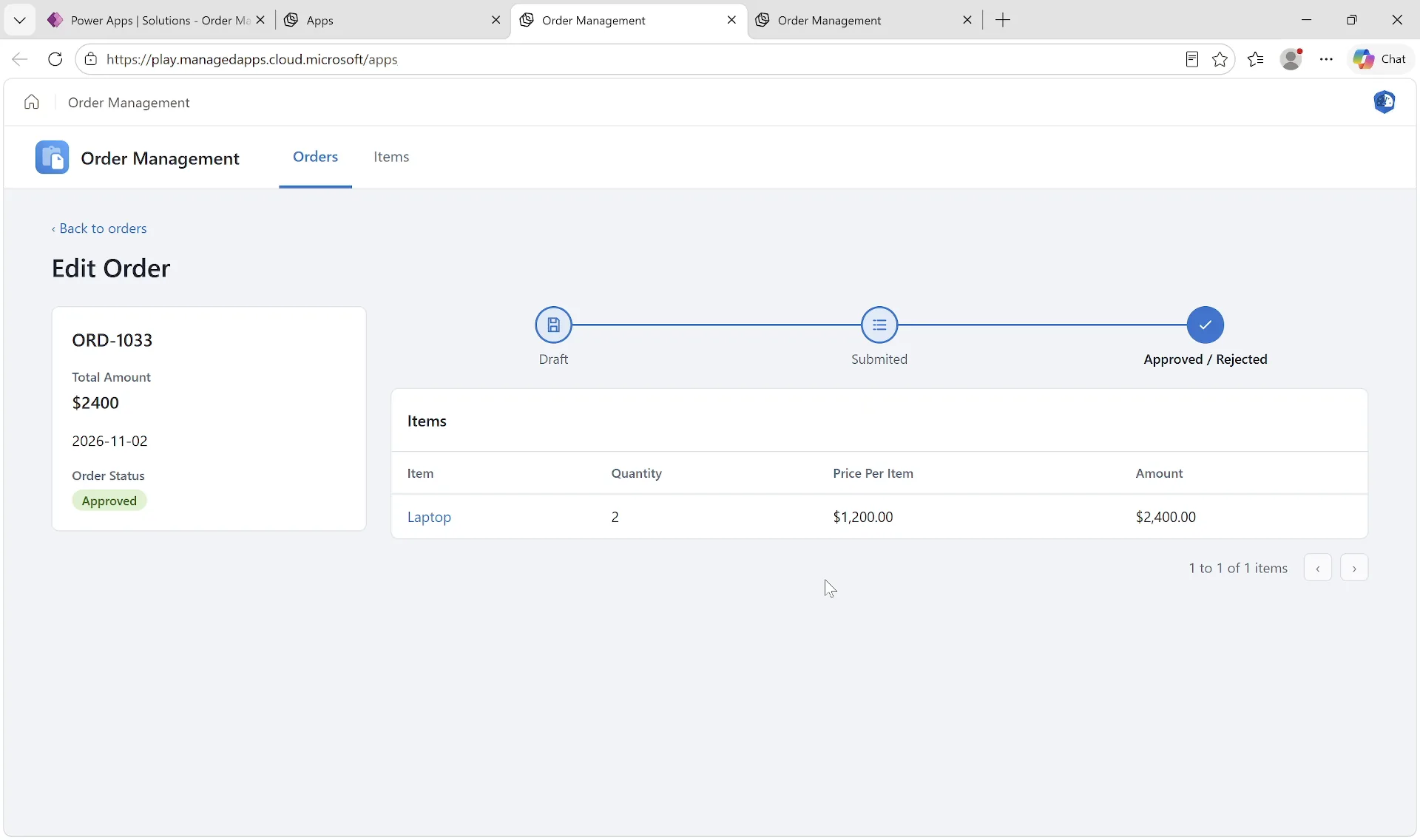
After - the orders in a managed app on the Copilot Managed Runtime
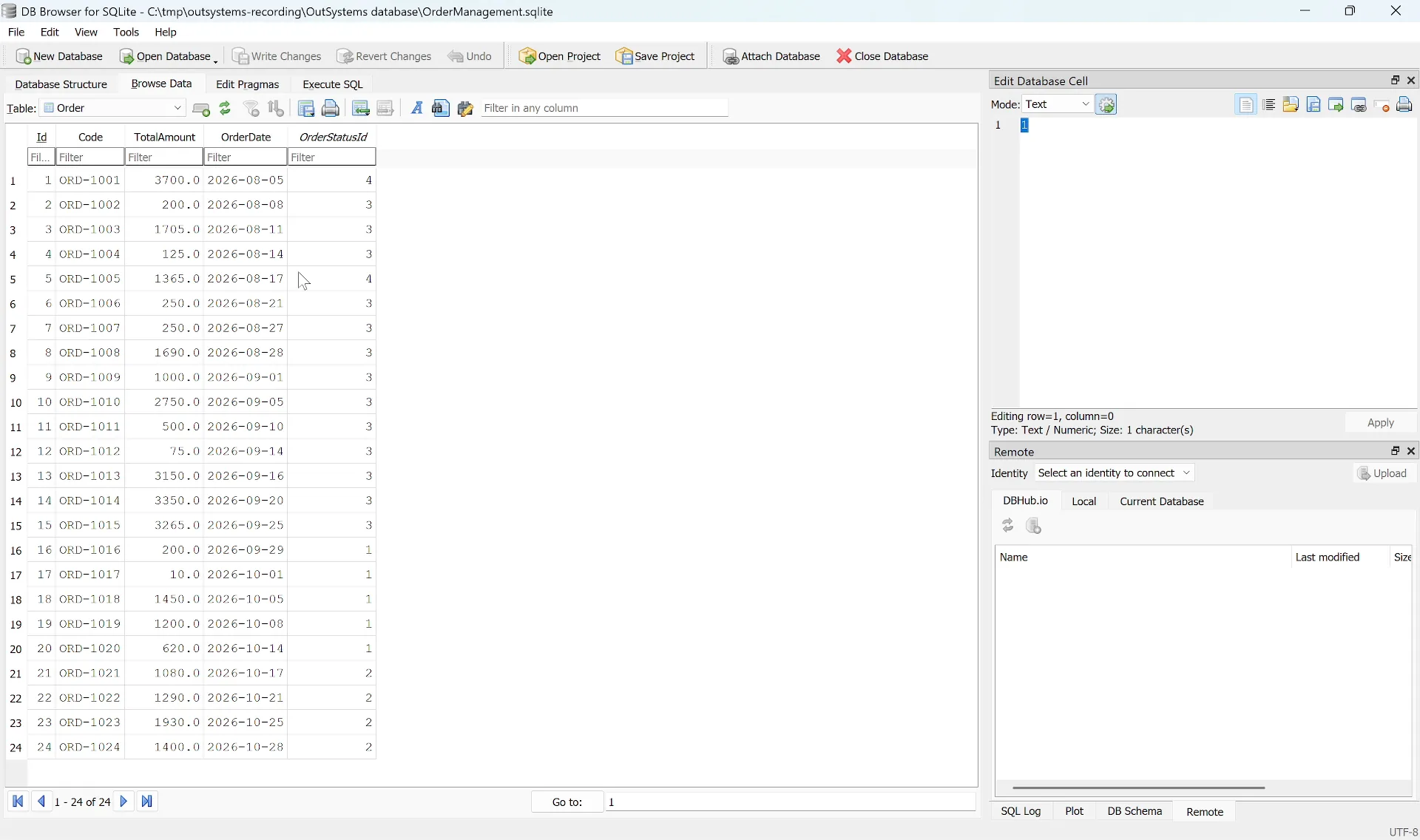
The data - demo orders in SQLite, standing in for the application's database
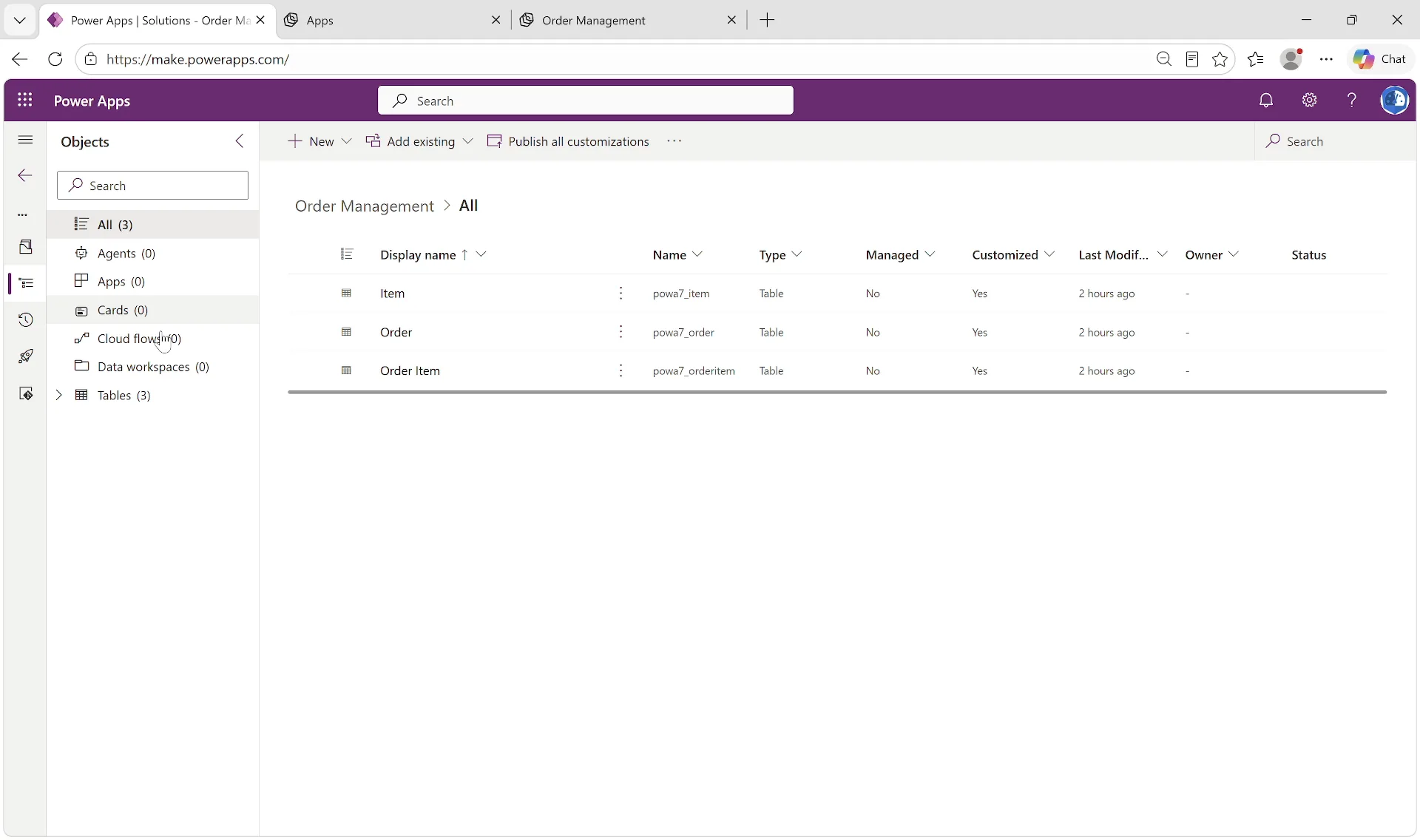
After - the tables in a Dataverse solution, with the rows moved and checked
A public OutSystems sample with 1 module, 3 screens, 4 entities and 68 logic steps: size Small, so it sits alone in the first wave. The deep scan names the 6 modules it uses that the export does not hold. From the bundle an AI agent built 3 Dataverse tables, with the static entity as a choice, moved 15 products, 24 orders and 61 order lines from the database and checked the counts and totals against it, and built a managed app on the Copilot Managed Runtime with the same screens, wording and status rules. The orders are demo data.
Why PowerAccelerate
Built for Real-World Migration
Non-Invasive
The tool reads export files and nothing else. No connection to OutSystems or to your environments, and nothing in the source changes. Safe to run the day you hear about it.
Secrets Never Read
Stored passwords and the values of site properties stay out of the model, the reports and the bundles. The report says where they are, never what they are.
The Whole Estate
Reactive and Traditional Web, every module an application holds, and the extensions it uses, in one report and one plan.
Dependencies First
What an application uses but the export does not hold is named, and the plan never puts an application before what it depends on.
Nothing on Trust
Every size shows the count that decided it, and every part shows what it becomes and whether that is Direct, Partial or Redesign.
Migration-Ready
HTML for stakeholders, Excel for planning, JSON for automation, and a rebuild bundle per application for the build itself.
Recommended Approach
Your Migration Journey
01 - Try
Ask for a trial licence and run the tool on a few of your applications, including the one everyone is worried about. You see the report and what the rebuild would start from, before anything is agreed.
02 - Assessment
The whole estate scanned, with what each application becomes, the decisions to take, and a plan in waves.
03 - Execution
Wave by wave: rebuild from the bundles and let AI do the heavy lifting while your people review and approve.
Get Started
Ready to Move
Your OutSystems Applications?
Ask for a trial licence and run it on a few of your applications, or talk through your estate. Assess, extract and rebuild on Power Platform, with AI doing the heavy lifting.