Oracle to Microsoft Power Platform
Oracle Forms & APEX
Assessment & Extraction Tool
Your Oracle Forms and APEX applications, read without changing anything in Oracle, mapped to Power Platform, and rebuilt by AI.
Point the tool at the Forms2XML export of your forms, or at the database for your APEX applications. It tells you what each application becomes on Power Platform, how big the job is, and what needs a decision first. It only reads, and nothing leaves your machine. Then it moves the data of the application you pick into SQLite and writes a bundle with its screens, triggers, PL/SQL and schema, for AI to rebuild from.
See the full Assess - Extract - AI Migrate cycle in 3 minutes, for Oracle Forms and for Oracle APEX:
Oracle Forms - Order Entry, from its Forms2XML export to a managed app on Dataverse
Oracle APEX - Maintenance Requests, from the database to a managed app on Dataverse
The Challenge
The rules live in the code
The Logic Lives in Triggers
A Forms application keeps its rules in triggers, program units and attached PL/SQL libraries, an APEX application in processes, validations and dynamic actions. Nobody has written them down, so reading the code is the only reliable way to know what the application does.
The Database Does Part of the Work
Stored packages the screens call, and database triggers that fire on their tables, carry rules the screens never show. A rebuild that misses them loses those rules without anyone noticing.
The Code Reaches the Desktop
HOST, TEXT_IO, OLE2 and WebUtil run commands, write files and drive Excel on the user's machine. None of it has a one-to-one counterpart on Power Platform, so each call needs a decision before the build.
Forms Lean on Each Other
Libraries, menus and object libraries are shared, and forms open each other. Size a form without what it uses and the estimate is wrong, so what is in use and not in the export has to be named.
What It Reads
Forms, APEX and the schema behind them
One tool for the whole Oracle estate. Forms are read from files, APEX from the database, and both can go into one scan, one report and one plan.
Oracle Forms
Forms, menus and object libraries as Forms2XML, made with Oracle's own frmf2xml, and PL/SQL libraries exported as .pld: blocks, items, canvases, triggers, program units, lists of values, relations and the forms each form opens. No database is needed to assess them.
Oracle APEX
Every application in the workspace, from the APEX dictionary views: pages, regions, items, processes, validations, dynamic actions, lists of values and authentication schemes. Read-only queries, and no Oracle client to install.
The Schema
With a connection, the tables an application uses, with their columns, keys and estimated row counts, also when it reaches them through views and synonyms, and the stored PL/SQL it calls or that fires on its tables.
Overview
Know Your Oracle Estate
One row per form or application: its blocks or pages, items, triggers and processes, lines of PL/SQL, tables and foreign keys, its size, what it becomes on Power Platform, and the notes that matter.
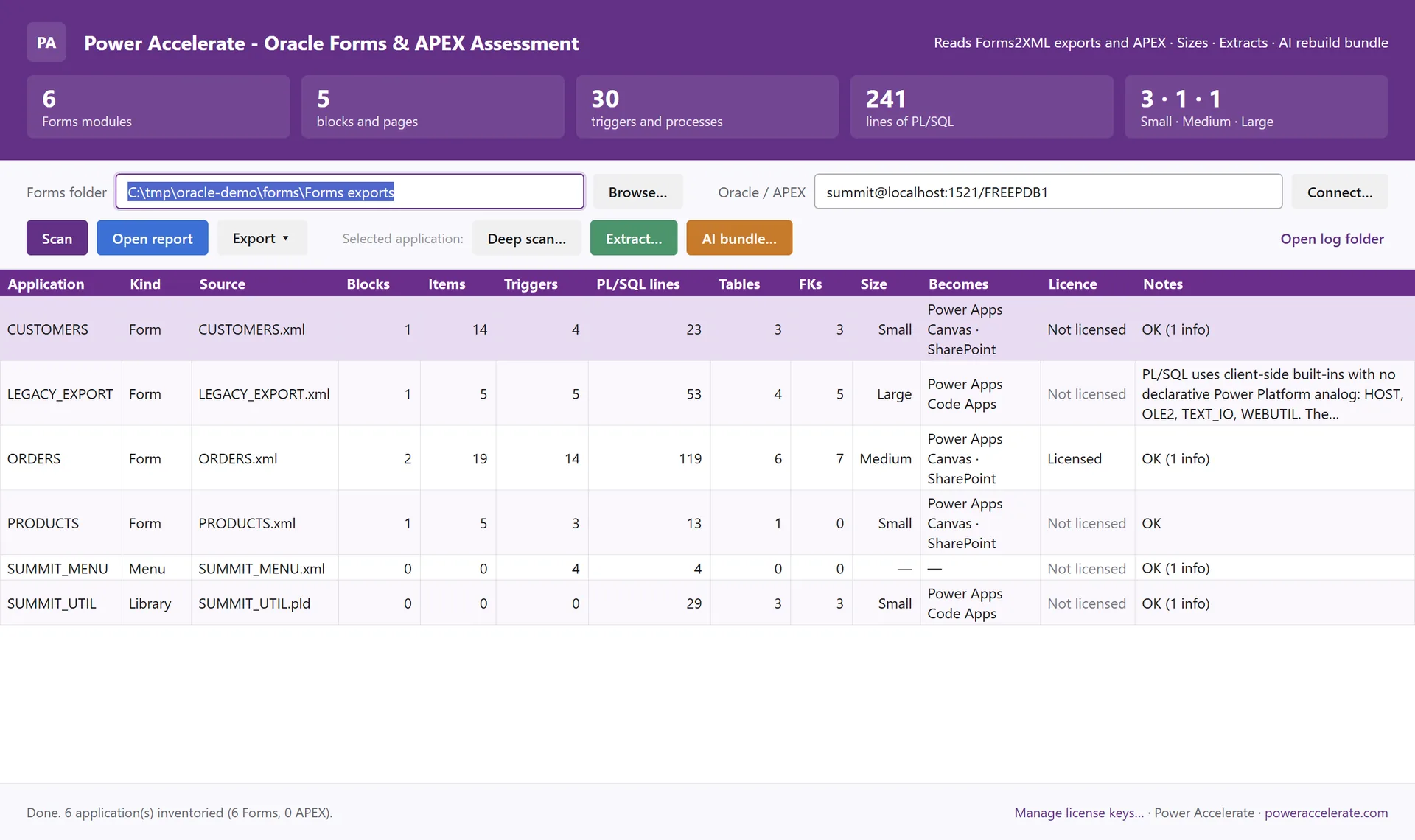
The assessment view - the Order Entry demo: three forms, a menu, a PL/SQL library and a form with desktop built-ins
What Each Part Becomes
Tables become Dataverse tables, blocks and pages the screens of a canvas app, a model-driven app, a code app or an app on the Copilot Managed Runtime, lists of values lookups or choices. Each part is marked Direct, Partial or Redesign.
Sizing You Can Check
Small, Medium or Large per application. Blocks, items, triggers, lines of PL/SQL, tables and desktop built-ins each score points, and the deep scan shows how the score was made.
Reports for Every Audience
A self-contained HTML report, an Excel workbook and a JSON export of the full model, with the same numbers in each, for the steering group, the planners and the build team. None of them holds PL/SQL source or data.
How It Works
Four Steps, Read-Only
From export to rebuild bundle, nothing in Oracle changes.
Convert or Connect
Convert your forms with Oracle's own frmf2xml and export the libraries as .pld, or connect to the database for APEX. Read-only: no agent, nothing installed on the server, no Oracle client on your machine.
Scan
Point the tool at the folder, the connection, or both. Every form and application is read: screens, items, triggers and processes, the PL/SQL, the tables and the systems outside.
Decide
The report shows what each part becomes, what needs a decision first, and a first migration plan in waves.
Extract
Pick the application to rebuild. Its data goes into SQLite, and it gets a bundle with the screens, the code, the schema and the instructions for an AI agent.
Assessment
Every Form, Every Trigger, Every Decision
Double-click any application for a deep scan: how its size was decided, its blocks or pages and items, every trigger and process with its PL/SQL, its tables and keys, and the systems it reaches outside. The report brings it together for the whole estate.
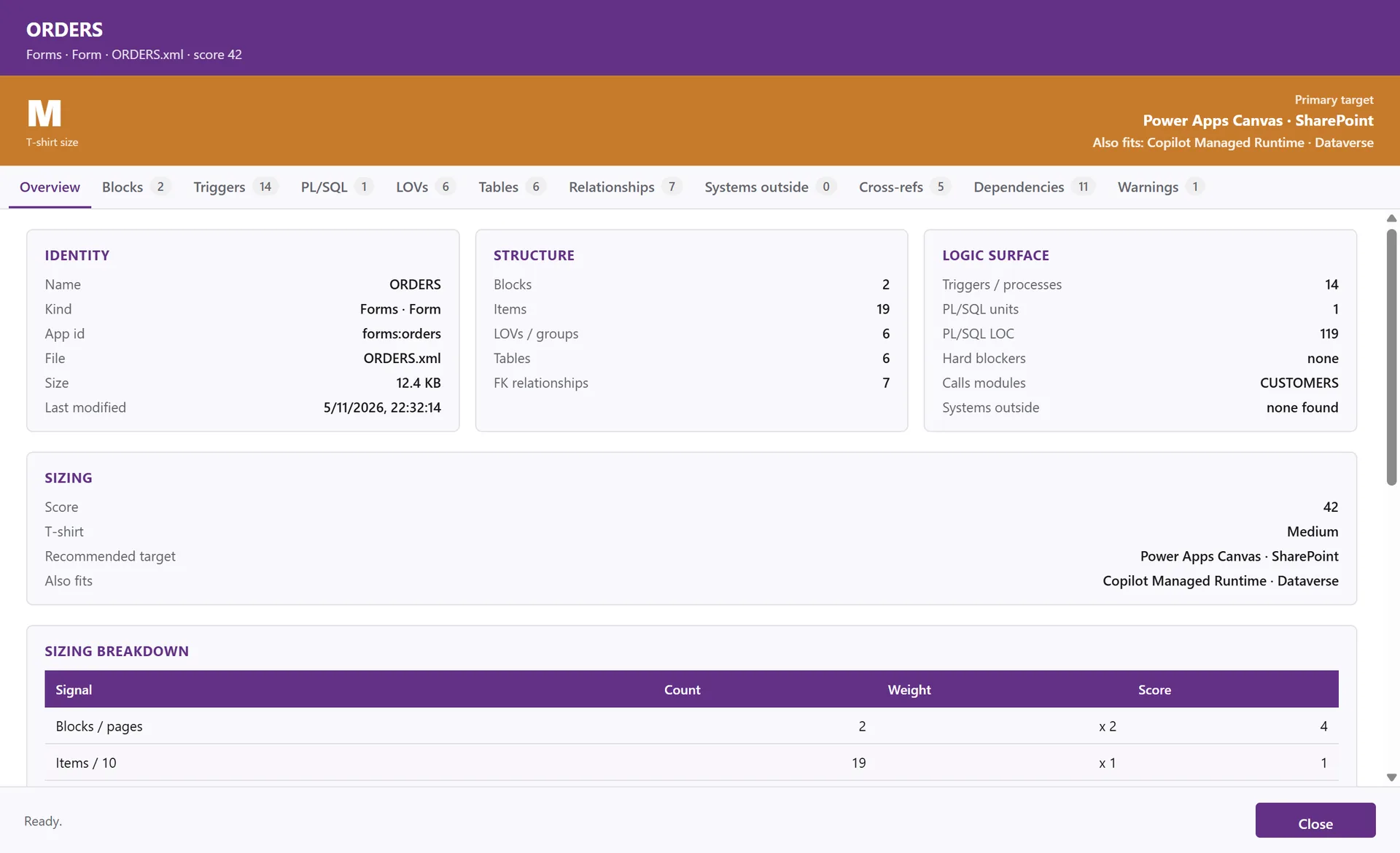
A deep scan - the size, the recommended target and what else fits, and how the size was decided
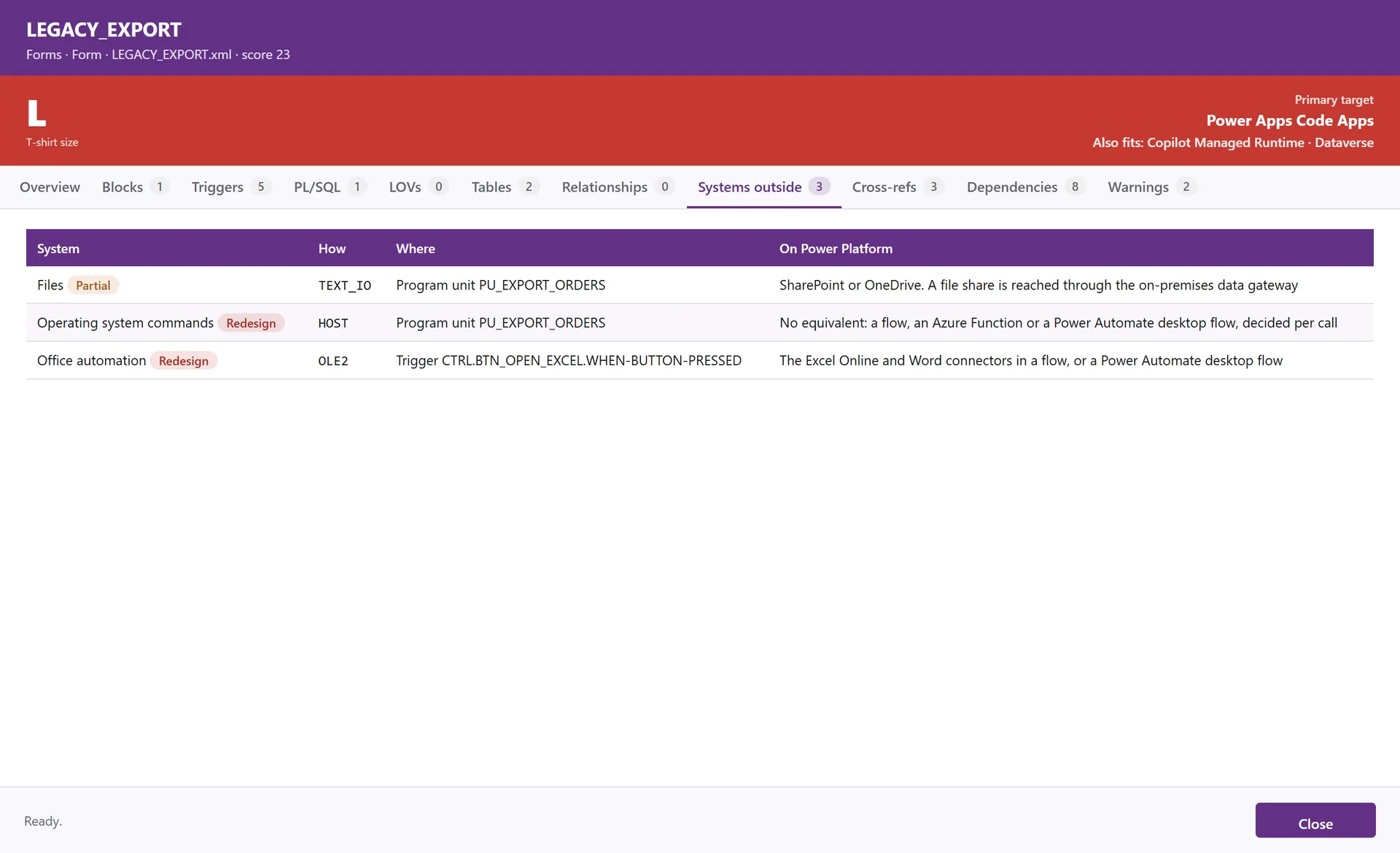
Systems outside - files, operating system commands and Office automation, each with what it becomes
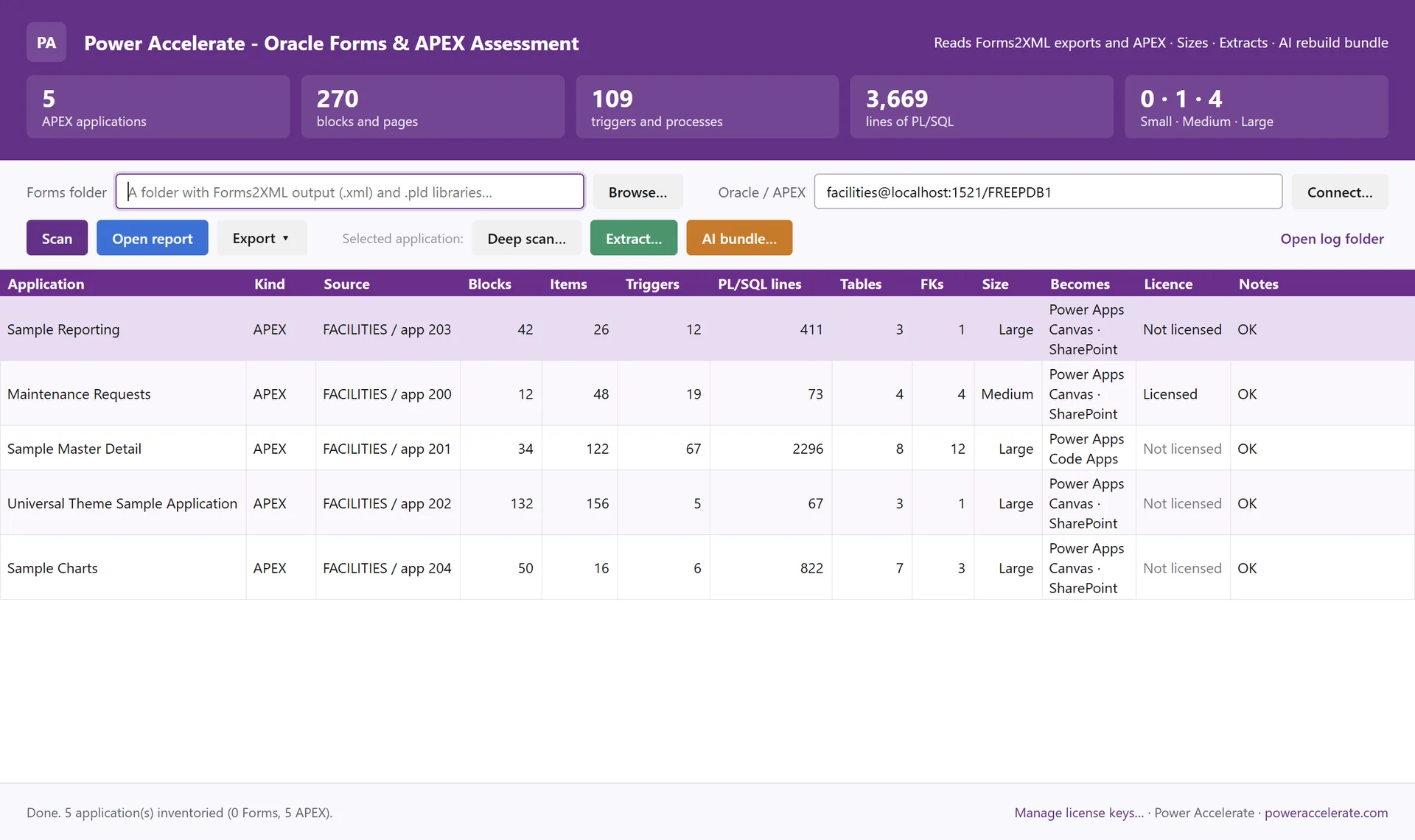
Oracle APEX - every application in the workspace: our demo app and four of Oracle's sample apps
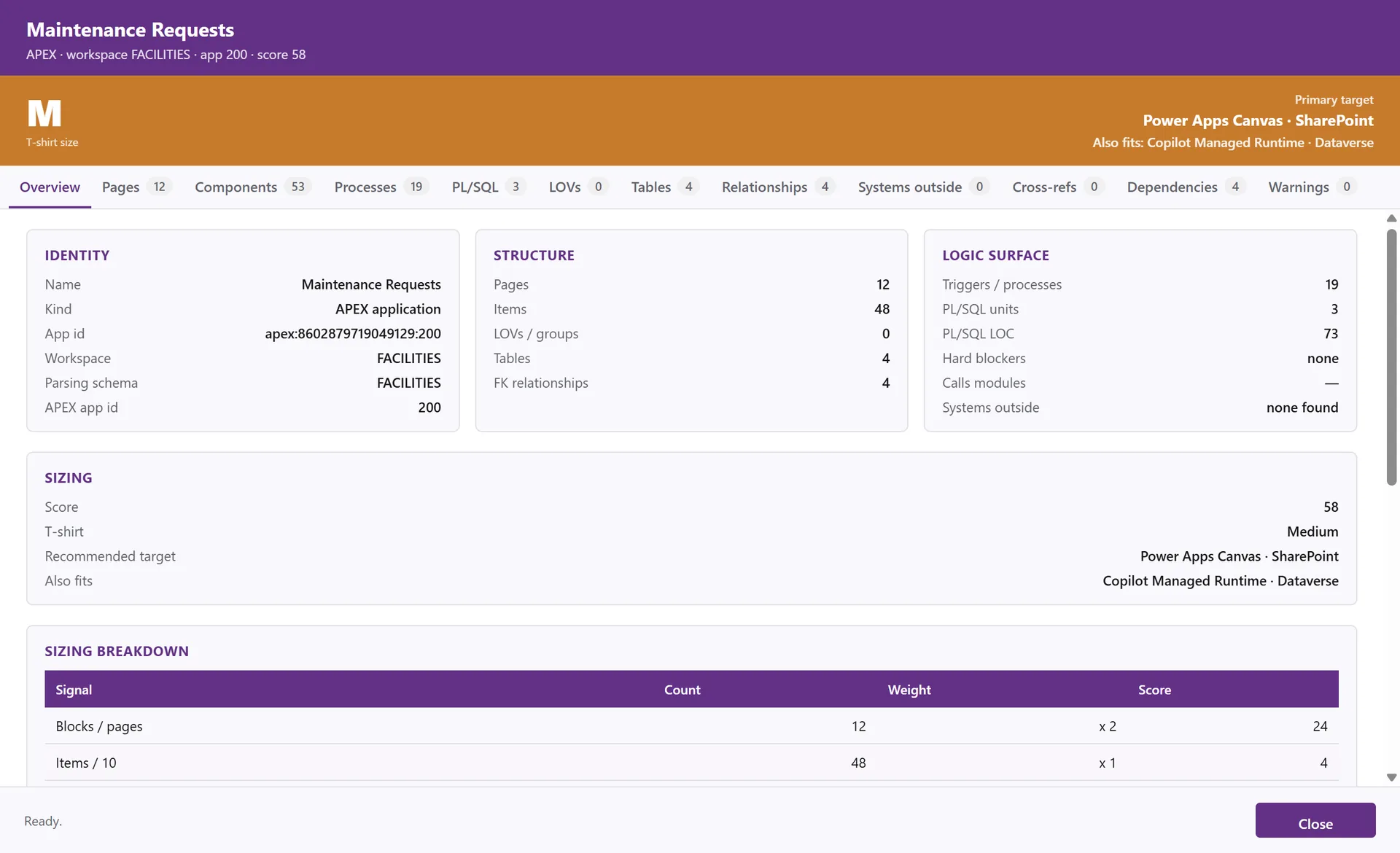
An APEX application - its pages, components, processes, PL/SQL, tables and relationships
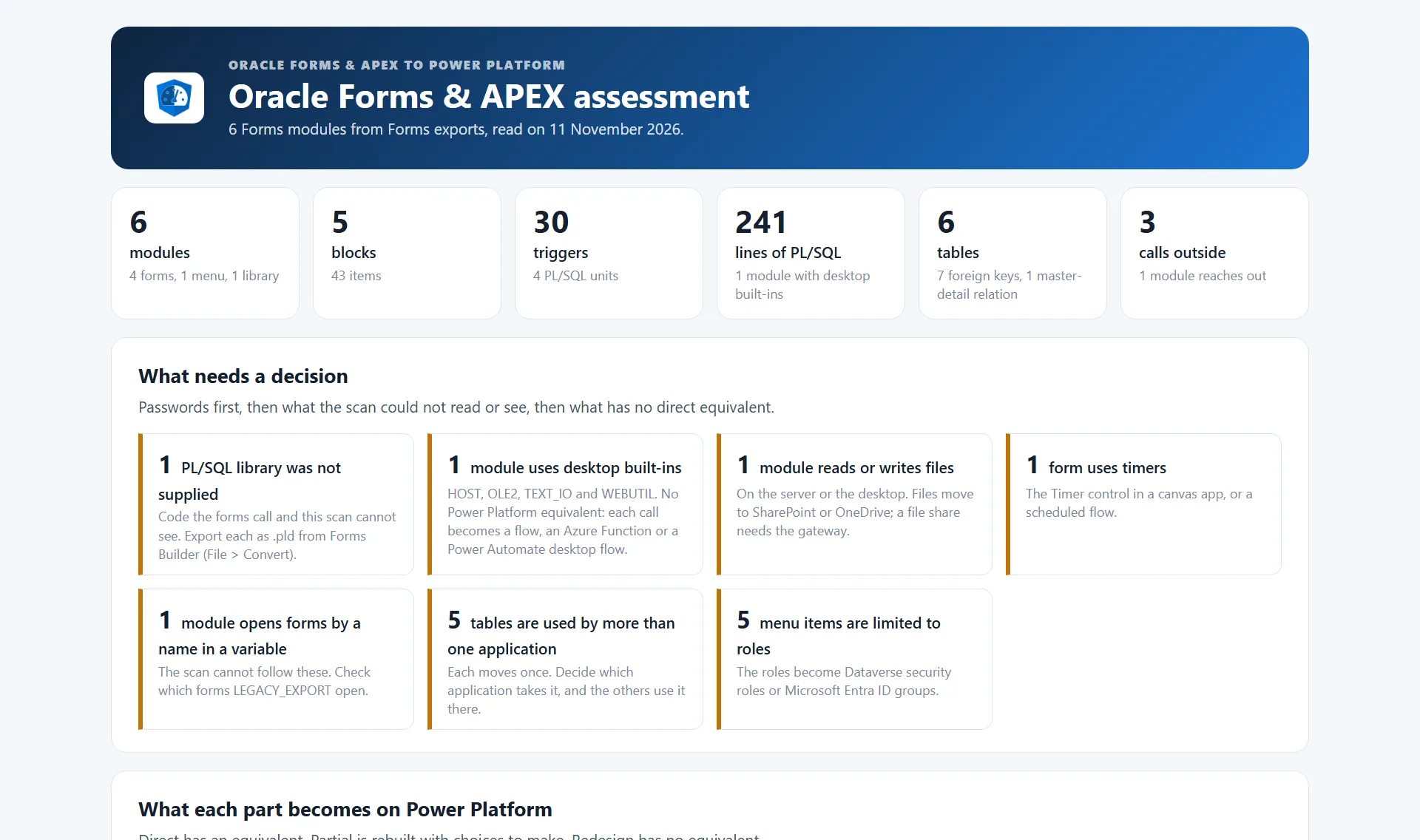
What needs a decision - passwords first, then what the scan could not see, then what has no direct equivalent
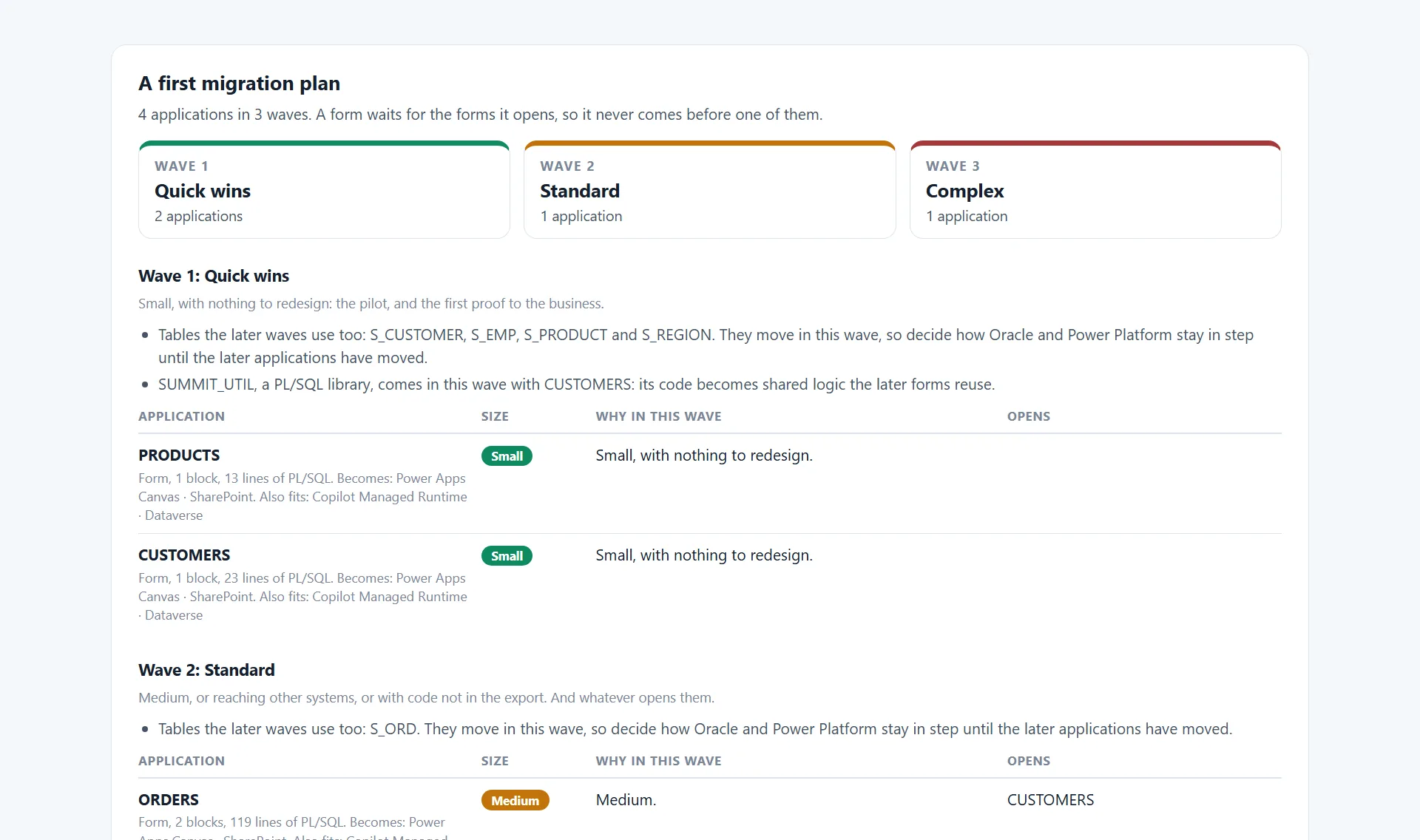
A first migration plan - three waves, and a form never before the forms it opens
Screens and Items
Blocks and canvases, or pages and regions, with every item, what it is bound to, and its list of values. Master-detail relations become lookups with a sub-grid or a nested gallery.
Triggers and PL/SQL
Every trigger, program unit and process with its PL/SQL, and the stored packages it calls, followed through the chain. What looks like a password in the code is flagged, never shown.
Desktop Built-ins
HOST, TEXT_IO, OLE2, WebUtil and their kind have no Power Platform equivalent. Each is named with where it sits, and the form is planned with the complex ones.
Systems Outside
Other databases, web services, email, files, scheduled jobs, Oracle Reports and queues, each with what it becomes: a connector, a flow, a paginated report or a redesign.
A Plan in Waves
Quick wins, standard and complex. A form waits for the forms it opens, and the tables later waves share move with the first application that uses them.
Extraction
The Data and a Bundle, Ready for AI
The assessment tells you what you have. The extraction hands it over: the rows of the tables the application uses, and a bundle with everything the rebuild needs, written for a person and for an AI agent alike.
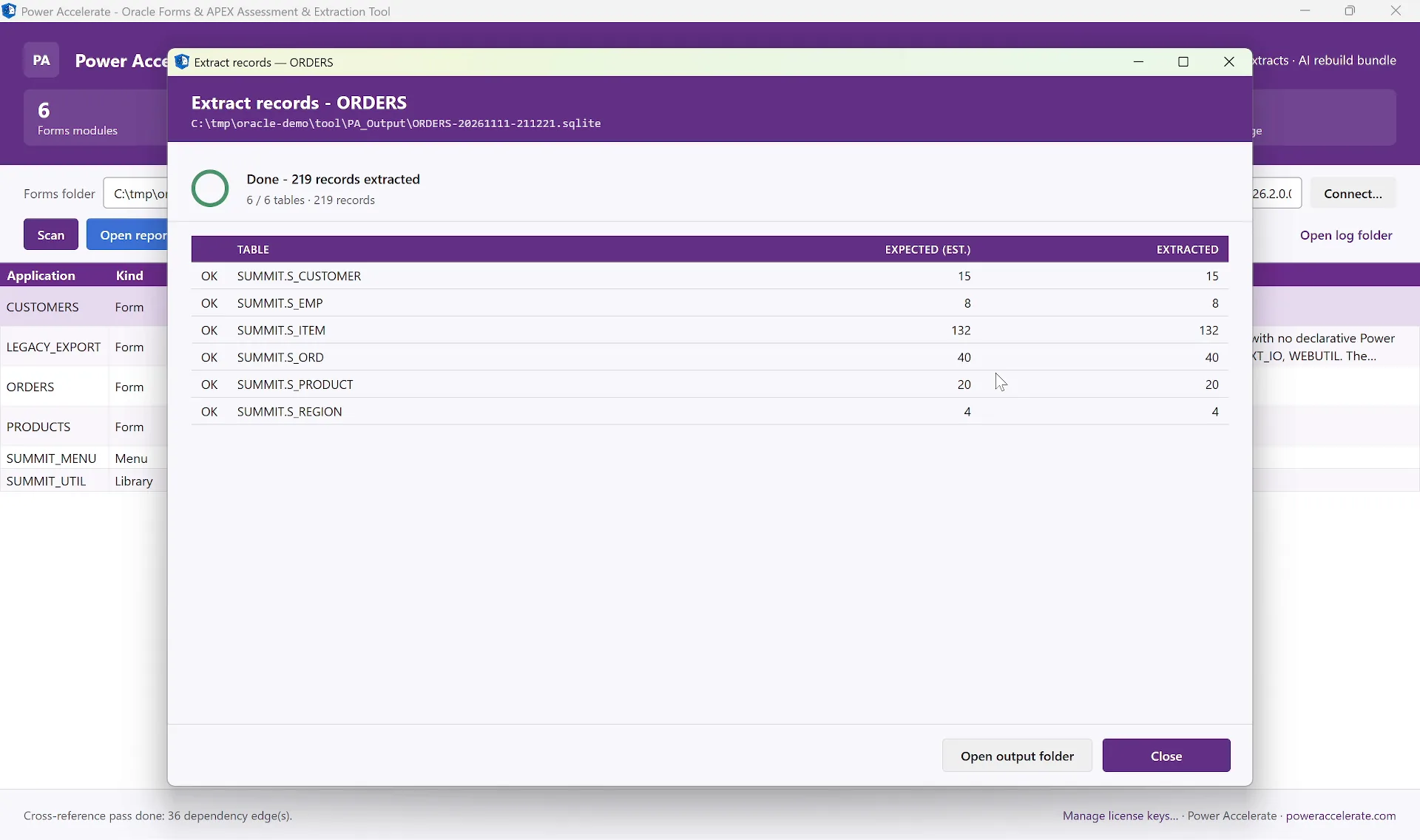
The data - every table the application uses, into one SQLite file, with the count per table
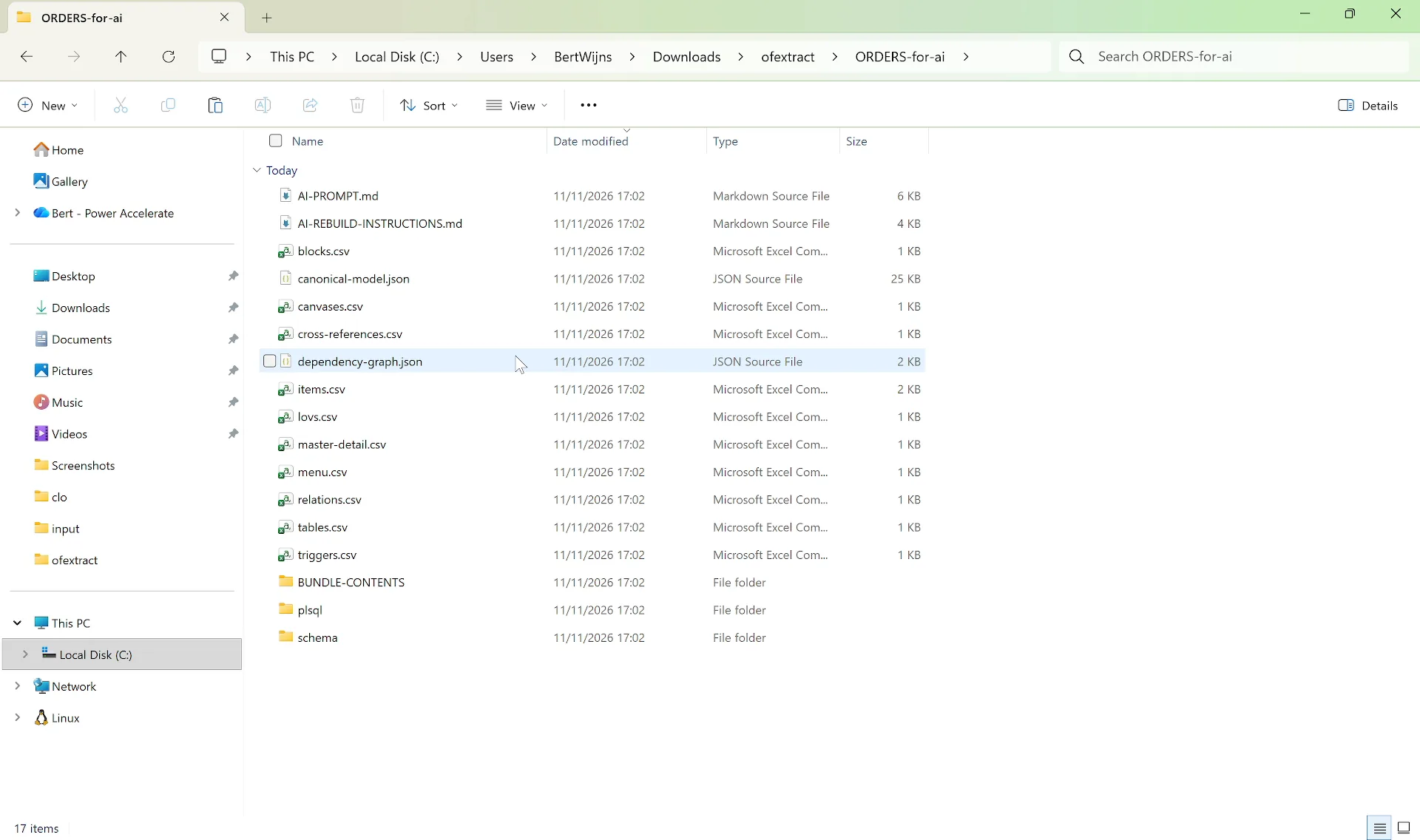
The bundle - AI-PROMPT, rebuild instructions, the model, the screens and triggers, the PL/SQL and the schema
The Data, in SQLite
The rows of every table the application uses, with their column types, in one SQLite file on your machine, with the expected and extracted count per table. From the command line, a cell-by-cell check against the live tables.
Screens and Items
Blocks, items with their on-screen labels and positions, canvases and tab pages, lists of values, master-detail relations and the menu with its roles. For APEX the pages, regions, buttons, dynamic actions and validations, and the full APEX export where the account may make one.
The PL/SQL Behind It
Every trigger, program unit and APEX process as its own file, the PL/SQL libraries a form attaches, and the stored packages, procedures and database triggers in scope, so the rules travel with the screens.
Instructions for AI
An AI-PROMPT with the key facts and the steps of the rebuild, and instructions for each target: a canvas app, a model-driven app, a code app or the Copilot Managed Runtime. Labels come from the screens, and no relationship is invented.
Schema Only by Default
The bundle holds the schema and no rows unless you ask for sample data, and the tool lists what it will contain before it writes it. Obvious passwords and connect strings in the code are masked.
Missing Pieces Named
Every scan ends with a check on the export: object libraries, PL/SQL libraries and forms that are used but not supplied are named, so you know what else to convert before the sizes are final.
End-to-End Flow
From Oracle to
a Running App on Power Platform
The canonical shape of every engagement: Assess → Extract → Rebuild → Deploy. The bundle goes to an AI coding agent, which builds the Dataverse tables, moves the data, and builds the app.
1. Assess
Every form and application, mapped, sized and planned
2. Extract
The data in SQLite, and a bundle with the screens, the PL/SQL and the schema
3. Rebuild
An AI agent builds the tables, moves the data and builds the app
4. Deploy
Dataverse and an app on Power Platform: canvas, model-driven, code app or Copilot Managed Runtime
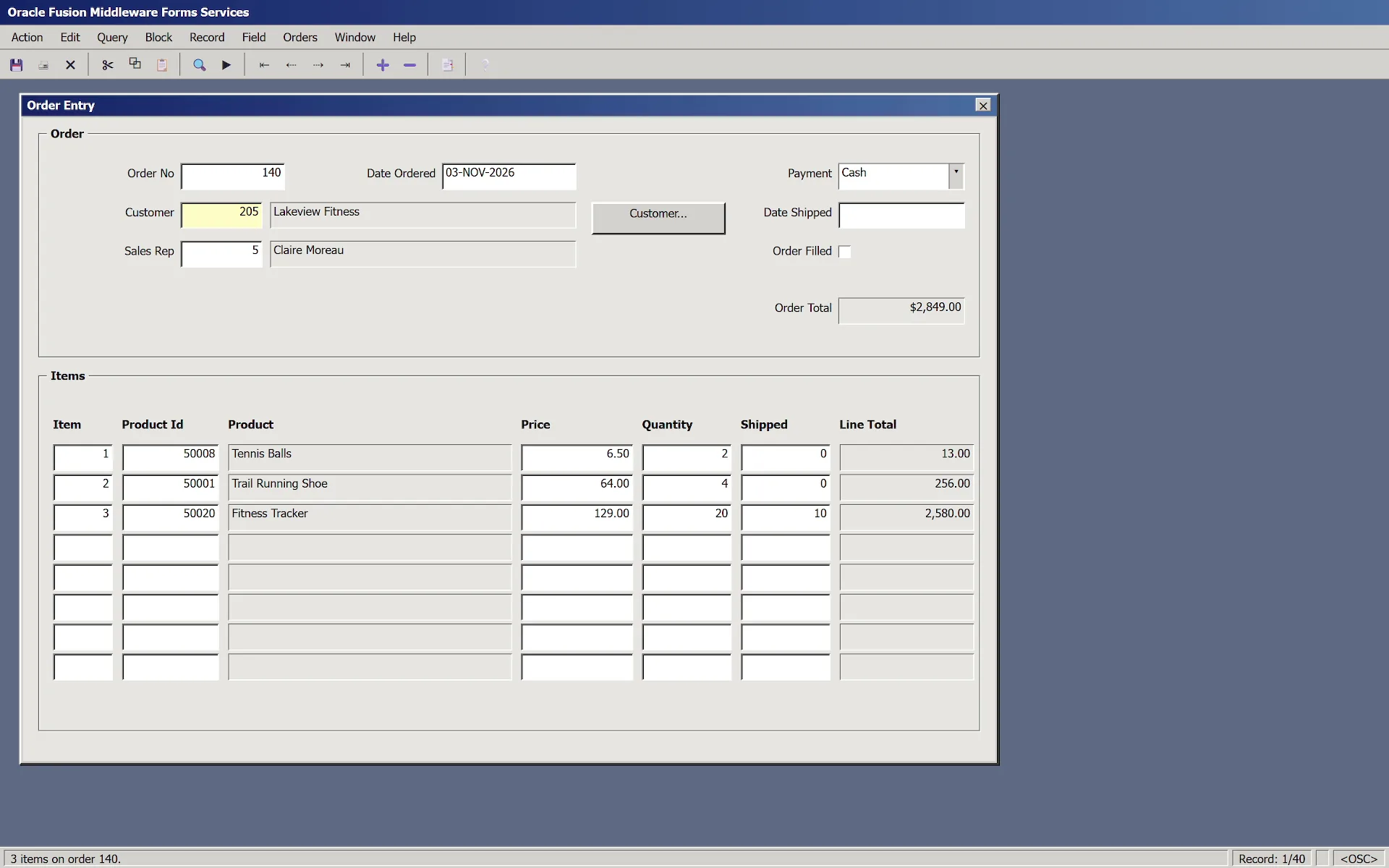
Before - Order Entry, an Oracle Forms application, drawn from its Forms2XML export and filled with the rows in Oracle
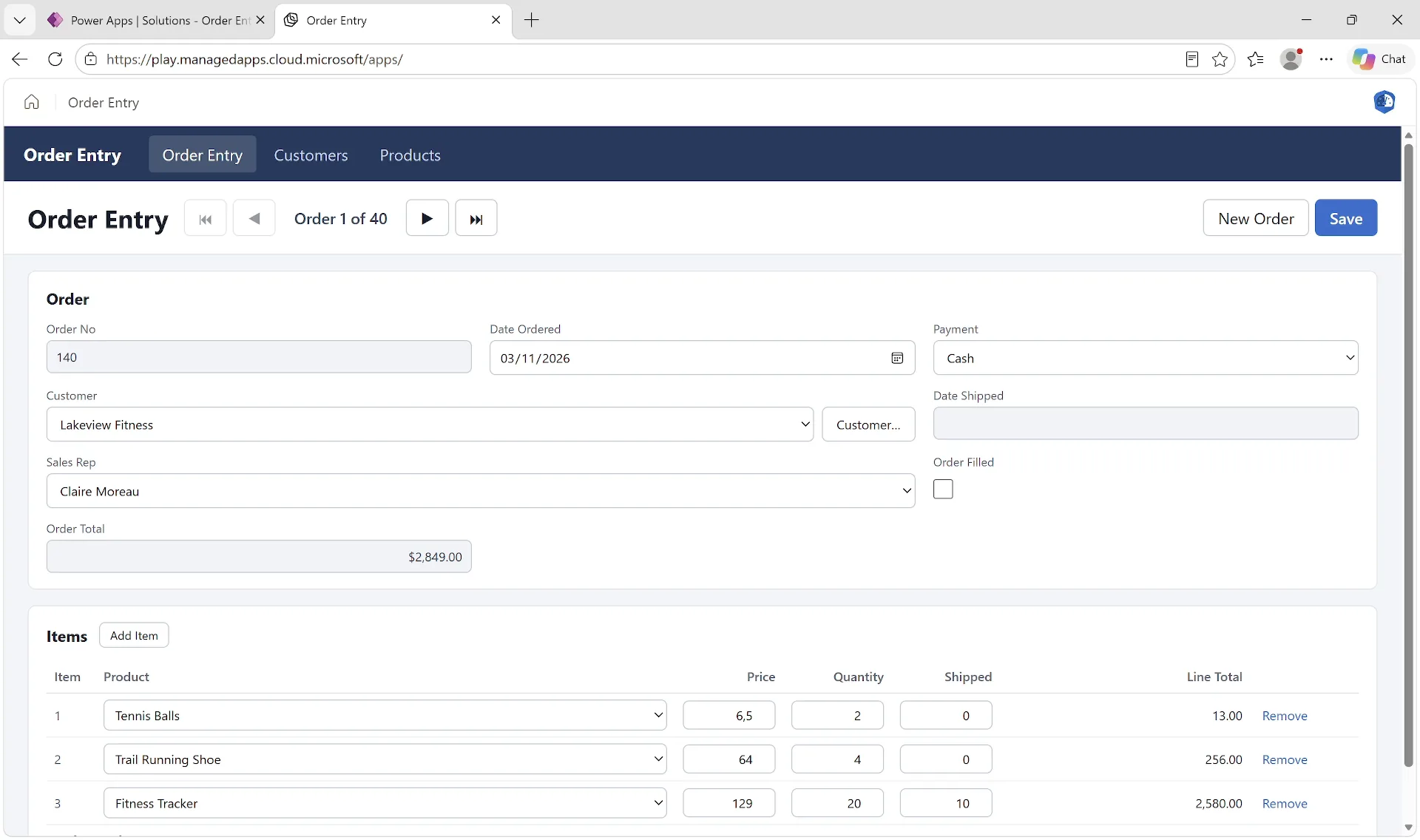
After - the same order in a managed app on the Copilot Managed Runtime
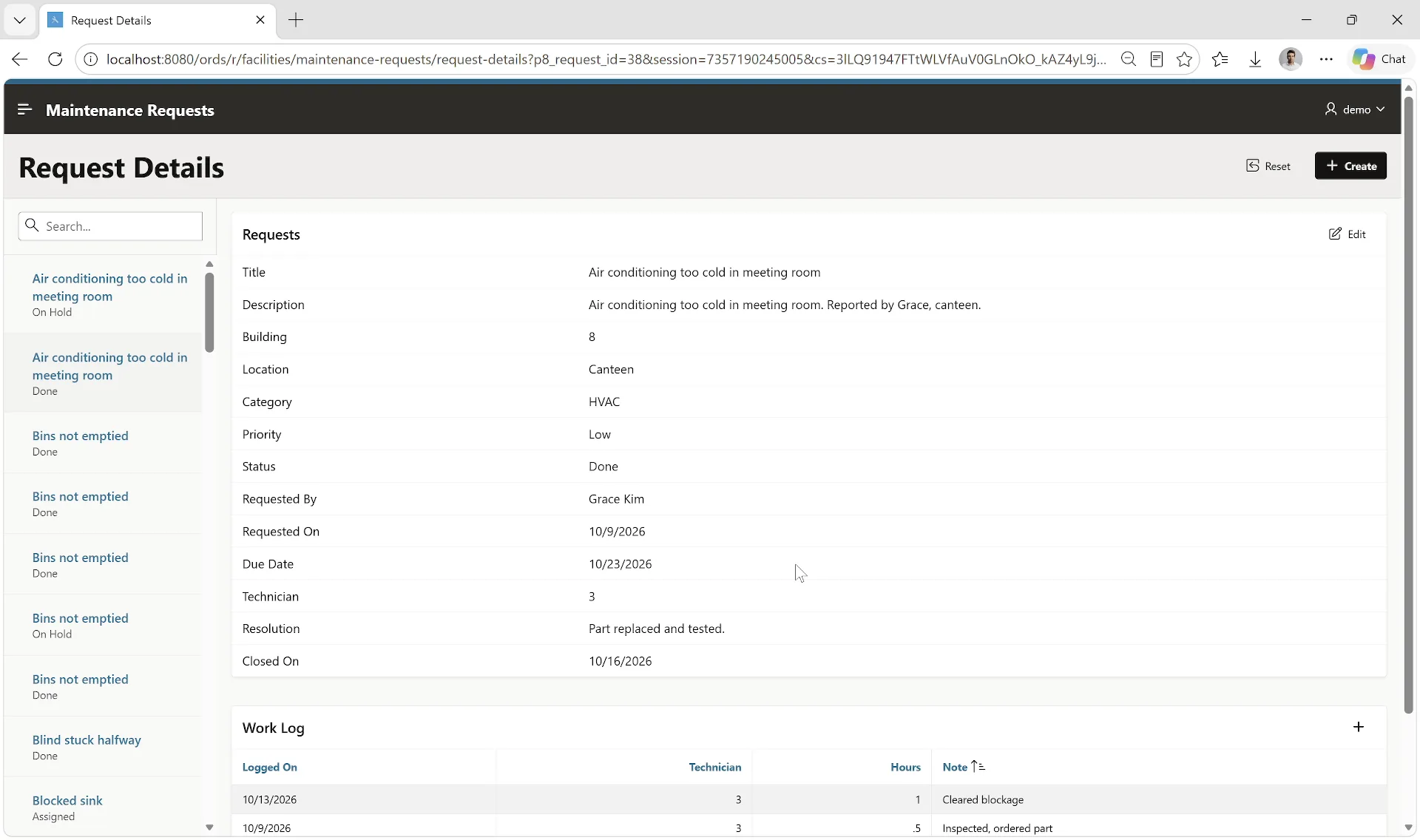
Before - Maintenance Requests, an Oracle APEX application, with a request and its work log
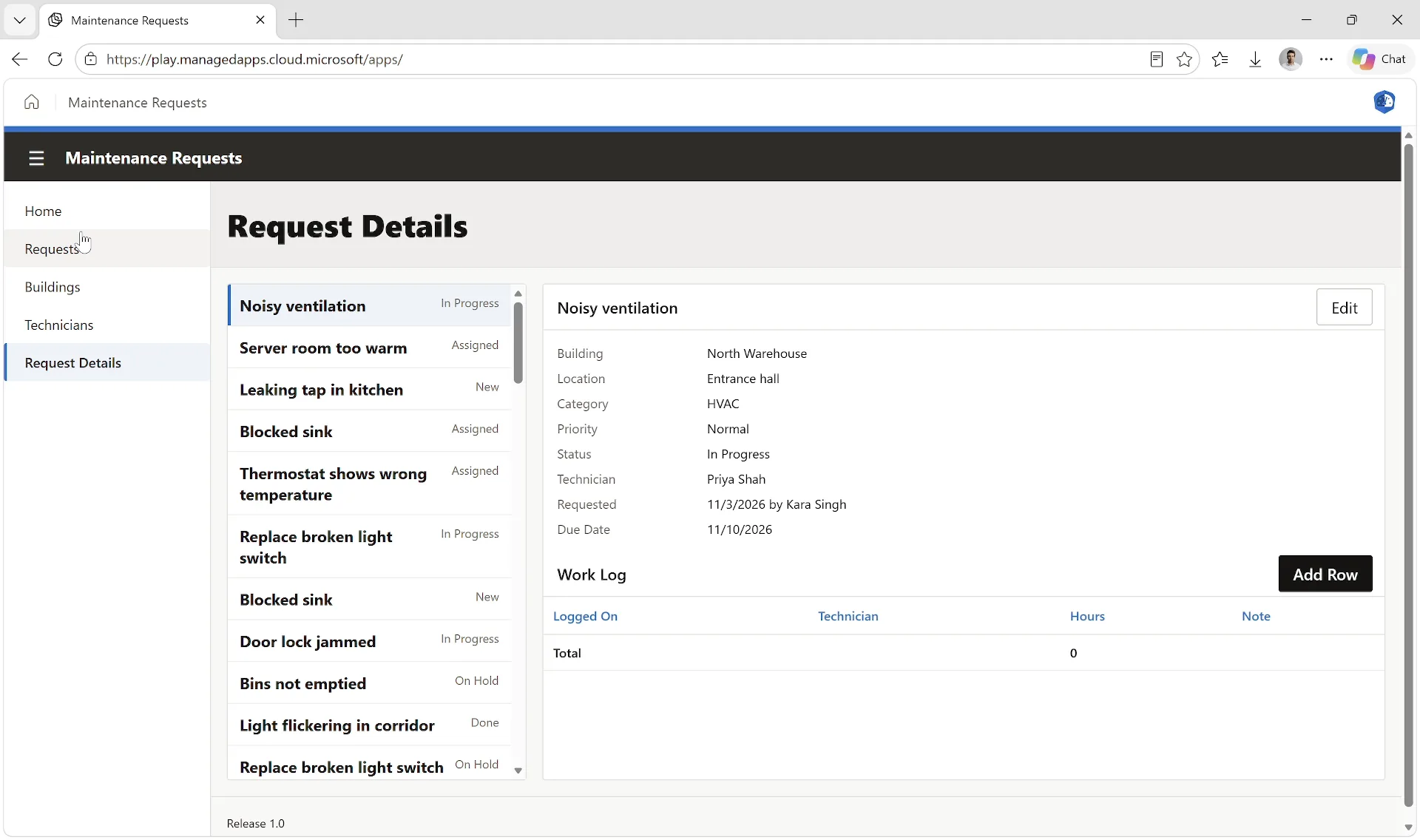
After - Maintenance Requests as a managed app on the Copilot Managed Runtime
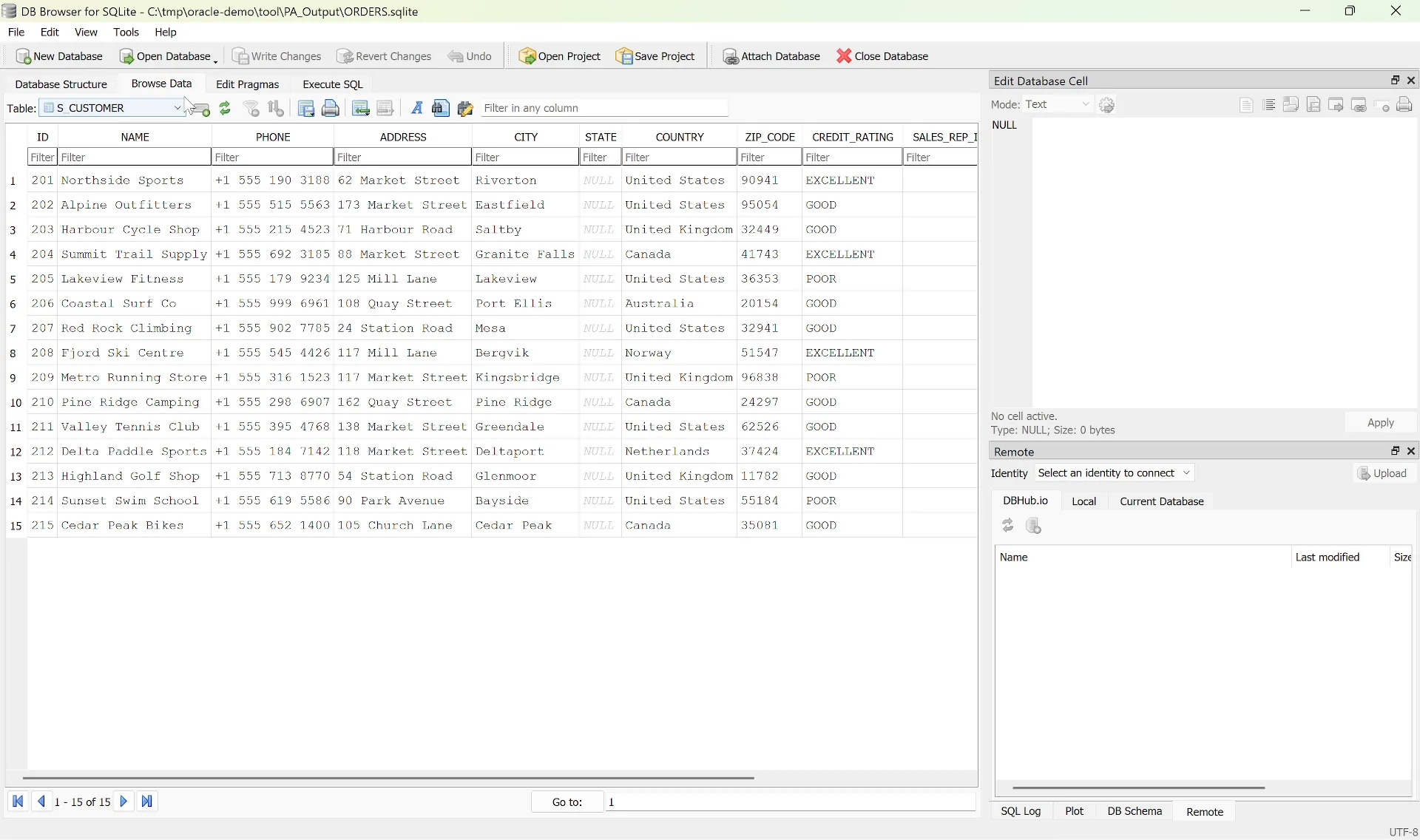
The data - the tables of Order Entry, extracted into SQLite
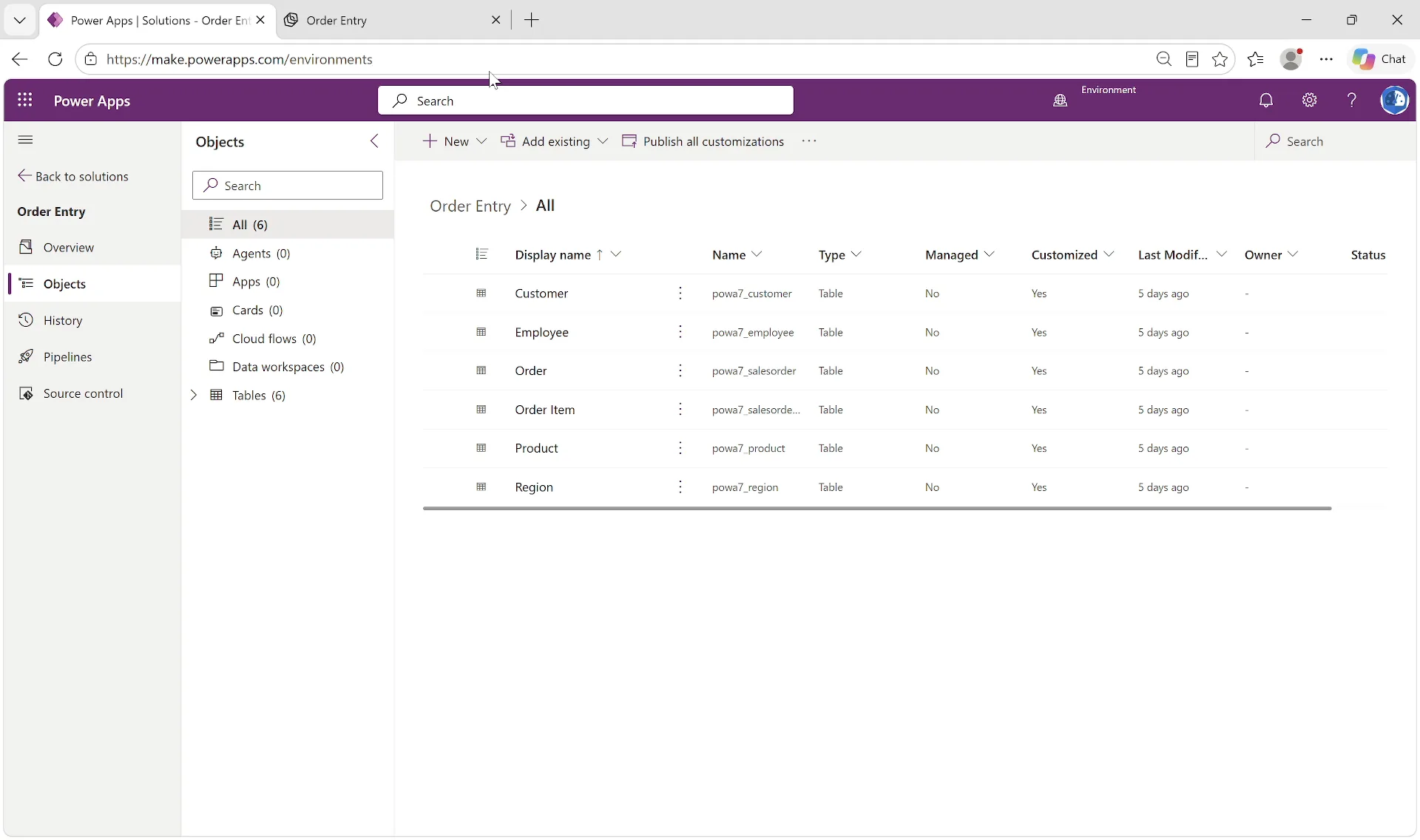
After - the six tables in a Dataverse solution, with the rows moved and checked
Three forms, a menu, a PL/SQL library and a form with desktop built-ins, with 241 lines of PL/SQL: 3 Small, 1 Medium and 1 Large, in three waves. ORDERS is Medium, with 2 blocks, 19 items and 14 triggers, and its credit check lives in the library it calls. From the bundle an AI agent built a Dataverse solution with 6 tables, moved 219 rows, 40 orders with their 132 items and the customers, products, employees and regions behind them, checked the order totals against Oracle, and built a managed app on the Copilot Managed Runtime with the same screens and rules: an order is filled only when every item has shipped, and a customer with a poor credit rating cannot order on credit. The forms and their data were written for the demo.
12 pages, 48 items, 19 processes and 73 lines of PL/SQL on 4 tables: size Medium, read from a workspace with four of Oracle's sample applications beside it. The tool moved its 206 rows into SQLite, and from the bundle an AI agent built the Dataverse tables, moved the data and built a managed app on the Copilot Managed Runtime with the same pages and rules. The requests are demo data.
Why PowerAccelerate
Built for Real-World Migration
Read-Only
Forms are read from files, APEX and the schema with read-only queries. Nothing in Oracle changes, and nothing is installed on the server. Safe to run the day you hear about it.
No Oracle Client
The connection is built in: host, port and service, or your own connection string, TNS alias or wallet. Nothing else to install on your machine.
Forms and APEX Together
Forms and APEX applications in one scan, one report and one plan, with the tables they share and the forms that open each other.
Dependencies First
What a form uses but the export does not hold is named, and the plan never puts a form before the forms it opens.
Nothing on Trust
Every size shows how it was scored, and every part shows what it becomes and whether that is Direct, Partial or Redesign.
Migration-Ready
HTML for stakeholders, Excel for planning, JSON for automation, the data in SQLite, and a rebuild bundle per application for the build itself.
Recommended Approach
Your Migration Journey
01 - Start
Contact us and pick a few of your forms or APEX applications, including the one everyone is worried about. You see the report and what the rebuild would start from, before anything is agreed.
02 - Assessment
The whole estate scanned, with what each application becomes, the decisions to take, and a plan in waves.
03 - Execution
Wave by wave: rebuild from the bundles and let AI do the heavy lifting while your people review and approve.
Get Started
Ready to Move
Your Oracle Applications?
Contact us to talk through your estate, or to see the report on a few of your forms or APEX applications. Assess, extract and rebuild on Power Platform, with AI doing the heavy lifting.